SV-XPNDR-261/262 Installation and Configuration
11-4 SkyView System Installation Guide - Revision AA
Orientation of the SV-XPNDR-261/262 is not critical – it can be mounted horizontally, or
vertically.
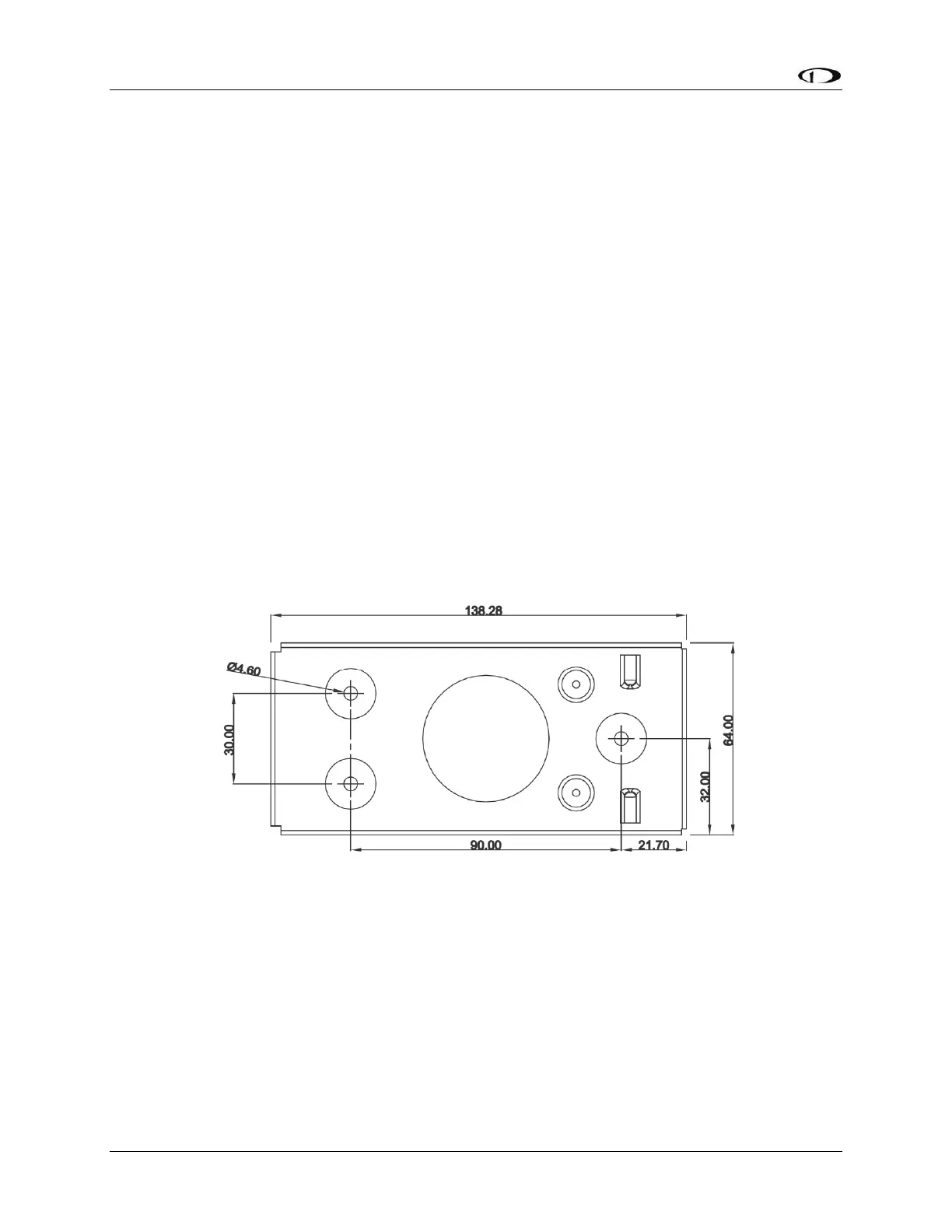
Secure the mounting tray to the aircraft via the three (3) mounting holes in the tray. The
tray should be mounted to a flat surface - it is important that the tray is supported at the
dimples as well as the three mounting points.
Put the SV-XPNDR-261/262 transponder into the secured mounting tray by hooking the
connector end under the lip on the tray.
Lock the SV-XPNDR-261/262 into the mounting tray by clipping the retaining wire over the
lugs on the opposite end.
Avoid sharp bends and placing the cables too near to the aircraft control cables.
Cooling Requirements
The SV-XPNDR-261/262 meets all applicable ETSO/TSO requirements without forced air-
cooling.
Attention should however be given to the incorporation of cooling provisions to limit the
maximum operating temperature if the SV-XPNDR-261/262 is installed in close proximity to
other avionics. The reliability of equipment operating in close proximity in an avionics bay can
be degraded if adequate cooling is not provided.
Mounting Tray and SV-XPNDR-261/262 Dimensions
Figure 128 – SV-XPNDR-261/262 Mounting Tray Dimensions (dimensions in millimeters)










 To Next Page