SV-COM-X83 Installation and Configuration
17-10 SkyView System Installation Guide - Revision AA
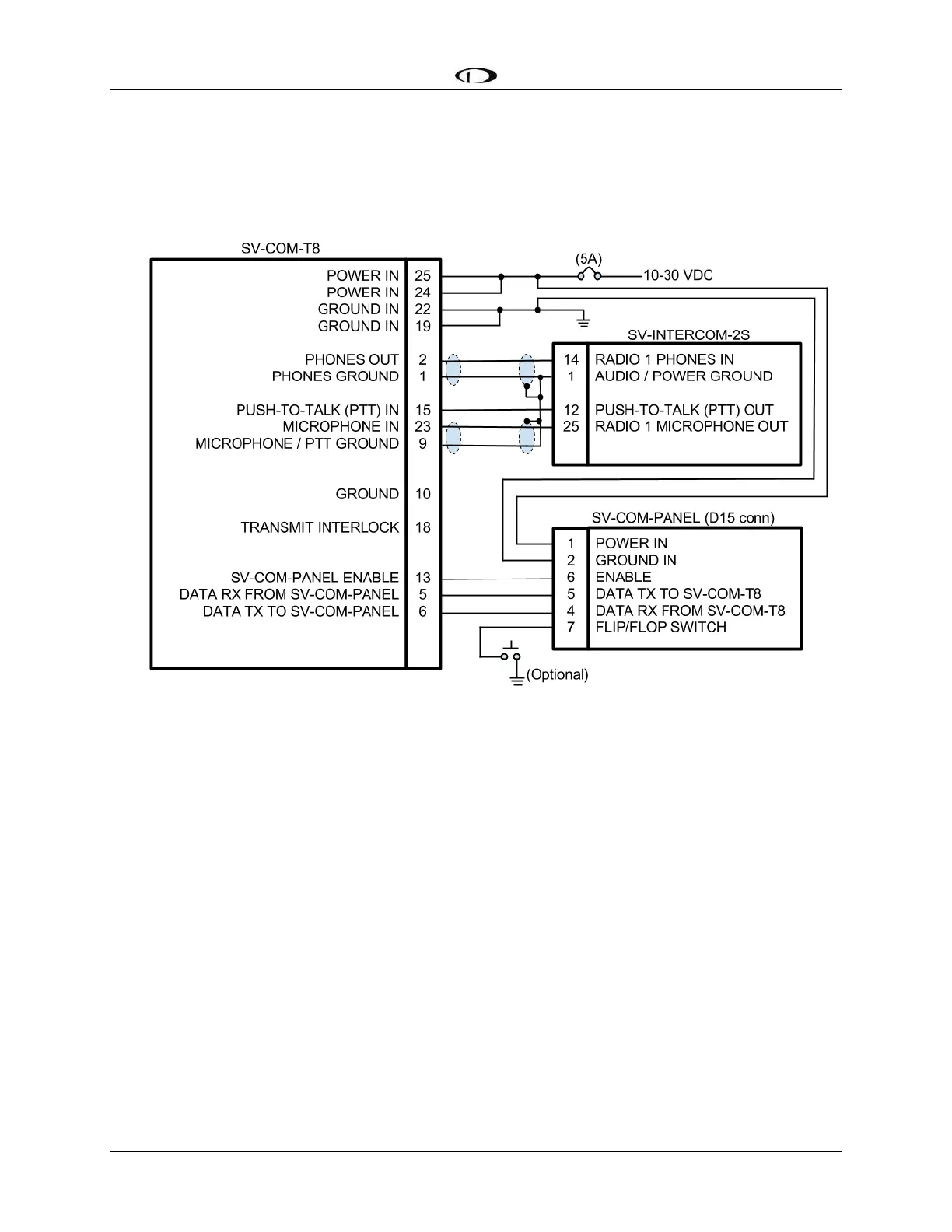
The following figure depicts how a single SV-COM-T8 is connected to an SV-INTERCOM-2S. Note
that SkyView Network connection(s) on SV-COM-PANEL are not shown, nor are additional
connections between the SV-INTERCOM-2S and other devices that it connects to.
Figure 188 – Single SV-COM-T8 to SV-INTERCOM-2S
Single SV-COM-X83 to SV-INTERCOM-2S Harness Construction Notes
Shielded cable between SV-COM-T8 Pins 2 and 1, and SV-INTERCOM-2S Pins 1 and 14:
This cable consists of two wires plus shield.
Use one of the wires to connect SV-COM-T8 Pin 2 to SV-INTERCOM-2S Pin 14.
Use the other wire to connect SV-COM-T8 Pin 1 to SV-INTERCOM-2S Pin 1 (see
instructions below - Terminating Shielded Cables to Pin 1 of SV-INTERCOM-2S).
On the SV-COM-T8 end, continue the shield as far into the connector as possible until
you're forced to pare it back to access the two inner wires. Put some heat shrink tubing
over the shield to keep it electrically isolated - the shield at the SV-COM-T8 end of this
cable is not electrically connected at the SV-COM-T8.
On the SV-INTERCOM-2S end, prep the shield into a "pigtail" so that you can solder to it
(see below).
Shielded cable between SV-COM-T8 Pins 23 and 9, and SV-INTERCOM-2S Pins 1 and 25:
This cable consists of two wires plus shield.
Use one of the wires to connect SV-COM-T8 Pin 23 to SV-INTERCOM-2S Pin 25.










 To Next Page