SV-MAG-236 Installation and Configuration
20-4 SkyView System Installation Guide - Revision AA
Confine the flying for the in-flight compass calibration to a specific area to
minimize variations in the earth’s magnetic field during the calibration process (IE,
don’t combine the in-flight compass calibration with a cross-country flight).
While the in-flight compass calibration is optional, it will likely improve the dynamic
performance of the heading indications in many aircraft. It is especially recommended for
aircraft with the SV-MAG-236 are installed due to magnetic interference issues when installing
the SV-ADAHRS-200/201. This is particularly true in steel framed aircraft.
The best compass performance will be achieved by performing the in-flight
compass calibration after the on-ground compass calibration has been performed.
1. If you have two SkyView displays, the in-flight compass calibration can be performed
from either display.
2. After observing the cautions above, push buttons 7+8 to enter the IN FLIGHT SETUP
MENU. Note – this menu is not accessible while on the ground.
3. Select COMPASS CALIBRATION
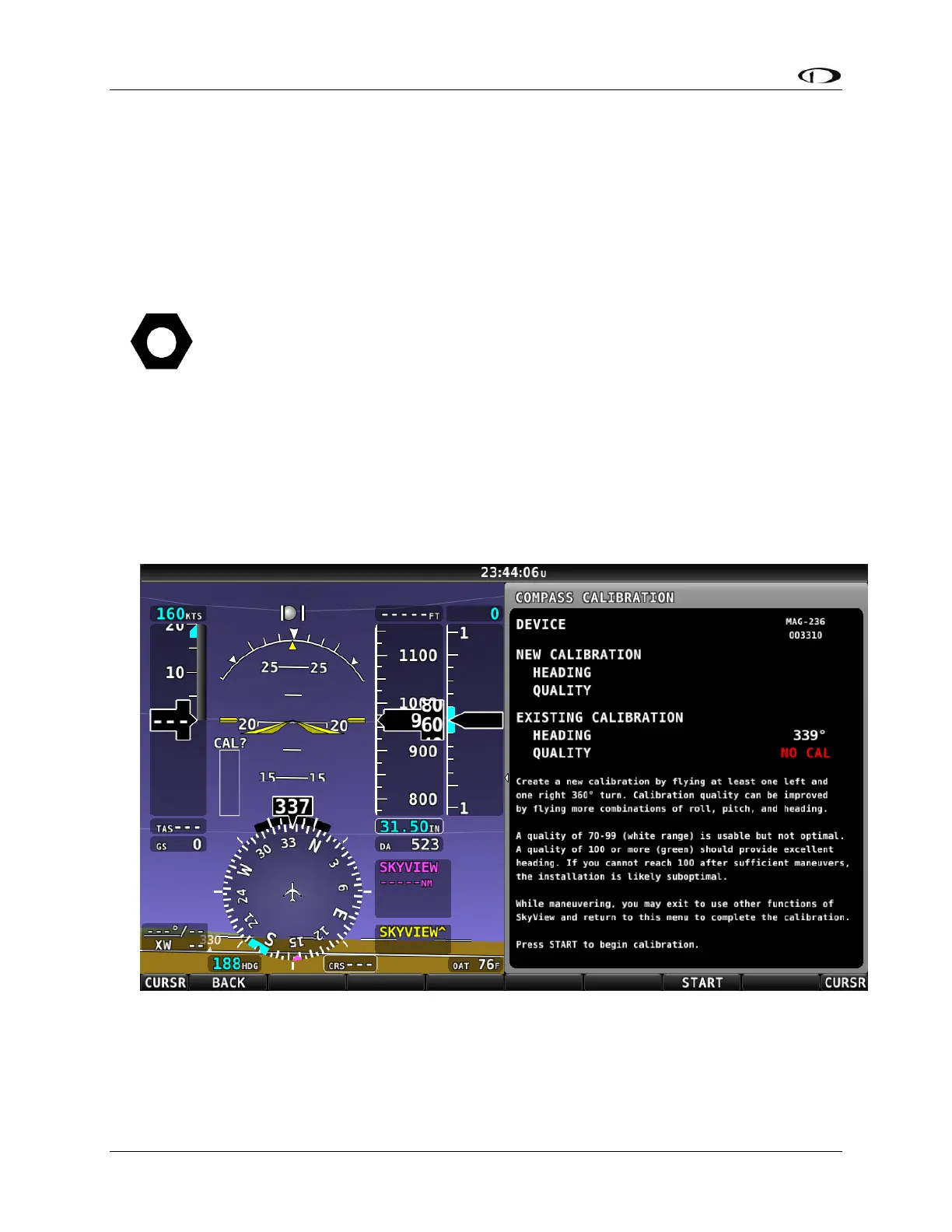
4. Right-click the knob to enter the in-flight COMPASS CALIBRATION menu. You will see a
screen similar to this:
Figure 205 – In-flight COMPASS CALIBRATION Menu
5. Push the START button to begin the calibration.
6. Observe the NEW CALIBRATION section of the menu. The goal of the in-flight compass
calibration is to achieve a compass calibration “quality” of at least 100.










 To Next Page