SV-ARINC-429 Module Installation and Configuration
13-6 SkyView HDX System Installation Manual - Revision E
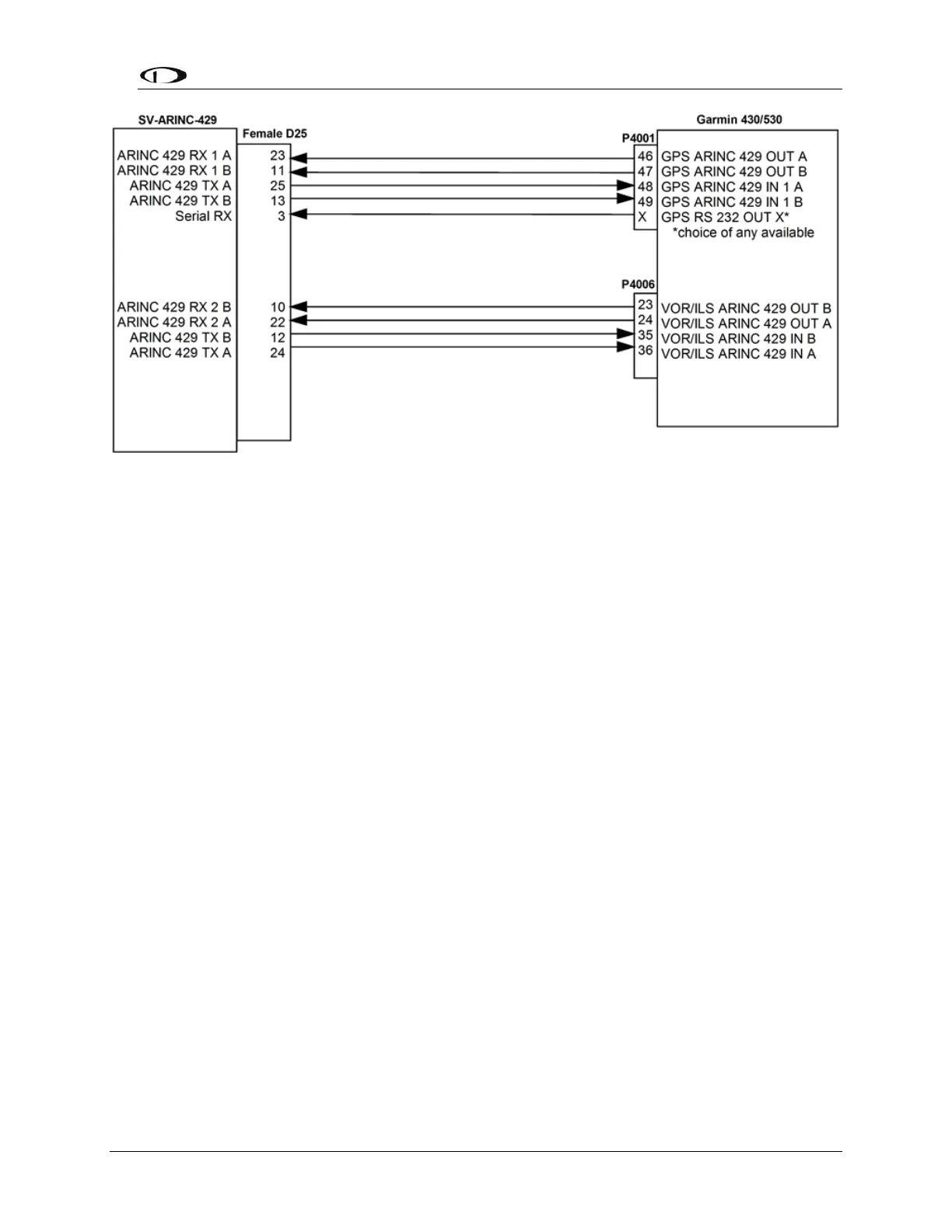
Figure 90: Garmin 430/530 SV-ARINC-429 Connections
13.2.2.1 Additional Garmin 430/530 Configuration Information
The following are the typical Garmin and SkyView configuration settings when this
combination of products is used:
Garmin Settings:
"Main ARINC 429 Config" page:
In 1: High | EFIS / Airdata
In 2: Unused by SkyView, configure as needed for other equipment
Out: High | GAMA 429
SDI: Common
VNAV: Enable Labels
"VOR / LOC / GS ARINC 429 Config" Page:
TX: High
RX: High
SDI: Common
DME: Unused by SkyView
“MAIN RS232 CONFIG” Page:
Chan X (where X is the physically connected port) Output: Aviation
Optional (ADS-B)
If a Dynon Avionics SV-XPNDR-261 is being used for ADS-B Out capability: Another
430/530 serial output should be set to “ADS-B+ OUT” format. That serial port should be
connected to the SV-XPNDR-261’s pin 3 through a 1.21k resistor as described in the SV-
XPNDR-261 Transponder Installation and Configuration. Finally, set SETUP >
TRANSPONDER SETUP > GPS DATA to DIRECT (GARMIN ADS-B/GARMIN ADS-B+).



 To Next Page