SV-ARINC-429 Module Installation and Configuration
SkyView HDX System Installation Manual - Revision E 13-7
SkyView Settings:
SETUP MENU > SYSTEM SETUP > ARINC-429:
(Configure MODULE 1 and MODULE 2 independently)
> INPUT SPEED: HIGH
> INPUT 1: GPS x
> NAVIGATION SOURCE DISP NAME: (user selectable, 7 characters. The name
entered here is displayed as the HSI source and the Flight Plan Source (if this
device outputs a flight plan).
> INPUT 2: NAV x
> NAVIGATION SOURCE DISP NAME: (user selectable, 7 characters. The name
entered here is displayed as the HSI source and the Flight Plan Source (if this
device outputs a flight plan).
> OUTPUT SPEED: HIGH
> ALLOW AUTO SWITCH: YES (LABEL 100P)
Setting ALLOW AUTO SWITCH: to YES (LABEL 100P) (which is the default, including
after upgrading Software to v10.0 or later) allows the 430/530 to tell SkyView to switch
from GPS to ILS or back when on an ILS overlay approach - SkyView will display
whatever mode the 430/530 tells SkyView to be in. When in this mode and not on an
approach, switching between the NAV function and GPS function must be performed from
the 430/530.
If you want to manually select GPS and NAV from the 430/530, as you have done prior
to v10.0, SETUP MENU > SYSTEM SETUP > ARINC-429 > ALLOW AUTO SWITCH:
NO.
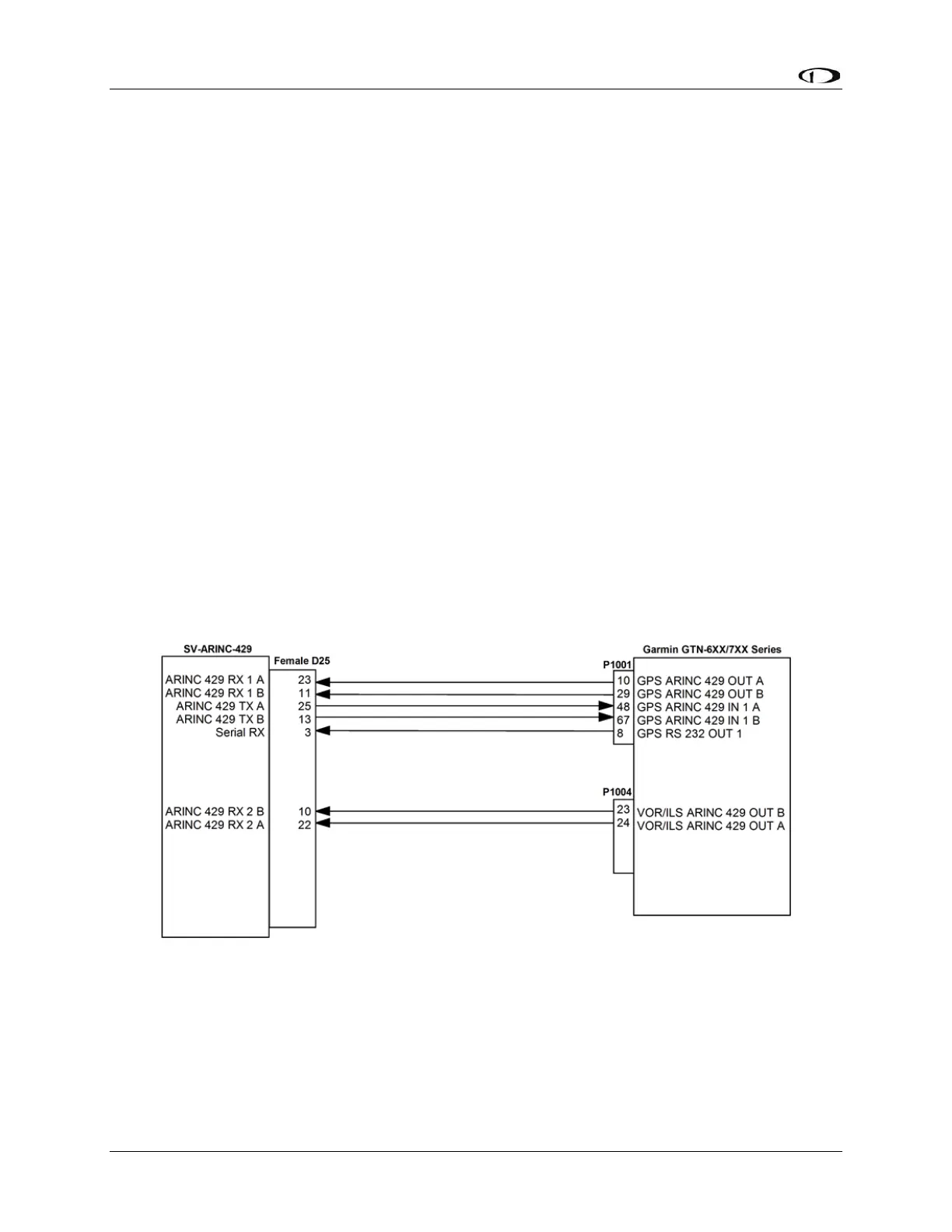
Figure 91: Garmin GTN Series SV-ARINC-429 Connections
13.2.2.2 Additional Garmin GTN Series Configuration Information
The following are the typical Garmin and SkyView configuration settings when this
combination of products is used.



 To Next Page