134
Solution Ultima 844/862/880 Installation Manual
Basic Pager Reporting Format
Basic Pager Format requires some interpretation of the numbers that appear on the display; however,
it is possible to differentiate between 1000 different control panels when a number of control panels
are reporting to the one pager.
How To Set up Receiver 1 For Basic Pager Reporting
1. "LOCATION 000 - 015" on page 139 requires the Basic Pager's access telephone number
programmed.
2. “LOCATION 034 – 039” on page 141 requires a Subscriber ID Number programmed.
3. "LOCATION 032" on page 140 requires "Option 5 - Pager Handshake" to be selected.
4. "LOCATION 033" on page 141 requires "Option 5 - Basic Pager Format" to be selected.
How To Set up Receiver 2 For Basic Pager Reporting
1. "LOCATION 040 - 055" on page 142 requires the Basic Pager's access telephone number
programmed.
2. “LOCATION 074 – 079” on page 144 requires a Subscriber ID Number programmed.
3. "LOCATION 072" on page 143 requires "Option 5 - Pager Handshake" to be selected.
4. "LOCATION 073" on page 144 requires "Option 5 - Basic Pager Format" to be selected.
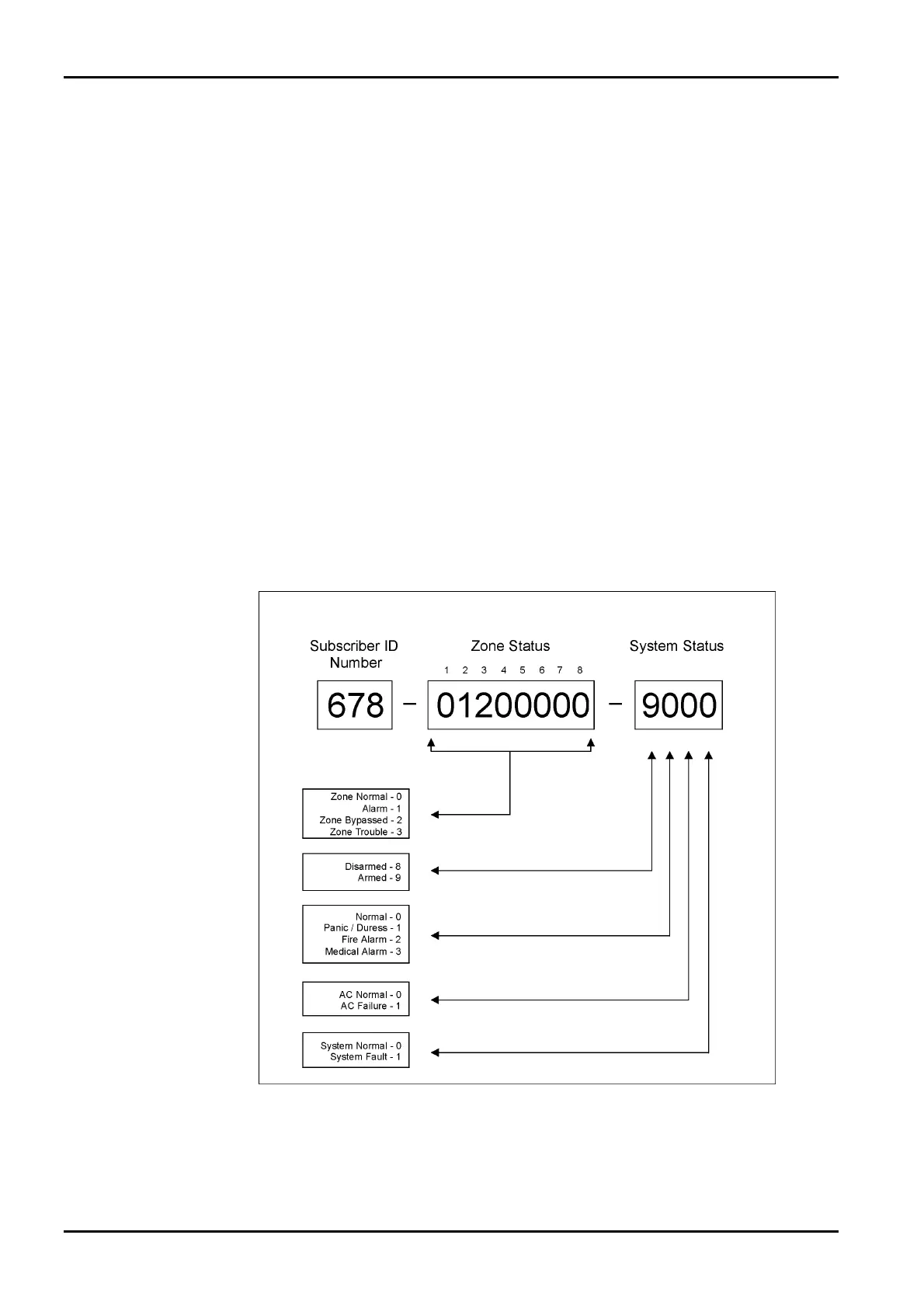
Figure 5: Basic Pager Display
The example in "Figure 5: Basic Pager Display" shows that the transmission has come from
Subscriber ID Number 678 and that Zone 2 is in alarm, Zone 3 has been manually isolated, the system
is armed, the panic zone is normal, the AC is connected and there is no fault condition.
ISSUE162.DOC Electronics Design and Manufacturing Pty Limited



 To Next Page