250 Solution Ultima 844/862/880 Installation Manual
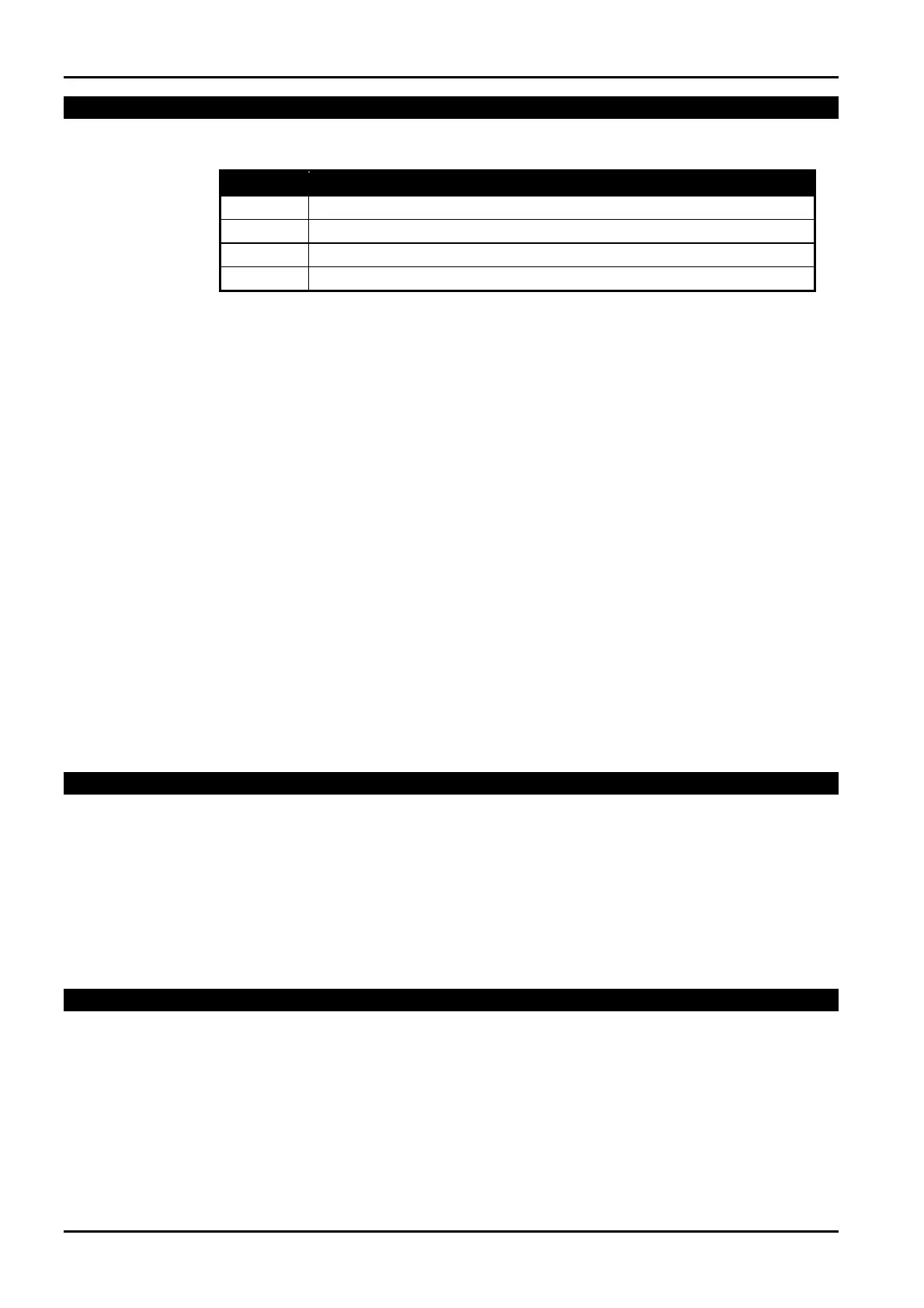
RF Option Bit
LOCATION 527 0
Option Description
1
Sound Siren On RF Receiver Fail
2
Sound Siren On RF Receiver Tamper / Jamming
4
Unseal Zone That Fails Supervision (If Supervision Enabled)
8
Enable RF Jamming Monitoring
1
2
4
8
Table 160: RF Option Bit
Sound Siren On RF Receiver Fail
If this option has been programmed, the horn speaker, piezo and strobe will operate when the RF
receiver fails to communicate to the control panel.
Sound Siren On RF Receiver Tamper / Jamming
If this option has been programmed, the horn speaker, piezo and strobe will operate when the tamper
switch on the receiver has become open circuit or the receiver has picked up jamming signals from a
RF device.
Unseal Zone That Fails Supervision
If a wireless zone device fails to send a signal within the RF Supervision Time programmed in
LOCATION 337 on page 187, the control panel will force the zone indicator on the codepad to
display as unsealed.
Enable RF Jamming Monitoring
If this option has been enabled, the RF receiver will monitor the background RF levels. If this level
reaches a preset limit, the receiver will assume it is being jammed. This will generate a fault on the
codepad and will also send an “RF Jamming” report back to the monitoring station.
RF Device Mapping (Devices 1 – 8)
LOCATION 528 - 535 12345678
These locations allow you to allocate RF wireless devices 1 – 8 to any of the available 8 zones on the
control panel. More than one RF wireless device may be mapped to the same zone. Refer to
“LOCATION 536 - 543” to map RF wireless devices 9 – 16 to any of the available 8 zones on the
control panel. At factory default, RF devices 1 – 8 are mapped separately to each of the available 8
zones (e.g.: Device 1 is mapped to Zone 1, Device 2 is mapped to Zone 2 etc).
RF Device Mapping (Devices 9 – 16)
LOCATION 536 - 543 00000000
These locations allow you to allocate RF wireless devices 9 – 16 to any of the available 8 zones on the
control panel. More than one RF wireless device may be mapped to the same zone. Refer to
“LOCATION 528 - 535” to map RF wireless devices 1 – 8 to any of the available 8 zones on the
control panel.
ISSUE162.DOC Electronics Design and Manufacturing Pty Limited



 To Next Page