■ Optimum utilization of the drive motor in relation to the user's actual air demand.
■ Automatic restart of the machine after a power failure (can be deactivated).
The monitoring function allows:
■ Supervision of all maintenance-relevant components via the maintenance interval counters.
■ Display of warning and maintenance messages for due maintenance on the display of
the SIGMA CONTROL 2 .
The protective function allows:
■ Automatic machine shutdown on alarms that may lead to damage to the machine, e.g. high
current, high pressure, or high temperature.
4.2 Operating panel
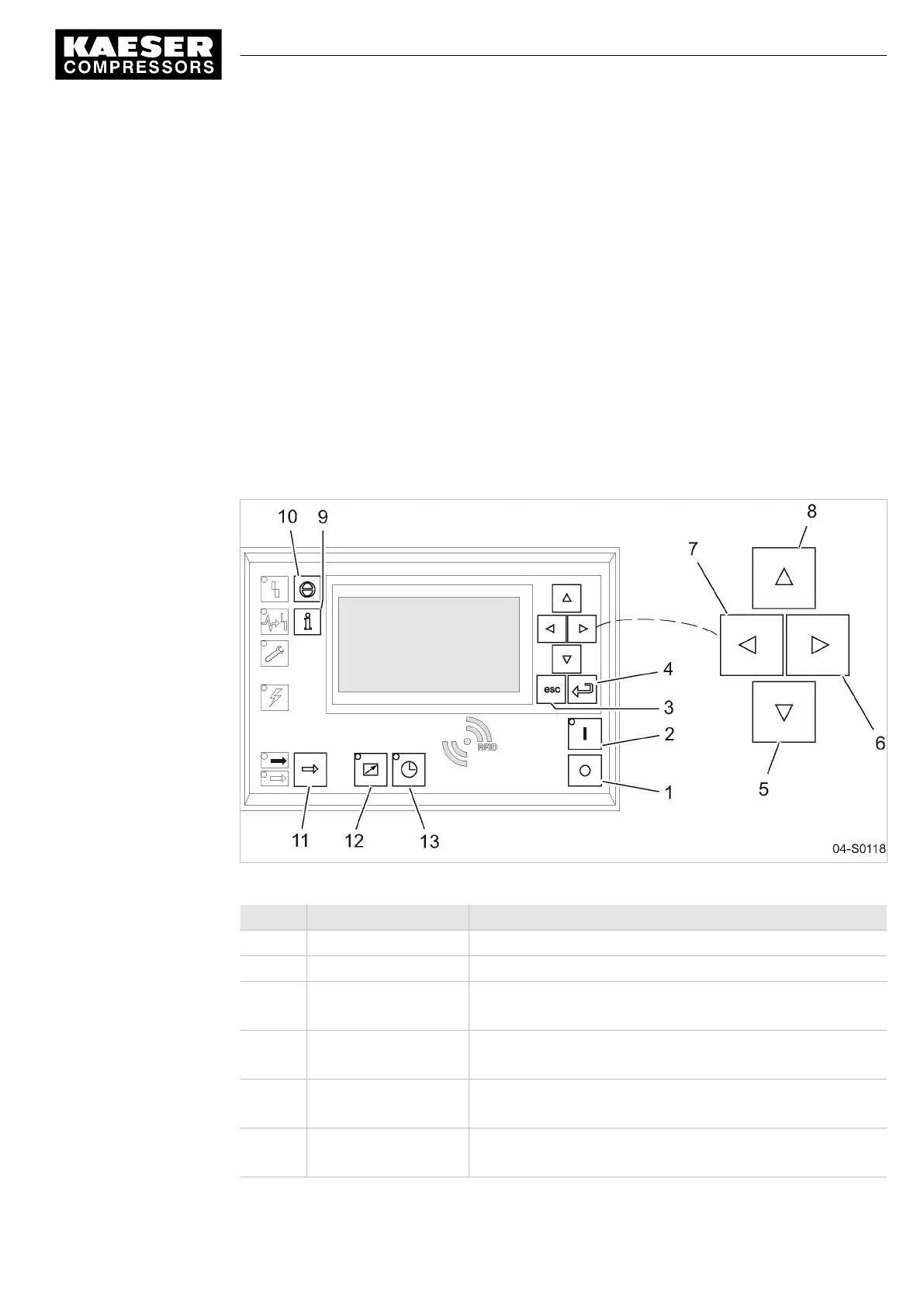
Keys
Fig. 4 Keys – overview
Position Name Function
1 «OFF» Switches the machine off.
2 «ON» Switches the machine on.
3 «Esc» Returns to the next higher menu option level.
Exits the edit mode without saving.
4 «Enter» Jumps to the selected menu option.
Exits the edit mode and saves.
5 «Down» Scrolls down the menu options.
Reduces a parameter value.
6 «Right» Jumps to the right.
Moves the cursor position to the next right field.
4 Design and Function
4.2 Operating panel
9_9450 03USE
Service manual Controller
SIGMA CONTROL 2 SCREW FLUID 1.1.3
11





 To Next Page