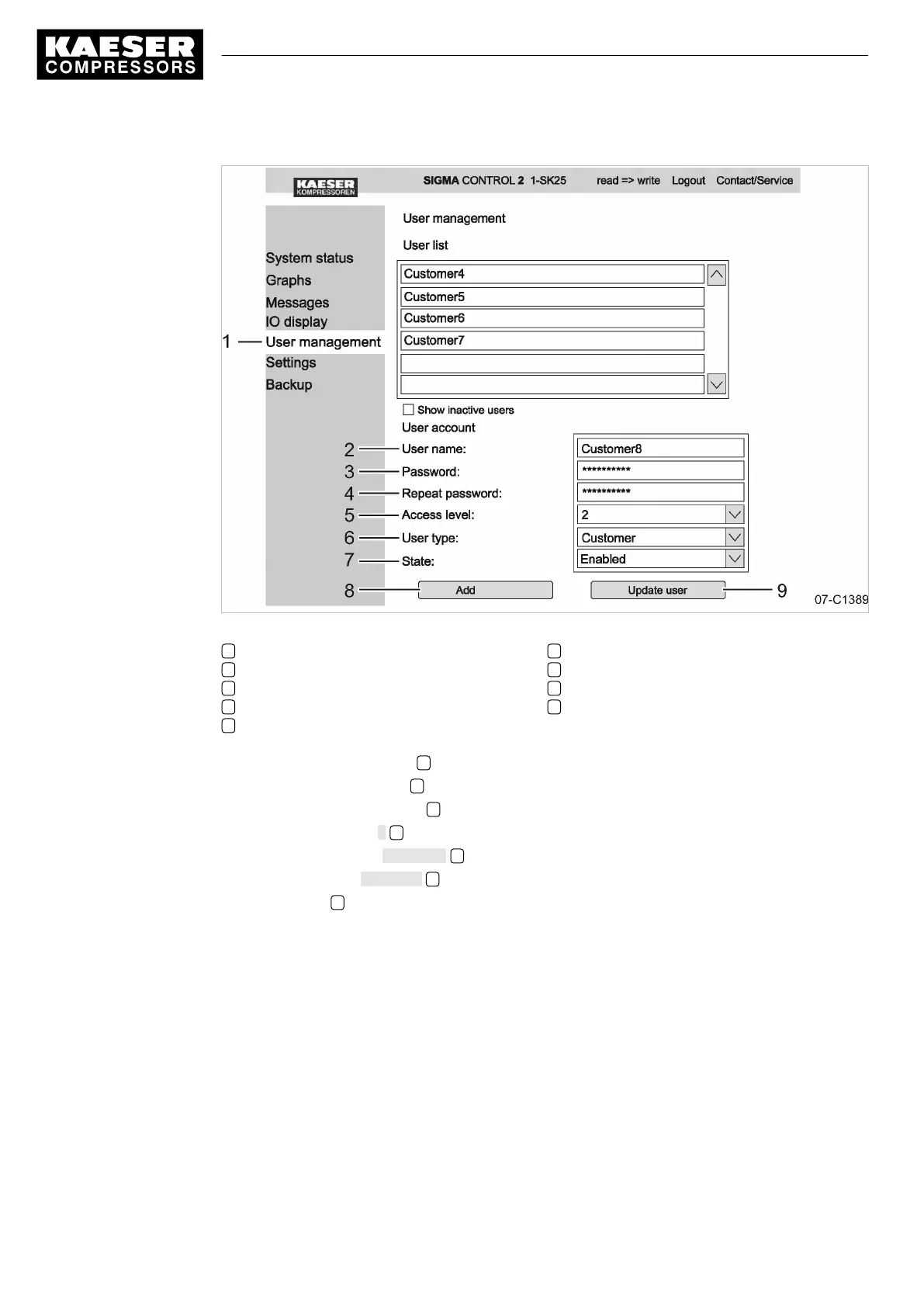
Fig. 21 Creating a new user
1
<User administration>
menu
2 New user name
3 Password
4 Confirm the password
5 Access level
6 User type
7 Status
8 «Add» key
9 «Update» key
6. Enter the new user name 2 for an additional employee.
7. Enter the new password 3 .
8. Confirm the new password 4 .
9. Select access level 2 5 .
10. Select the user type Customer 6 .
11. Select the status Activated 7 .
12. Click «Add» 8 .
The new user name has been added to the user list.
Result A new user account has been created and activated.
Updating user accounts
Similar to the creation of new user accounts, you can also update existing user accounts.
■ Changing the password
■ Changing the access level
■ Changing the status
As an example, we show here how to change a password.
7 Initial Start-up
7.3 Using KAESER CONNECT
56
Service manual Controller
SIGMA CONTROL 2 SCREW FLUID 1.1.3 9_9450 03USE




 To Next Page