Precondition Access level 2 is activated.
1. Select
< Configuration ➙ Pressure control ➙ Pressure settings >
(see Section 7.4.1)
2. Press the «DOWN» key repeatedly until the following is displayed as the active line:
8 9 p s i 0 8 : 1 5 1 7 6 ° F
5.2.2 Pressure settings
Menu
pRV 232 psi
·········
Pressure rise
pE SP : 122 psi ¦ SD : - 7 psi
Active line with current switching point pressure rise,
current switching differential
ΔpFC : 44 psi
·········
3. Press «Enter» to switch into setting mode.
The
122 psi
parameter flashes.
4. Use «UP» or «DOWN» to adjust the setting.
5. Press «Enter» to accept the setting.
6. Adjust the switching differential if necessary in the same way.
7. Press «Esc» repeatedly to return to the Main Menu.
7.4.2.4 Adjusting pressure rise: Machine with variable frequency drive (SFC)
The pressure rise value
dpfC
is the limit from which the machine switches to IDLE.
This value can be between 2.9 psi and 5.8 psi. The factory setting is 2.9 psi.
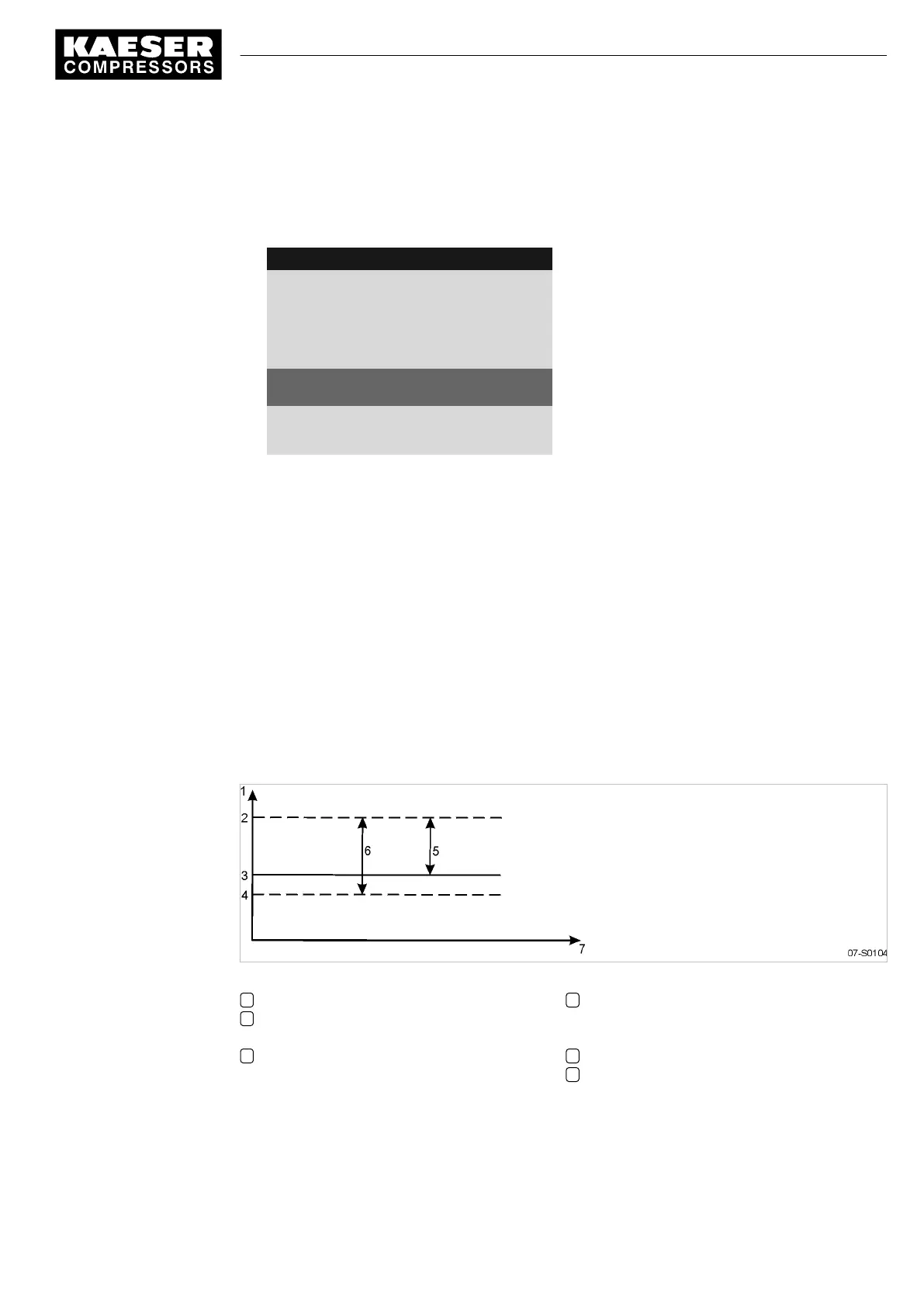
The pressure rise is added to the system setpoint pressure. In this way, the system setpoint pres‐
sure can be changed without having to adjust the parameter again.
Precondition Access level 2 is activated.
Fig. 25 Pressure rise in frequency-controlled (SFC) machines
1 System pressure
2 IDLE switching point:
System setpoint pressure + dpFC
3 System setpoint pressure pA or pB
4 LOAD switching point:
(System setpoint pressure + dpFC) -
switching differential
5 Pressure rise dpFC
6 System pressure band width
1. Select
< Configuration ➙ Pressure control ➙ Pressure settings >
(see Section 7.4.1)
7 Initial Start-up
7.4 Adjusting the pressure parameters of the machine
9_9450 03USE
Service manual Controller
SIGMA CONTROL 2 SCREW FLUID 1.1.3
63





 To Next Page