Position Name Function
4 «Scroll right»
Shift the display area by
1
/
3
to the right
5 «End» Display of newest data
Tab. 51 Arrow keys and functions
1. Click the «Start» 1 arrow key.
The oldest data are displayed.
2. Click the «Scroll right» 4 arrow key.
The display area is shifted to the right by
1
/
3
.
3. Draw a rectangle with the mouse pointer pressed.
4. Release the mouse pointer.
The selected area is enlarged (zoom-in function).
5. Click the «Zoom-out» 3 arrow key.
Time range is enlarged (zoom-out function).
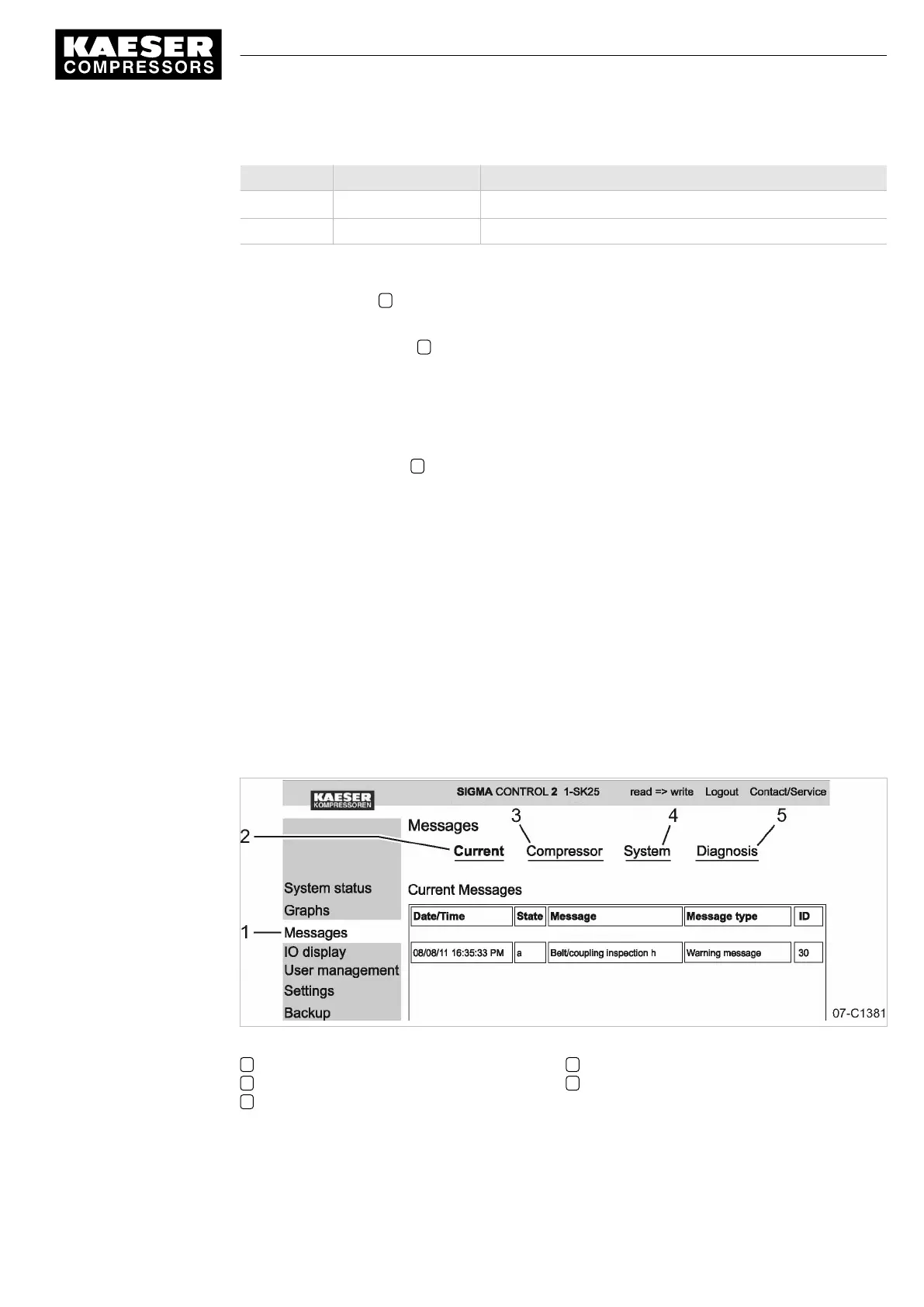
7.3.4 Displaying messages
The following messages are shown:
■ Current messages
■ Compressor messages
■ System messages
■ Diagnostic messages
Precondition KAESER CONNECT for SIGMA CONTROL 2 is displayed.
1. Open menu
<Messages>
.
Menu
<Messages>
is displayed.
Fig. 18 Messages
1 Menu
< Messages >
2 Current messages
3 Compressor messages
4 System messages
5 Diagnostic messages
2. Check messages.
7 Initial Start-up
7.3 Using KAESER CONNECT
9_9450 03USE
Service manual Controller
SIGMA CONTROL 2 SCREW FLUID 1.1.3
53





 To Next Page