Precondition The system displays the
<User administration>
menu.
Write mode is activated.
1. Click on the existing user account.
2. Enter the new password.
3. Confirm the new password.
4. Click «Update» 9 .
Result The existing user account has been updated.
7.3.7 Settings
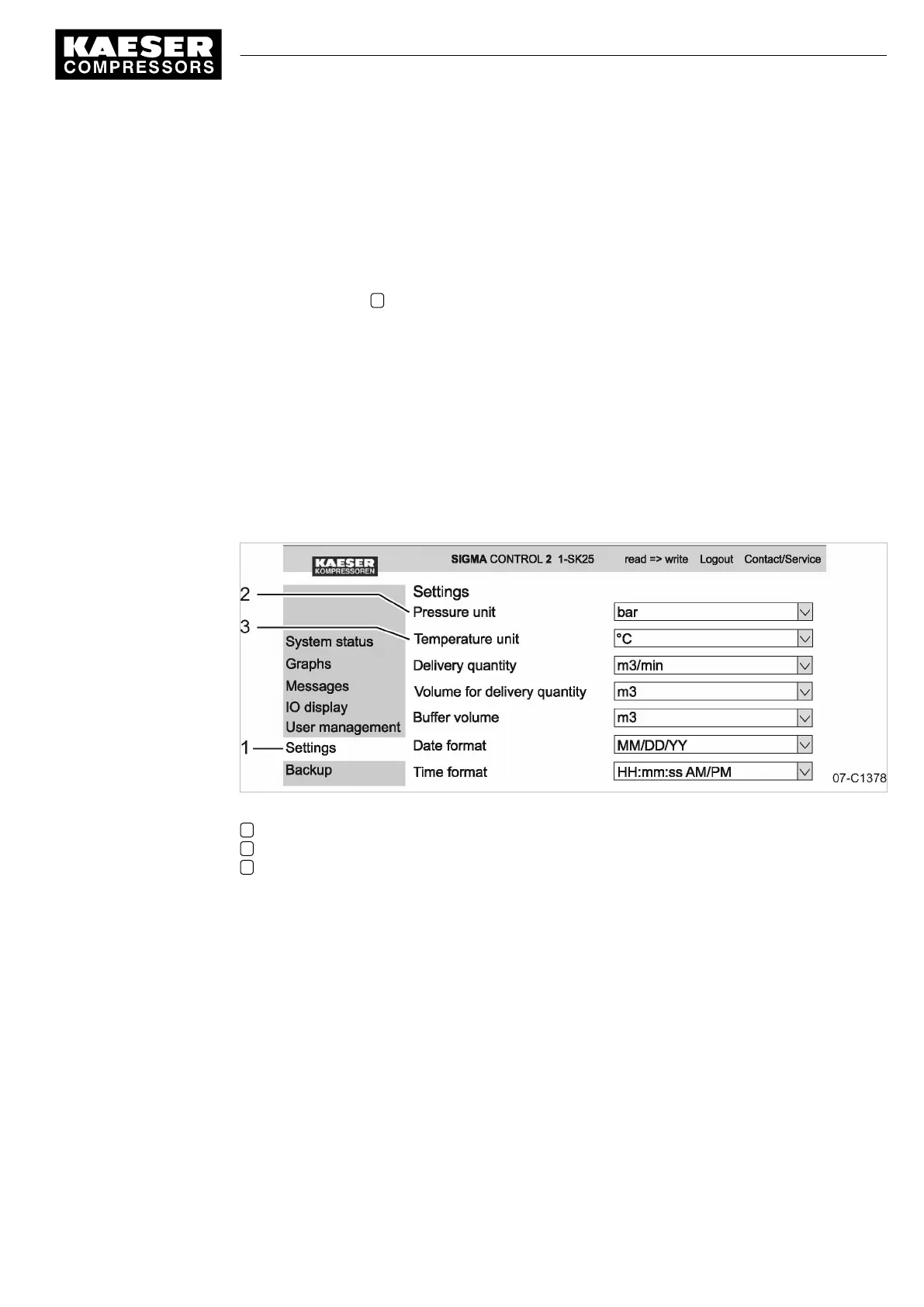
Settings via KAESER CONNECT apply only to your PC and your Browser.
The following settings are available:
■ Units
■ Date format
■ Time format
Fig. 22 Settings
1
<Settings>
menu
2 Unit of pressure
3 Unit of temperature
Converting units to US values:
Precondition KAESER CONNECT for SIGMA CONTROL 2 is displayed.
1. Select the
<Settings>
menu.
The system displays the
<Settings>
menu.
2. Click the arrow key for the unit of pressure.
A selection list of units of pressure is displayed.
3. Select the desired unit.
4. Click the arrow key for the unit of temperature.
A selection list of units of temperature is displayed.
5. Select the desired unit.
6. Set additional units and date and time formats.
7 Initial Start-up
7.3 Using KAESER CONNECT
9_9450 03USE
Service manual Controller
SIGMA CONTROL 2 SCREW FLUID 1.1.3
57





 To Next Page