4. Press «Enter» to accept the setting.
The «Remote control» key is activated and can be used.
5. Press the «Remote control» key to enable remote mode.
7.9.6 Configuring for master control with local/LOAD remote contact
Overview
■ Making the electrical connection
■ Setting the local/LOAD remote contact operating mode and assign the input.
■ Configuring the local operating mode, if necessary.
■ Activating the «Remote control» key
➤ Configuring master control as described below.
7.9.6.1 Making the electrical connection
Use the input “Controller On (DOR 1.03) for the "alarm machine X" message to prevent line
breaks!
➤ Wire the "motor running” and "Controller on” (DOR 1.03) messages from the compressor
to the MVS 8000 controller.
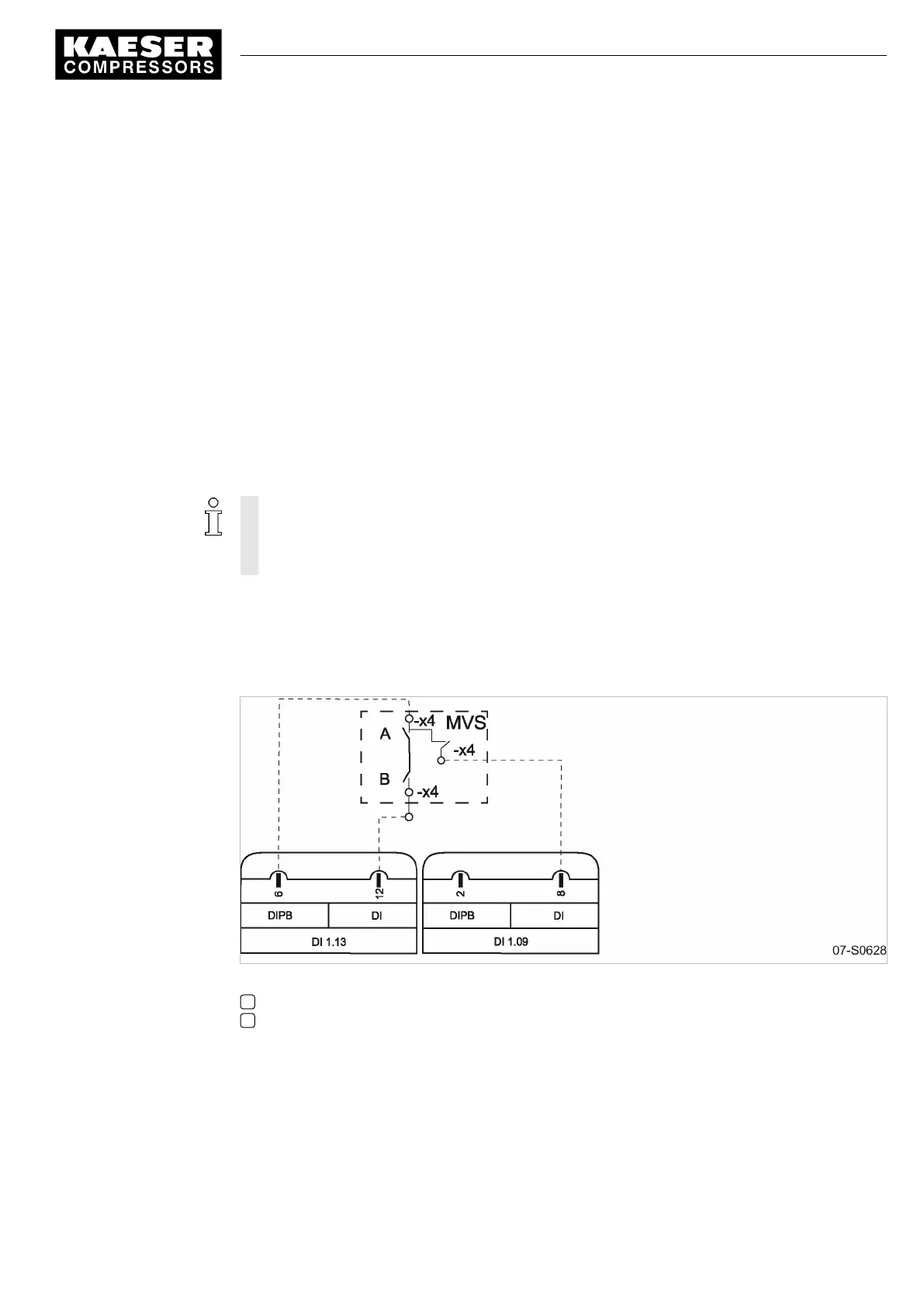
■ Contact A open: SIGMA CONTROL 2 controls with system setpoint pressurepB
■ Contact A closed: SIGMA CONTROL 2 controls using a remote contact input.
■ DI 1.13: LOAD/IDLE external
■ DI 1.09: LOAD control – switchover local/LOAD remote contact.
Fig. 33 Wiring diagram for local/LOAD remote contact:
A Changeover between automatic and manual modes
B LOAD/IDLE contact
➤ Make the electrical connection according to the diagram.
7.9.6.2 Setting the local/LOAD remote contact operating mode and assigning the input
Precondition Access level 2 is activated.
The
< Configuration ➙ Pressure control ➙ Load control >
menu is selected.
7 Initial Start-up
7.9 Configuring the machine for master control
9_9450 03USE
Service manual Controller
SIGMA CONTROL 2 SCREW FLUID 1.1.3
107





 To Next Page