Page 254 Job Editor Group 8
Release R1.06 JET3up
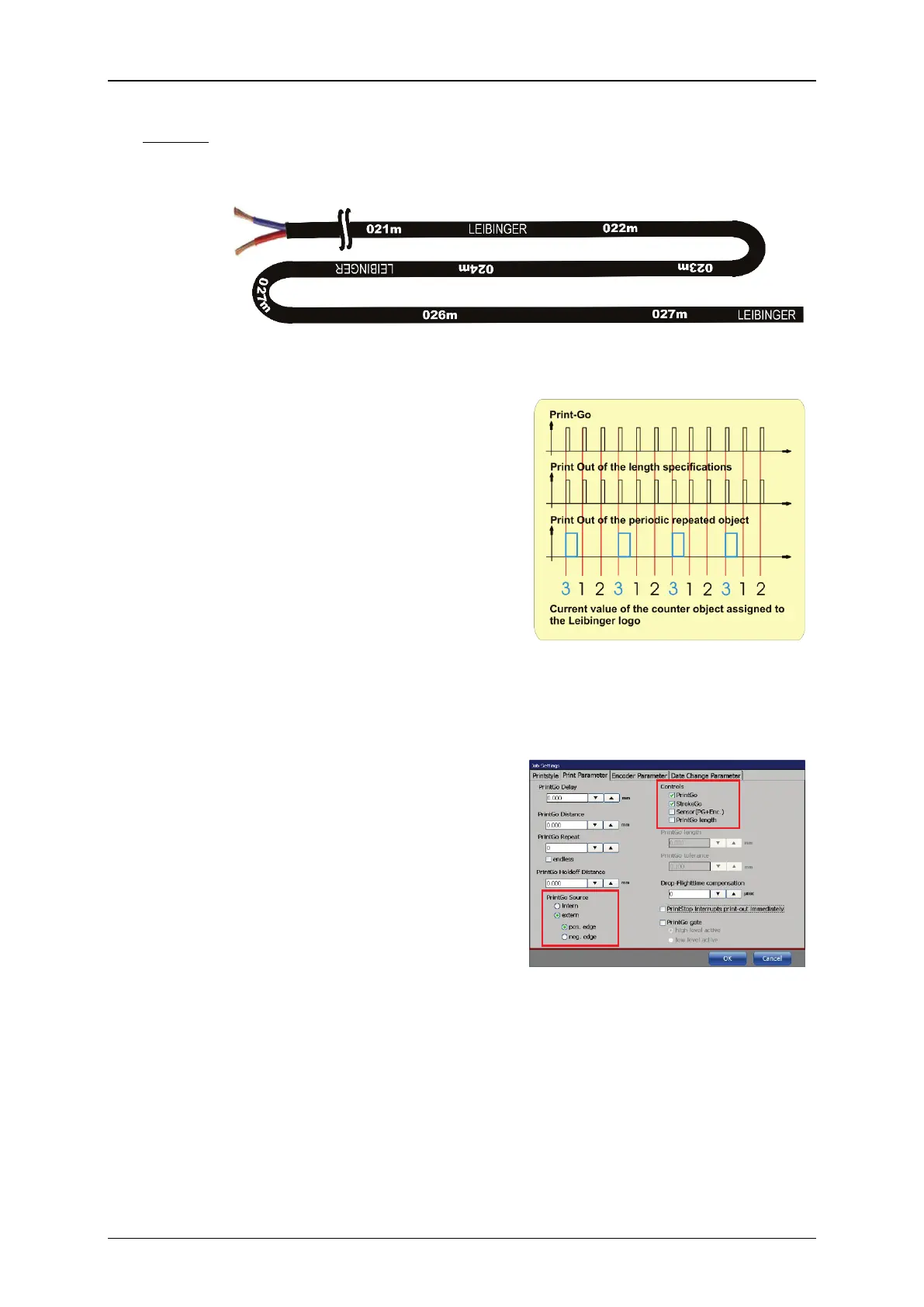
In this example lengths specifications are printed on a cable (for details
see <Meter-Go-function>). In addition the word Leibinger shall be
printed together with each third printout. See
Picture 1 for details.
Picture 1 – Example cable print: the Leibinger logo together with each
third meter printout
The printout of the length
specifications are controlled by the
PrintGo signals. The printout of the
Leibinger logo is controlled by the
value of the counter that is assigned
to the Leibinger text object.
Picture 2 shows the timing diagram.
For this print job are several settings
required.
Picture 2 – Timing diagram for the
periodically repeating
object
Settings for the PrintGo parameters
The PrintGo parameters are the
same for all objects printed. The
PrintGo signals (from the external
measuring system) and the StrokeGo
signals (from the external encoder)
are used to control the printout.
Relevant settings are marked in
Picture 3.
Picture 3 –
printed objects



 To Next Page