Group 8 Job Editor Page 283
JET3up Release R1.06
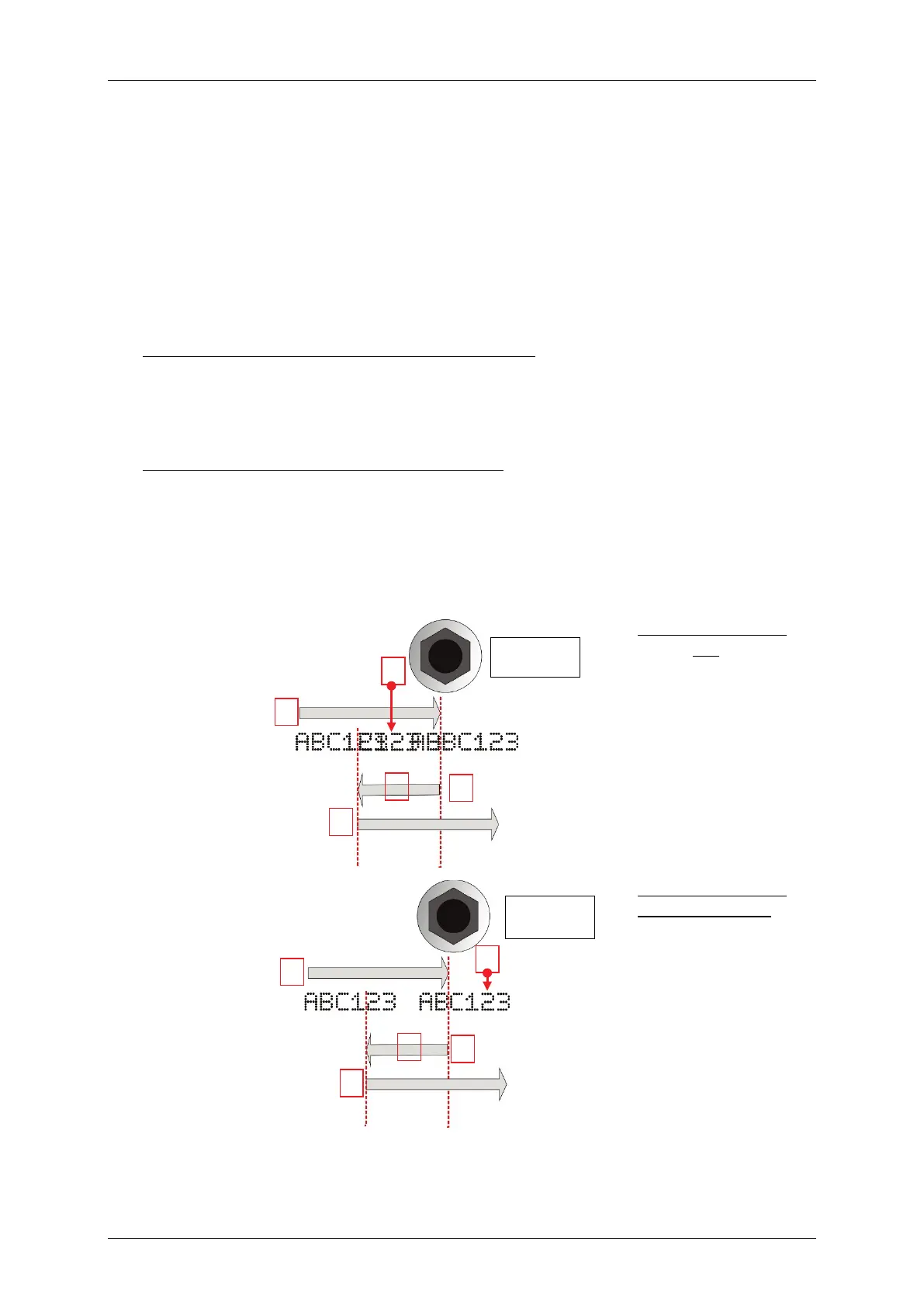
Example1
Settings:
PrintGo repeat: endless
Rotational direction: clockwise
After a PrintGo signal the printout
will start as soon as the StrokeGo signals from
the encoder are received; provided that the signals indicate a clockwise rotation
(1).
If the rotational direction changes during the printout (2)
the <lock backward> option.
With the <lock backward> option not activated:
During the counter-clockwise (backward) rotation there wil be no printouts (3)
When the rotational direction changes again (4) the printout
Therefore with the <lock backward> option not
activated in may happen that the
printout after the directional change overprints (5) the already existing printout.
With the <lock backward> option activated:
During the counter-
clockwise (backward) rotation there will be no printouts. When
the rotational direction changes again (4)
the printout will not start until the
position is reached where it was interrupted. Therefore with the <lock backward>
option activated a seamless printout is possible (6)
backward movement in the production line.
<lock backward>
option not activated:
Overprints after
backward
movements
<lock backward>
option activated:
No overprints after
backward
movements.
Seamless resumption
of the printout.
(Top view)
Printing direction



 To Next Page