215184 187 Revision A
6.2.4 Converting from Ultra Narrow Configuration to Narrow Configuration
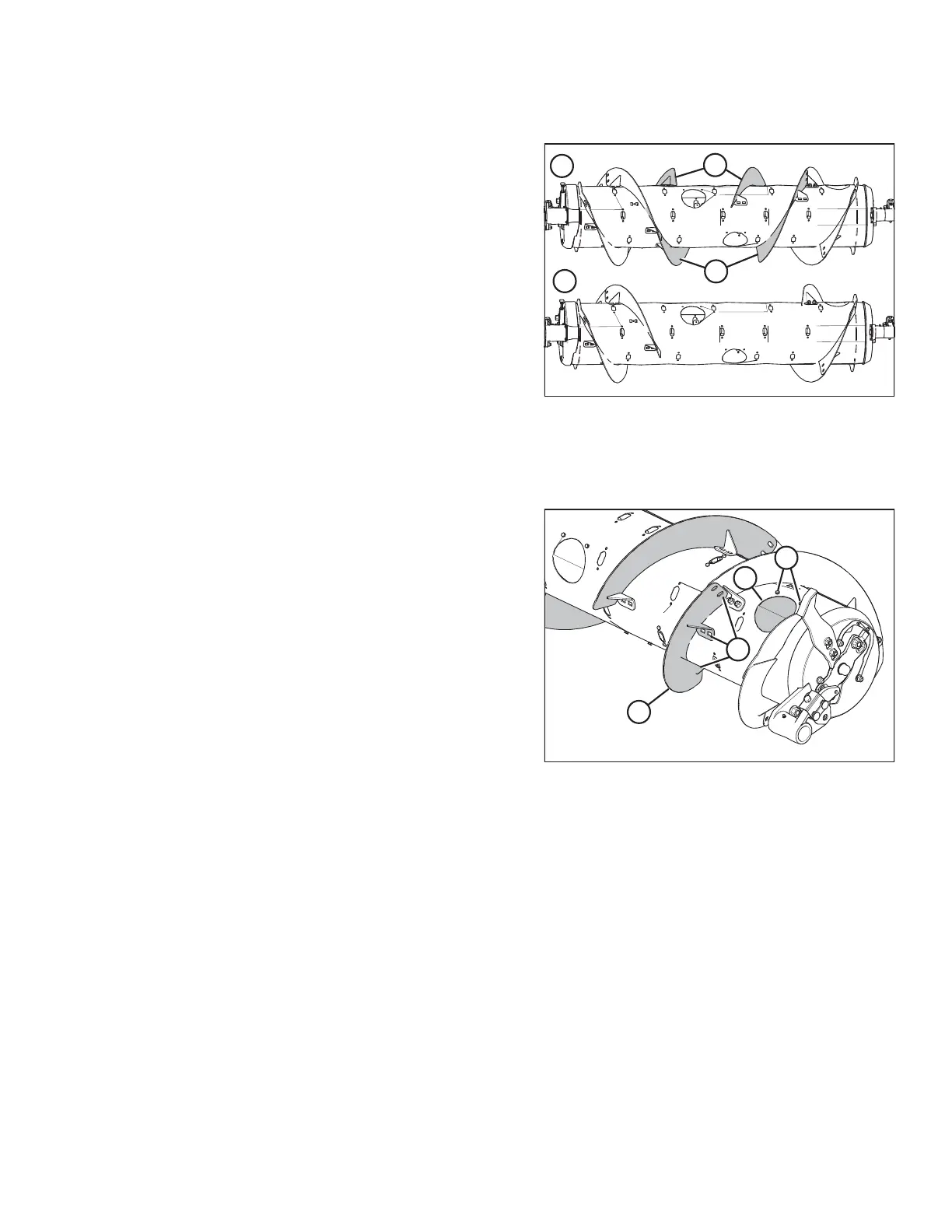
Figure 6.27: Auger Configurations – Rear View
1 - Ultra Narrow Configuration 2 - Narrow Configuration
The Ultra Narrow and Narrow auger configurations are shown
at right. Existing flightings (A) are removed from the auger when
converting to the Narrow configuration.
1. Improve access and ease installation by removing the float module from the combine. For instructions, refer to the
header operator’s manual or technical manual.
Figure 6.28: Ultra Narrow Configuration – Right Side
2. Remove bolts (A) and access cover (B). Retain for
reassembly.
3. Remove hardware from locations (C), and remove bolt-on
flighting (D) from feed auger.
4. Repeat procedure for the remaining three inboard
flightings.
5. Install additional auger fingers. A total of 18 fingers is
recommended for this configuration. For instructions, refer
to 6.2.10 Installing Feed Auger Fingers, page 198.
FLOAT MODULE SETUP AT DEALER



 To Next Page