215184 196 Revision A
6.2.9 Converting from Narrow Configuration to Ultra Narrow Configuration
Two flighting kits (MD #287032 or B6400
3
) and some hole-drilling are required to convert to this configuration. Extra
hardware is included in these kits. Be sure to use the correct hardware at the correct location to prevent damage and to
maximize performance.
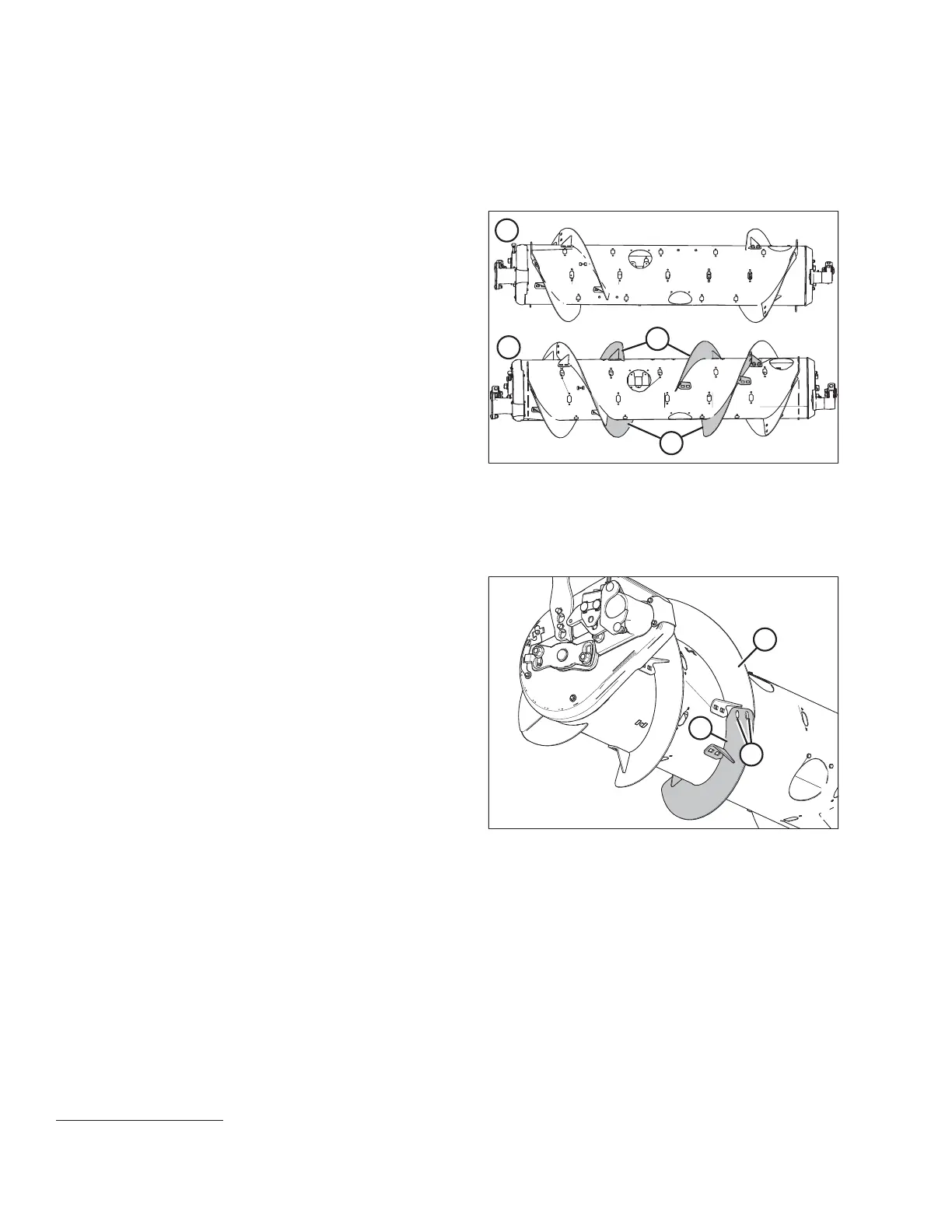
Figure 6.50: Auger Configurations – Rear View
1 - Narrow Configuration 2 - Ultra Narrow Configuration
NOTE:
Additional holes on the auger are needed before these
flightings (A) can be installed.
NOTE:
Some parts have been removed from the illustrations for clarity.
1. Improve access and ease installation by removing the float module from the combine. For instructions, refer to the
header operator’s manual or technical manual.
Figure 6.51: Left Side of Auger
2. Place new bolt-on flighting (A) outboard of existing
flighting (B) on the left side of the auger, as shown.
3. Mark hole locations (C) of new bolt-on flighting (A) onto
existing bolt-on flighting (B).
4. Remove nearest access cover to existing bolt-on
flighting (B). Retain hardware for reassembly.
5. Remove existing bolt-on flighting (B) from the auger. Retain
hardware for reassembly.
6. Drill two 11 mm (7/16 in.) holes at the marked locations of
existing bolt-on flighting (B).
7. Reinstall existing bolt-on flighting (B) on the auger.
NOTE:
Ensure carriage bolt heads are on the inside of the auger to
prevent damage to internal components.
FLOAT MODULE SETUP AT DEALER
3. MD #287032 is available only through MacDon Parts. B6400 is available only through Whole Goods.



 To Next Page