215184 368 Revision A
Setting Cutting Height – CLAAS 500 Series
Cutting heights can be programmed into the preset cutting height and auto contour systems. Use the preset cutting height
system for cutting heights above 150 mm (6 in.), and use the auto contour system for cutting heights below 150 mm (6 in.).
Setting Preset Cutting Height – CLAAS 500 Series
WARNING
Check to be sure all bystanders have cleared the area.
NOTE:
Changes may have been made to the combine controls or display since this document was published. Refer to the combine
operator’s manual for updates.
1. Start the engine.
2. Activate the machine enable switch.
3. Engage the threshing mechanism.
4. Engage the header.
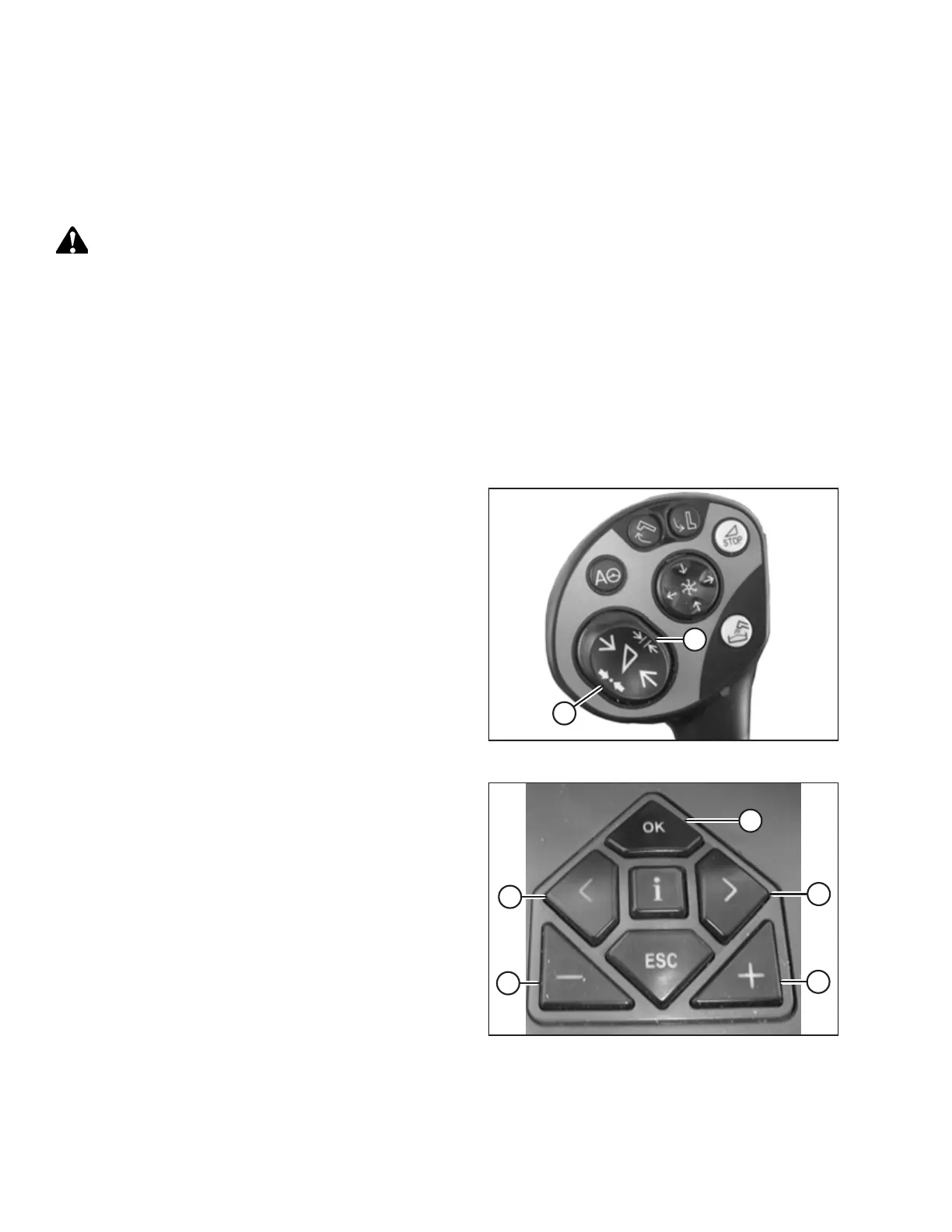
Figure 9.141: Control Handle Buttons
5. Briefly press button (A) in order to activate the auto
contour system, or briefly press button (B) in order to
activate the preset cutting height system.
NOTE:
Button (A) is used only with auto header height control
(AHHC) function. Button (B) is used only with the return to
cut function.
Figure 9.142: CLAAS Combine Controls
6. Use < key (C) or > key (D) to select the CUTTING HEIGHT
screen, and press OK key (E).
7. Use – key (A) or + key (B) to set the desired cutting height.
An arrow indicates the selected cutting height on the scale.
SETTING UP AUTO HEADER HEIGHT CONTROL



 To Next Page