215184 485 Revision A
Configuring Reel Fore-Aft, Header Tilt, and Header Type – New Holland CR Series
This procedure applies only to 2016 New Holland CR models 6.90, 7.90, 8.90, and 9.90.
NOTE:
Changes may have been made to the combine controls or display since this document was published. Refer to the combine
operator’s manual for updates.
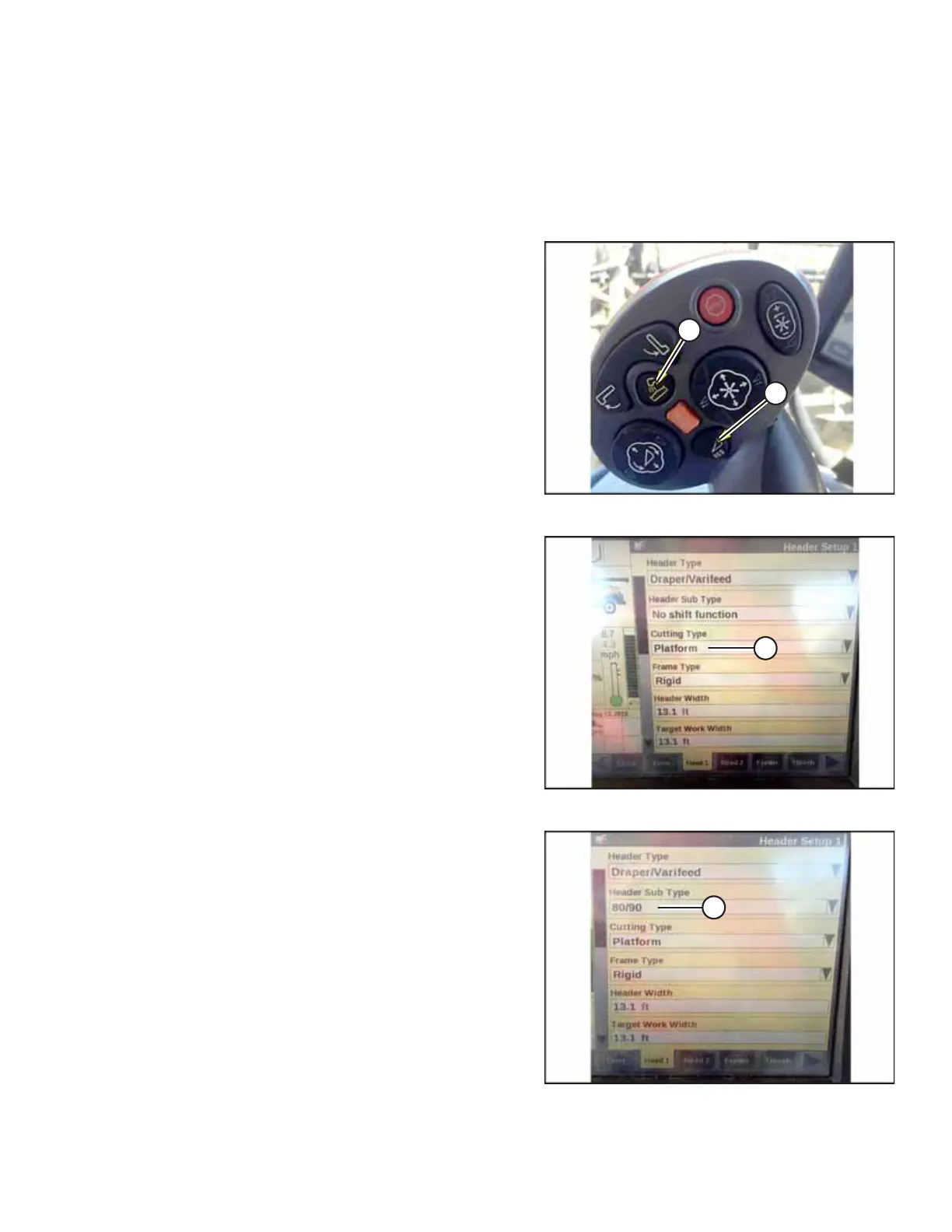
Figure 9.401: New Holland Combine Controls
1. Simultaneously press UNLOAD (A) and RESUME (B) buttons
on the control handle.
Figure 9.402: New Holland Combine Display
2. On the HEAD 1 screen, change the CUTTING TYPE from
FLEX to PLATFORM as shown at location (A).
Figure 9.403: New Holland Combine Display
3. On the HEAD 2 screen, change HEADER SUB TYPE from
DEFAULT to 80/90 as shown at location (A).
SETTING UP AUTO HEADER HEIGHT CONTROL



 To Next Page