215184 7 Revision A
2.2 Separating Headers
Follow these instructions to separate the headers. Headers can also be moved to an assembly area before separating.
• Refer to 2.3 Moving to Assembly Area, page 12 for proper lifting procedures.
• Refer to 12.3 Lifting Equipment Requirements, page 515 for equipment requirements.
NOTE:
Unless otherwise specified, discard stands, shipping material, and hardware. Removable stands and supports are painted
yellow or unpainted.
Remove shipping material and hardware as instructed in the following steps:
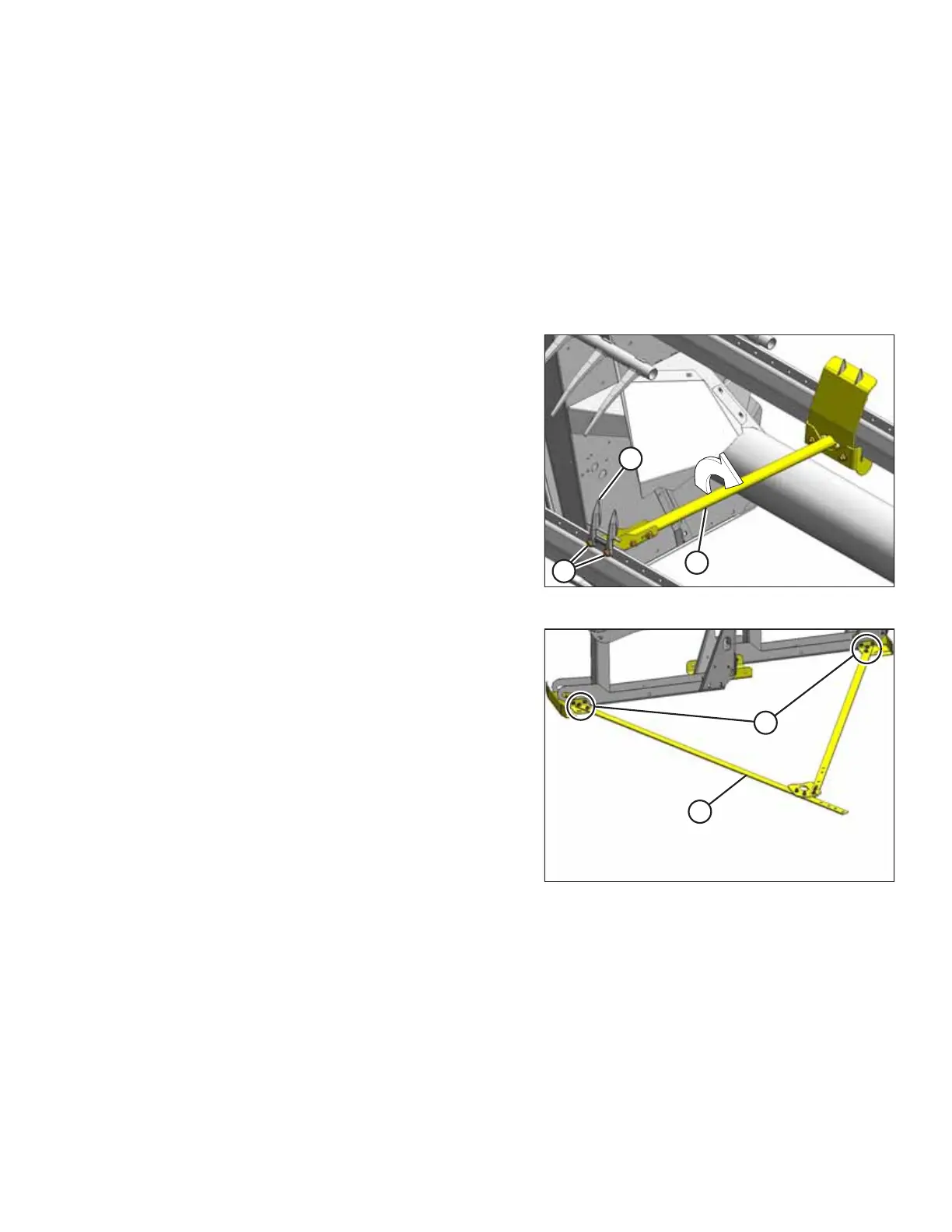
Figure 2.3: Cutterbar Shipping Support
1. Remove two bolts (A) securing guard (B) and shipping
support (C) to the cutterbar, and remove guard.
2. Lift support bar (C) clear of cutterbar, turn support bar 90°,
and remove bar from support bracket on opposite header.
NOTE:
Due to inaccessibility, the support bracket on the other
header’s cutterbar should be removed after headers are
separated.
Figure 2.4: Shipping Pull Strap Assembly
3. Remove four bolts (A) to remove shipping pull strap
assembly (B).
UNLOADING THE HEADER



 To Next Page