215184 456 Revision A
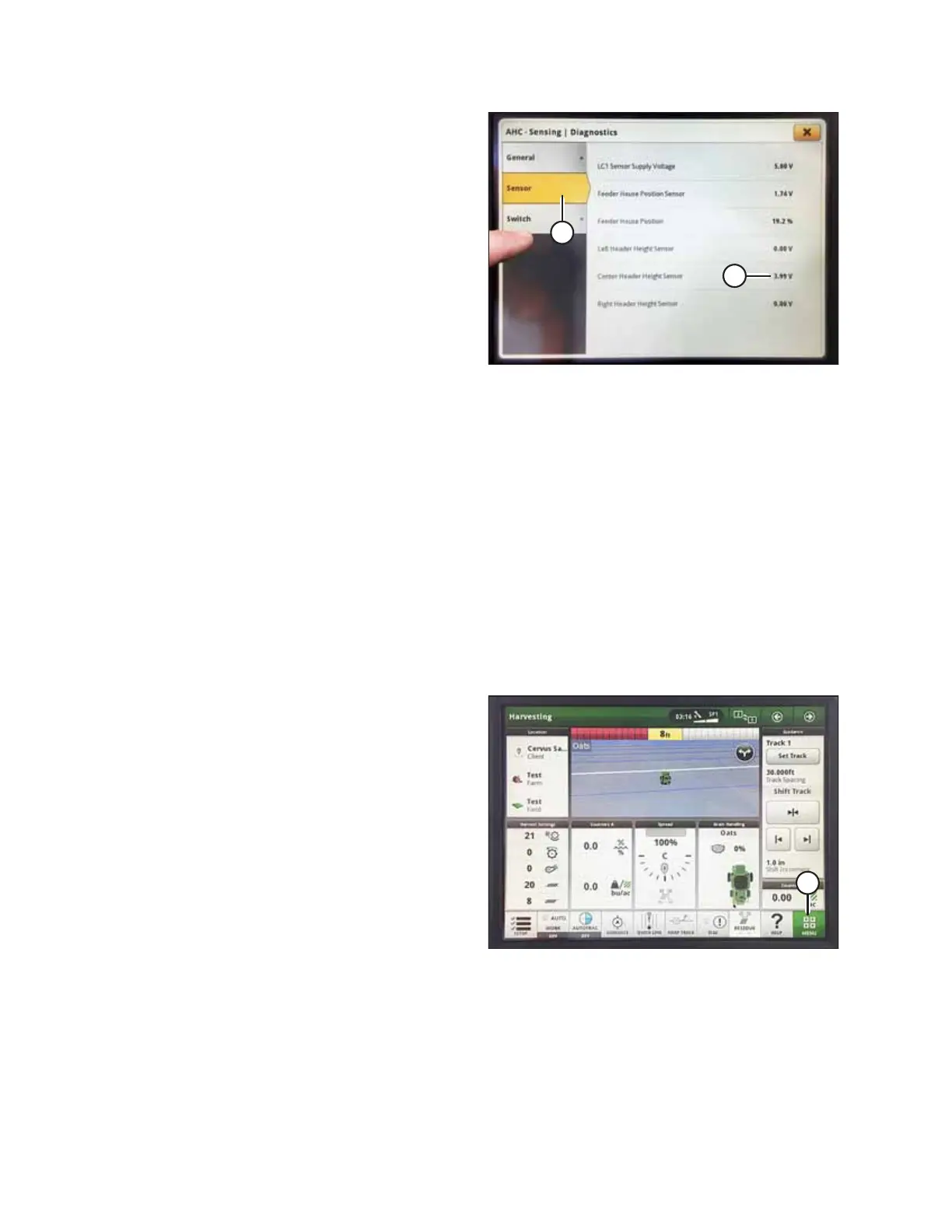
Figure 9.337: John Deere S7 Display – Checking Sensor
Voltage
8. Select SENSOR tab (A) to view sensor voltages. Center
header height sensor voltage (B) must be between 0.5 and
4.5 V, with at least 3 V of variation between 0 and 4 on the
float indicator box.
NOTE:
If the optional Auto Lateral Tilt AHHC kit is installed, the left
and right header height sensors must also be in the same
0.5–4.5 V range.
9. If sensor voltage adjustment is required, refer to Adjusting
Voltage Limits – One-Sensor System, page 314.
Calibrating Feeder House – John Deere S7 Series
Feeder house calibration must be done before header calibration.
For best performance of auto header height control (AHHC), perform these procedures with center-link set to D. When
setup and calibration are complete, adjust center-link back to desired header angle. For instructions, refer to the header
operator’s manual.
NOTE:
Changes may have been made to the combine controls or display since this document was published. Refer to the combine
operator’s manual for updates.
1. Ensure center-link is set to D.
2. Rest header on down stops and unlock float.
Figure 9.338: John Deere S7 Display – Harvesting Page
3. On the HARVESTING page, select MENU icon (A) in the
bottom right corner of screen. The MENU opens.
SETTING UP AUTO HEADER HEIGHT CONTROL



 To Next Page