215184 335 Revision A
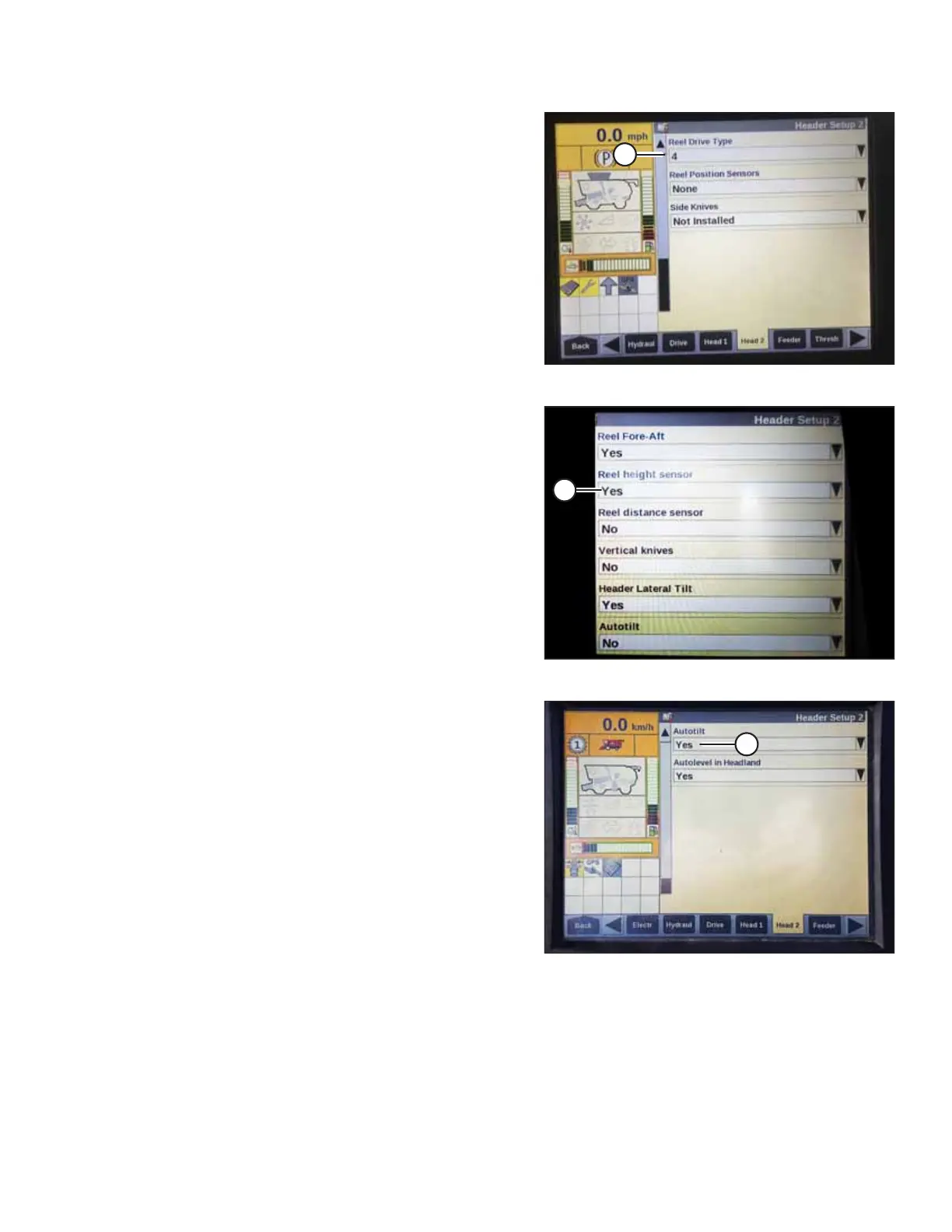
Figure 9.62: Case IH Combine Display
9. From REEL DRIVE TYPE menu (A), select one of the
following:
• 4 if you are using a standard 19-tooth drive sprocket.
• 5 if you are using an optional high-torque 14-tooth drive
sprocket.
• 6 if you are using an optional high-torque 10-tooth drive
sprocket.
Figure 9.63: Case IH Combine Display
10. From REEL HEIGHT SENSOR menu (A), select YES.
Figure 9.64: Case IH Combine Display
11. Locate AUTOTILT field (A).
• If using a two-sensor system: Select YES in the
AUTOTILT field.
• If using a single-sensor system: Select NO in the
AUTOTILT field.
Checking Voltage Range from Combine Cab – Case IH 5130/6130/7130; 5140/6140/7140
NOTE:
Changes may have been made to combine controls or display since this document was published. For instructions, refer to
the combine operator’s manual for updates.
SETTING UP AUTO HEADER HEIGHT CONTROL



 To Next Page