215184 229 Revision A
7.5 John Deere Combines
The D1 Series Draper Header is compatible with John Deere 60, 70, S, and T Series combines.
7.5.1 Attaching Header to John Deere Combine
WARNING
To avoid injury or death from unexpected start-up of machine, always stop the engine and remove the key from the
ignition before leaving the operator’s seat for any reason.
1. Shut down the engine, and remove the key from the ignition.
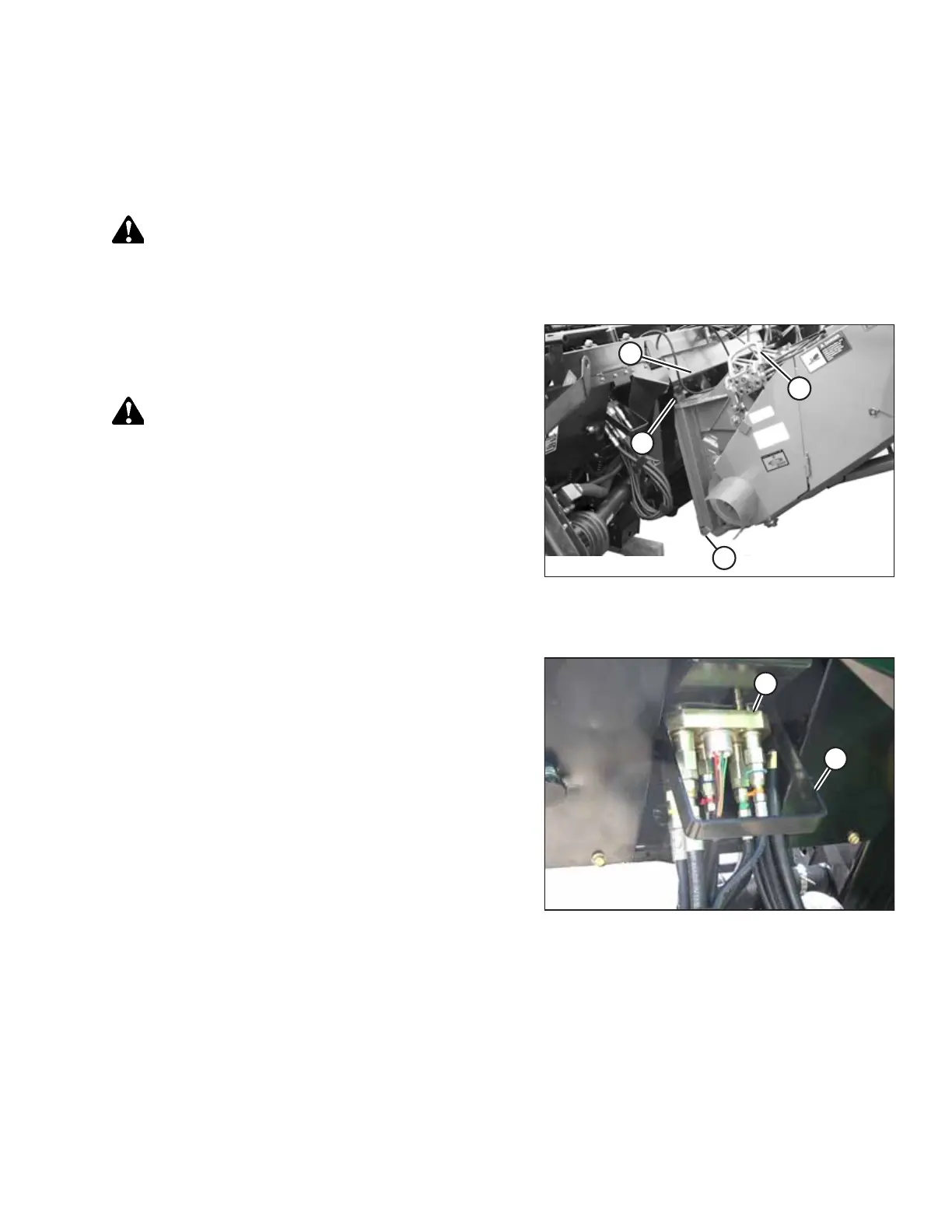
Figure 7.57: Combine and Float Module
2. Push handle (A) on the combine multicoupler receptacle
towards the feeder house to retract pins (B) at the bottom
corners of the feeder house. Clean the receptacle.
WARNING
Never start or move the machine until you are sure all
bystanders have cleared the area.
3. Start the engine and slowly drive the combine up to the
header until feeder house saddle (C) is directly under float
module top cross member (D).
4. Raise the feeder house slightly to lift the header ensuring
the feeder house saddle is properly engaged in the float
module frame.
5. Shut down the engine, and remove the key from
the ignition.
Figure 7.58: Multicoupler Storage
6. Pull handle (A) on the float module to release
multicoupler (B) from the storage position. Remove the
multicoupler, and push the handle back into the float
module to store.
ATTACHING HEADER TO COMBINE



 To Next Page