215184 254 Revision A
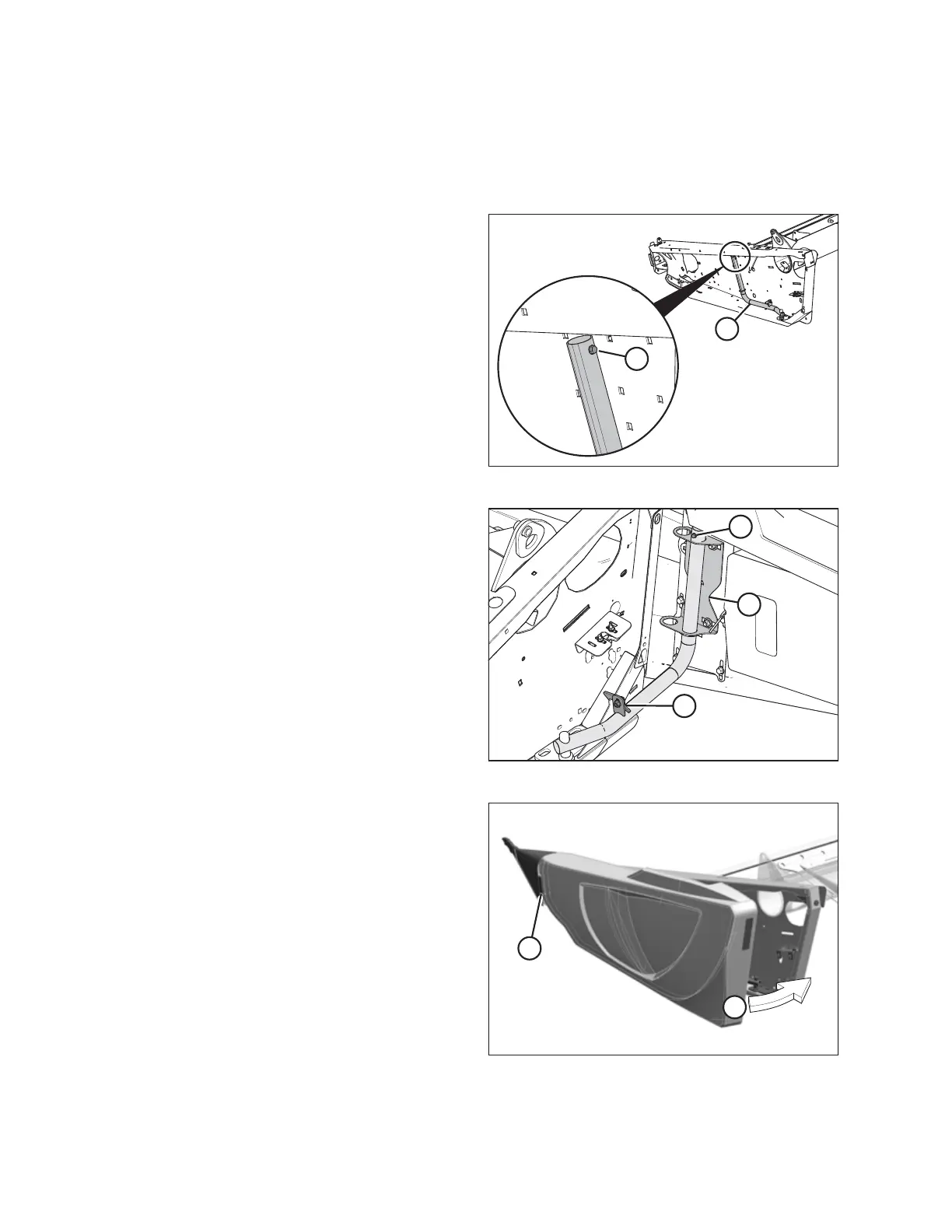
7.7.3 Installing Left Endshield – Split-Frame Headers
NOTE:
On 12.2 and 13.7 m (40 and 45 ft.) split-frame headers, only the left endshield requires installation; the right endshield was
installed prior to shipping.
Figure 7.114: Left Endsheet Hinge
1. Remove and retain self-tapping screw (A) from hinge
arm (B).
Figure 7.115: Left Endshield
2. Rotate hinge arm towards the rear of the header and
engage lock (A).
3. Guide endshield onto hinge arm, using outboard holes
(position 1) on bracket (C). Slowly slide the endshield
downwards.
4. Install self-tapping screw (B).
5. Disengage lock (A) to allow endshield movement.
Figure 7.116: Left Endshield
6. Insert front of endshield behind hinge tab (A)
7. Swing endshield in direction (B) into closed position. Engage
lock with a firm push.
8. Verify that endshield is locked.
NOTE:
Plastic endshields may expand or contract when subjected
to large temperature changes; the endshields are checked
and adjusted later in this book.
ATTACHING HEADER TO COMBINE



 To Next Page