215184 181 Revision A
6.2.1 Converting from Ultra Narrow Configuration or Narrow Configuration to
Medium Configuration
Two flighting kits (MD #287031) are required to convert to this configuration.
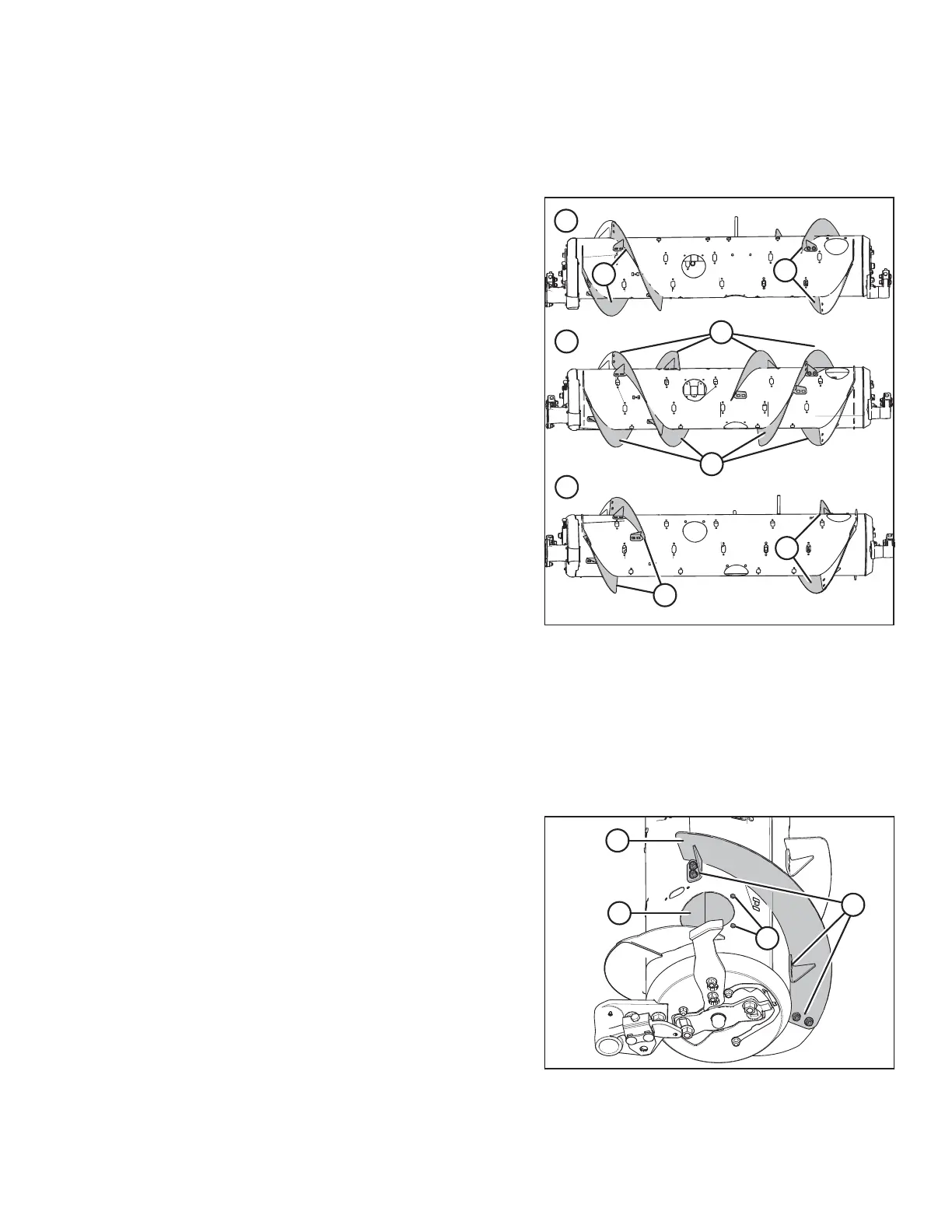
Figure 6.12: Auger Configurations – Rear View
1 - Narrow Configuration 2 - Ultra Narrow Configuration
3 - Medium Configuration
Ultra Narrow, Narrow, and Medium auger configurations are
shown at right. When converting from Ultra Narrow
configuration or Narrow configuration to Medium configuration,
you will need to replace long flightings (A) with short
flightings (B).
NOTE:
Some parts have been removed from the illustrations for clarity.
1. To improve access and ease installation, remove the float module from the combine. For instructions, refer to the
header operator’s manual or technical manual.
Figure 6.13: Narrow Configuration – Right Side
2. Remove bolts (A) and access cover (B) from each side of the
auger. Retain for reassembly.
NOTE:
If necessary, remove multiple access covers.
3. Remove hardware (C) and bolt-on flighting (D). Repeat for
all the remaining hardware and bolt-on flightings on the
auger. Retain hardware to attach new flightings.
FLOAT MODULE SETUP AT DEALER



 To Next Page