215184 445 Revision A
Checking Reel Height Sensor Voltages – John Deere S and T Series
NOTE:
Changes may have been made to the combine controls or display since this document was published. Refer to the combine
operator’s manual for updates.
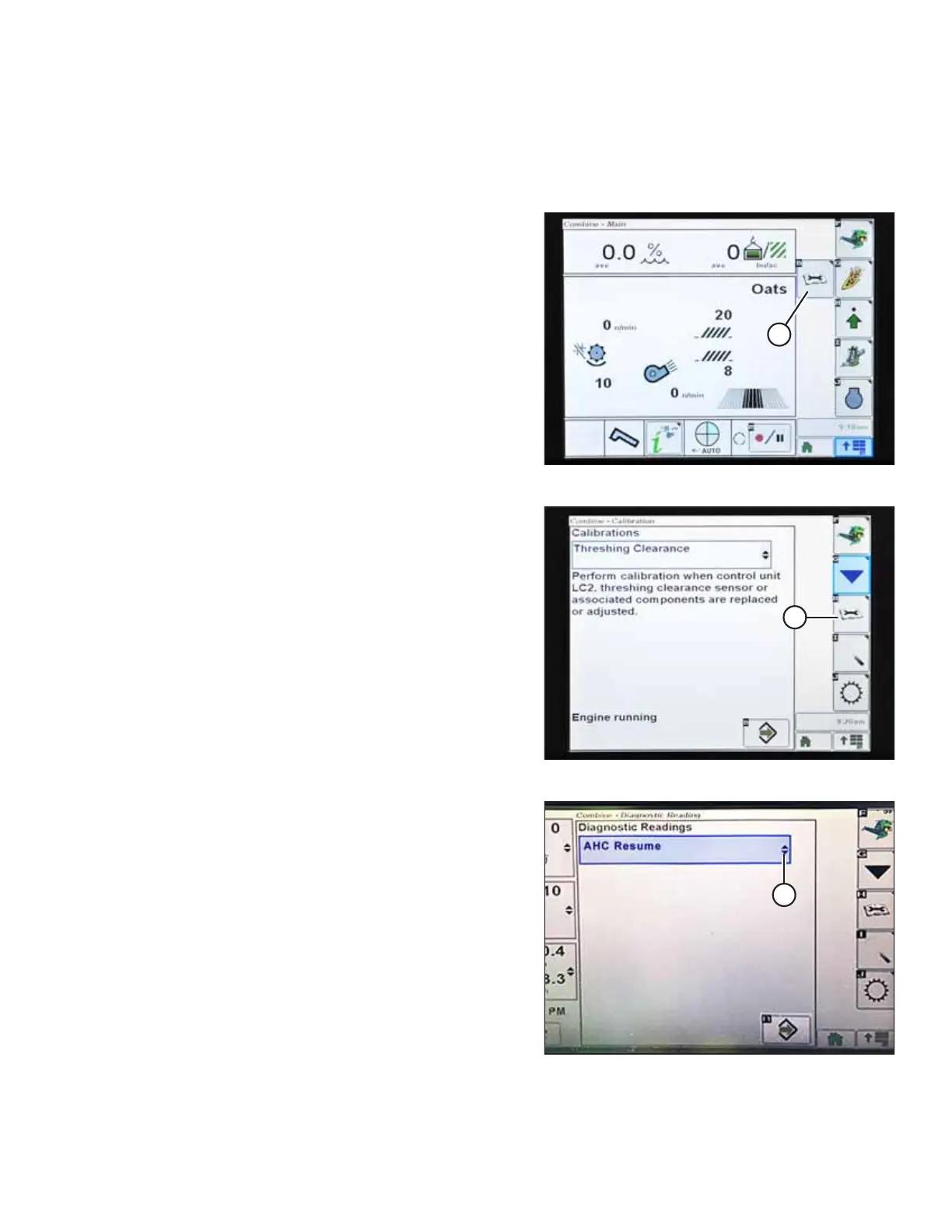
Figure 9.309: John Deere Combine Display
1. Press CALIBRATION icon (A) on the main screen of the
monitor. The CALIBRATION screen appears.
Figure 9.310: John Deere Combine Display
2. Press DIAGNOSTIC READINGS icon (A) on the CALIBRATION
screen. The DIAGNOSTIC READINGS screen appears. This
screen provides access to calibrations, header options, and
diagnostic information.
Figure 9.311: John Deere Combine Display
3. Select drop-down menu (A) to view the list of calibration
options.
SETTING UP AUTO HEADER HEIGHT CONTROL



 To Next Page