±
0.0
±
0.0
A Mode
RCRC
0.0
5.6250P
Ch1Low
TTL
Off
Off
A
Small
1/ Auto
ISO
3
0
+
-
C
B
[
1:02:03
]
1023
±
F
200
WB Auto
1
2
4
3
5
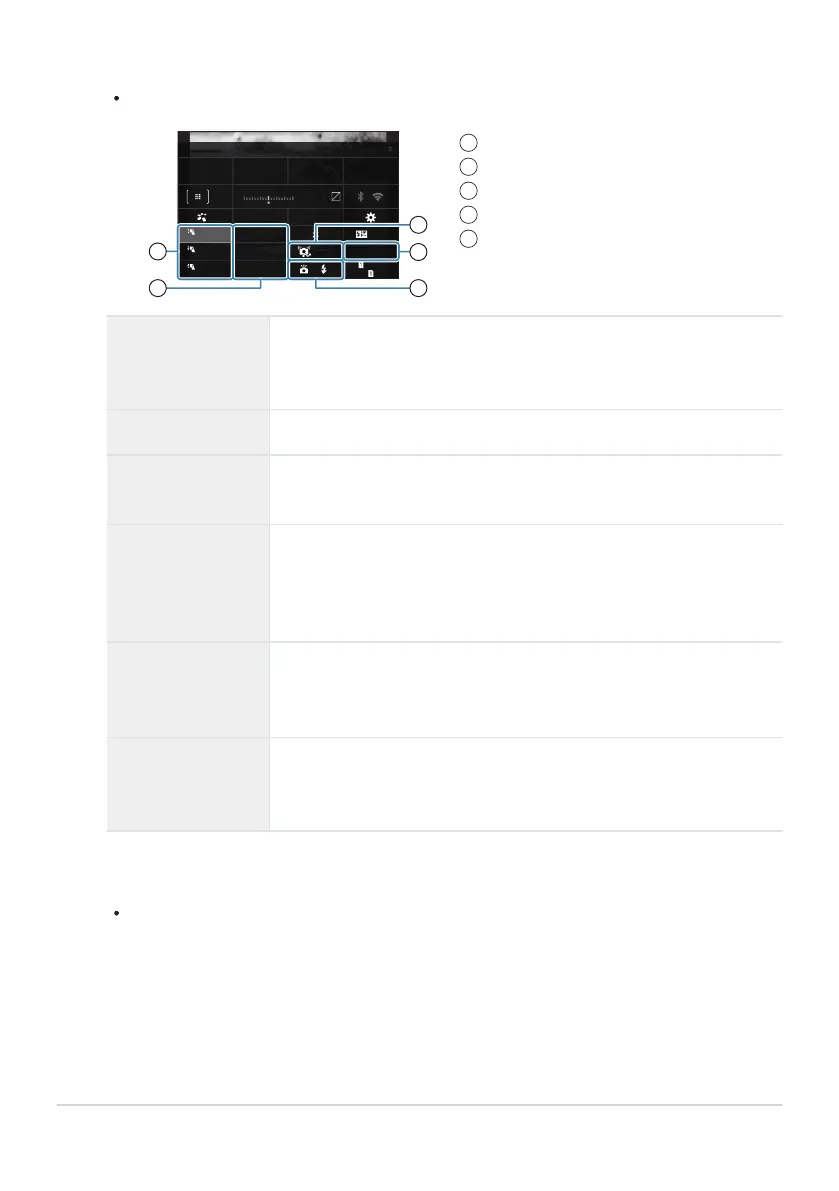
Group, flash control mode
Flash compensation
Optical signal strength
Channel
Flash mode
1
2
3
4
5
Adjust flash settings.
Highlight items using the FGHI buttons and rotate the front dial to choose settings.
Group
Choose a group. Changes to settings apply to all units in the selected
group. The unit mounted on the camera works as a member of Group
A.
Flash control mode Choose a flash mode.
Flash
compensation
Adjust flash output. When [Manual] is selected for flash mode, you
can choose a value for manual flash output.
Optical signal
strength
Choose the brightness of the optical control signals emitted by the
flash units. Choose [High] if you have placed flash units close to
the maximum distance from the camera. This setting applies to all
groups.
Flash mode/output
Choose A (standard) or FP (super FP). Choose super FP for shutter
speeds faster than the flash sync speed. This setting applies to all
groups.
Channel
Choose the channel used for flash control. Change the channel if you
find that other light sources in the area are interfering with remote
flash control.
Set the unit mounted on the camera to [TTL AUTO].
Flash control settings for the FL-LM3 can only be adjusted using the camera.
483
Optional Accessories
3.
4.


 To Next Page
 Loading...




