Setting up the flash
Set the remote flash units to RC mode.
Turn the external flash units on, press the MODE button, and select RC mode.
Set up the group to control with the dedicated external flash and configure their
communication channels so that they match the camera settings.
Arrange the flash units.
Position the wireless units with the remote sensors facing the camera.
Take pictures after confirming that the camera and flash units are charged.
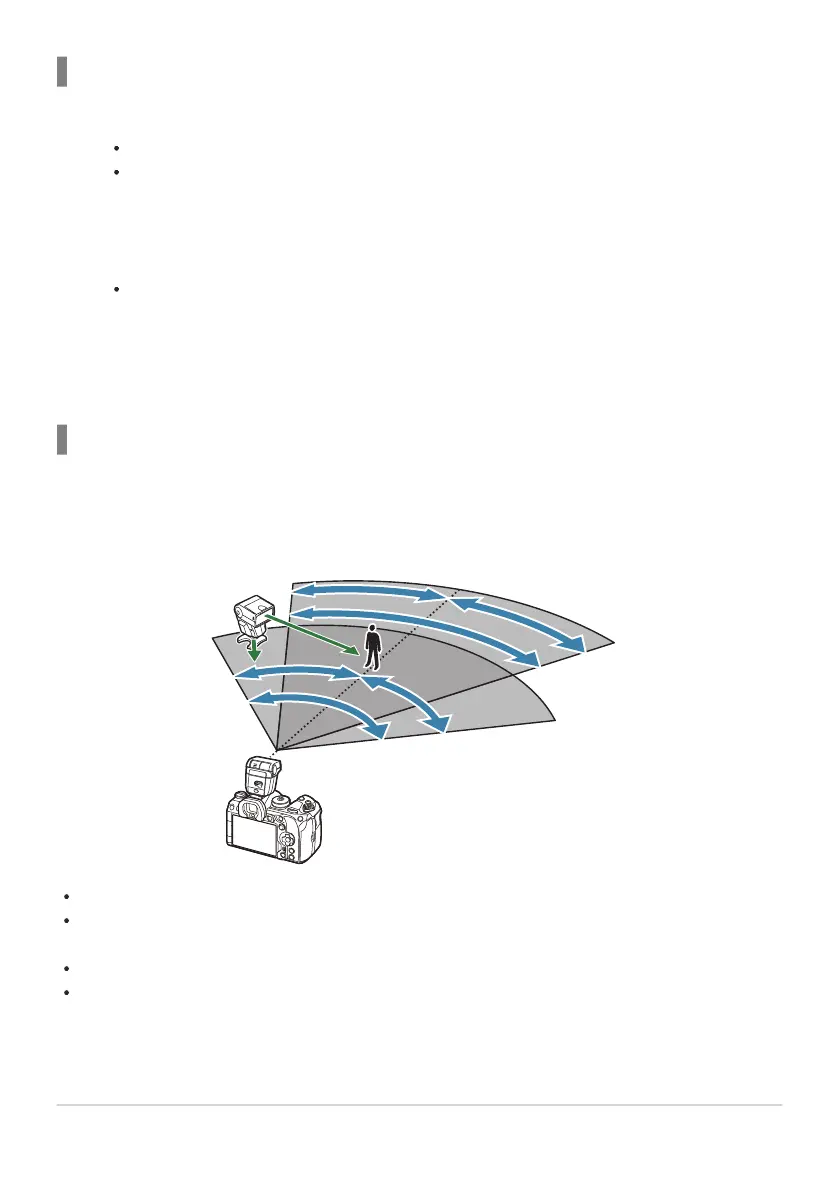
Wireless Flash Control Range
The illustration is intended as a guide only. The flash control range varies with the type of flash
mounted on the camera and the conditions in the surrounding area.
Flash Control Range for Camera-Mounted FL-LM3 Flash Units
7m
5
m
100°100°
50°50°
50°
50°
60°
60°
30°
30°
30°
30°
We recommend that each group contain no more than 3 flash units.
Wireless flash photography is not available in anti-shock mode or in rear-curtain slow sync mode
when a shutter speed slower than 4s is selected.
Waiting times longer than 4s cannot be selected in anti-shock and silent modes.
Flash control signals may interfere with exposure if the subject is too close to the camera. This can
be mitigated by reducing the brightness of the camera flash, for example by using a diffuser.
484
Optional Accessories
1.
2.
3.


 To Next Page
 Loading...




