Page Keeper Type M28 (D3DQ-17)
D0AP/D0C4/D0C5/D0C6/M0BQ/M0D1 2-76 SM
After installing the double-feed sensor
1. Connect the power cord and turn ON the main power.
2. Enter the SP mode.
3. Set the SP6-040-001 (Page Keeper: Mount Select) to “1(ON)”.
4. Press [END] twice.
5. Turn the main power OFF and ON.
6. Log in as Administrator.
7. Press the "User To o ls " icon.
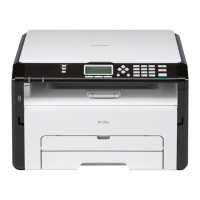
8. Press [Machine Features] > [System Settings] > [Administrator Tools].
9. Check that [ADF Optional Double Feed Detection] is displayed.


 To Next Page