Auto Remote Firmware Update (ARFU) Settings
D0AP/D0C4/D0C5/D0C6/M0BQ/M0D1 2-146 SM
Troubleshooting: If error code 71: [Network connection error] appears
If error code 71: [Network connection error] appears when you click [Firmware Update] >
[Update] > [Execute update] in SP mode, check the following.
• 4-1. IPv4 address, Subnet mask of the machine and Gateway IPv4 address
• 4-2. IPv4 address of the DNS server
• 4-3. Proxy server settings
• 4-4. Encryption level setting SP
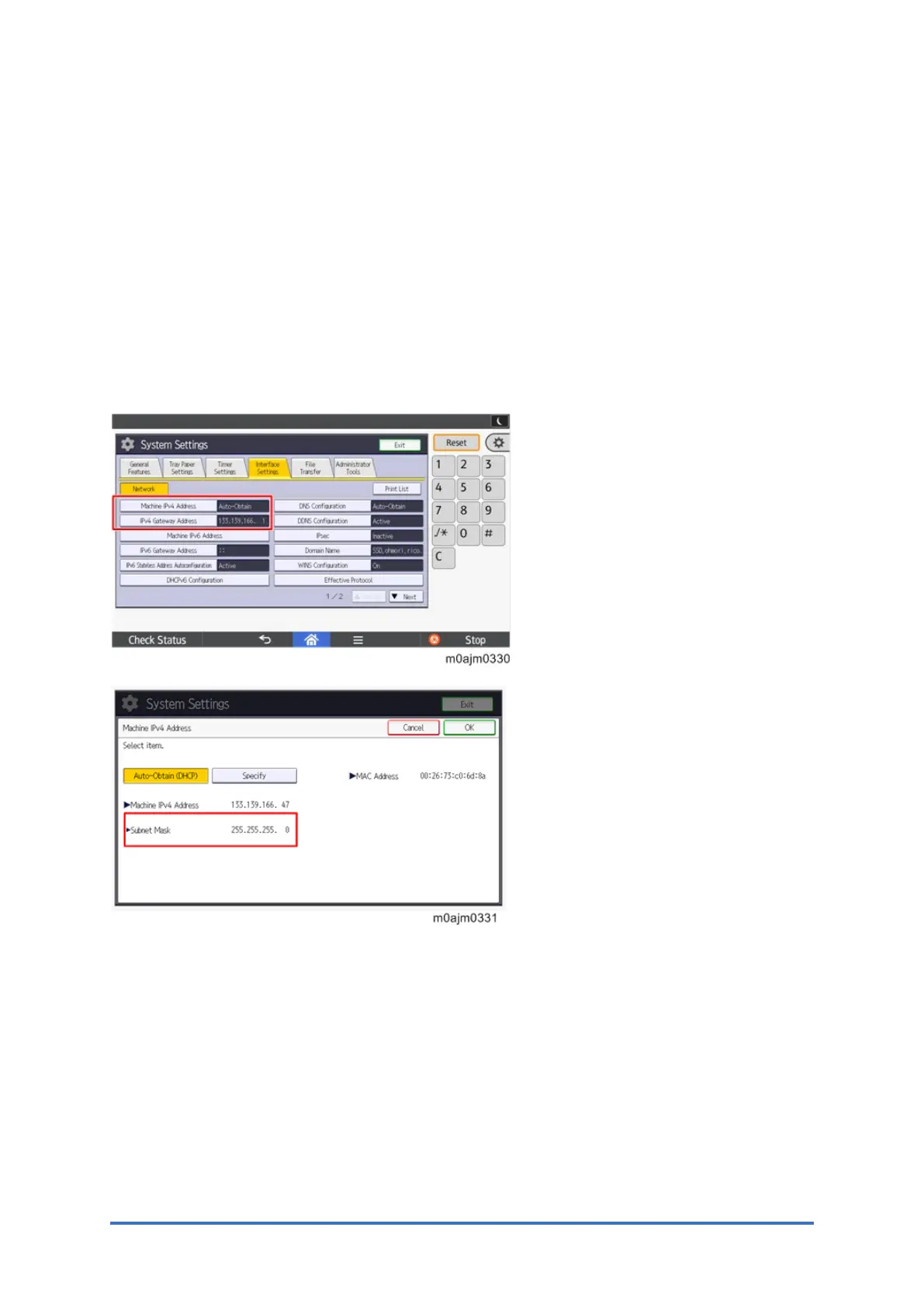
4-1. IPv4 address, Subnet mask of the machine and Gateway IPv4 address
Check the machine’s IPv4 address, subnet mask, and gateway IPv4 address.
(In User Too l s > Machine Features > System Settings > Interface Settings)
4-2. IPv4 address of the DNS server
Check the DNS IPv4 address and check the connection.
(In User Too ls > Machine Features > System Settings > Interface Settings > DNS configuration)


 To Next Page