Auto Remote Firmware Update (ARFU) Settings
SM 2-147 D0AP/D0C4/D0C5/D0C6/M0BQ/M0D1
How to find the IP address:
Ask the customer to tell you the IP address of the DNS server. If the customer does not know it,
ask the customer to check the IP address by one of the following ways:
1. Run "ipconfig / all" at the command prompt on the computer, then check the IP address of the
DNS server.
2. Open the IPv4 properties dialog box on the computer, then check whether the IP address
setting of the DNS server is manual or automatic.
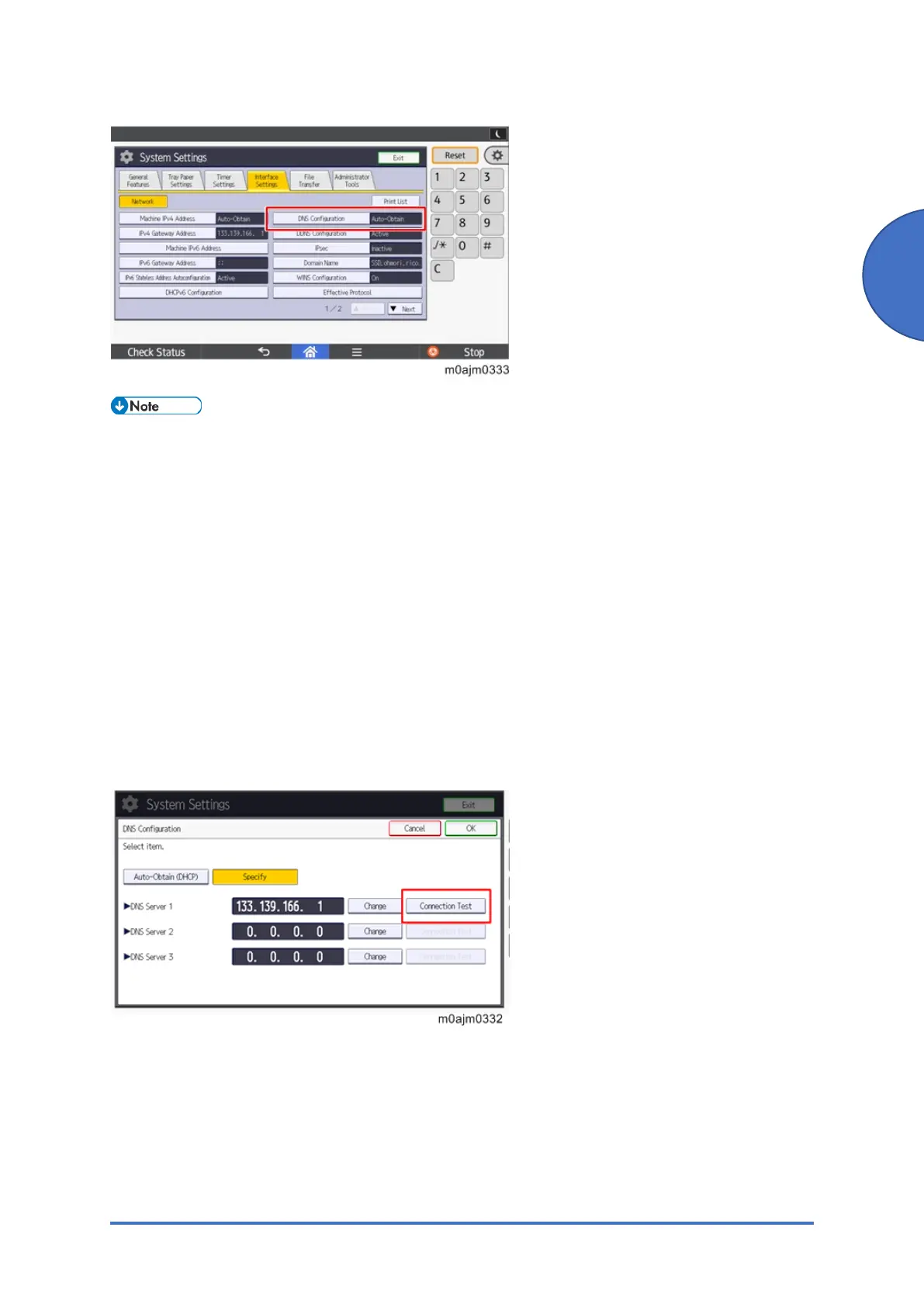
• If the setting of the DNS IP address is automatic, select [Auto-Obtain (DHCP)] at the
MFP machine's DNS settings.
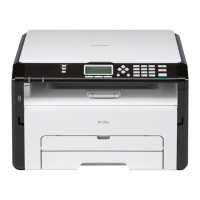
• If the setting of the DNS IP address is manual, select [Specify] and specify the DNS
server 1 to 3.
• Press [Connection Tes t ] to check the connection with the input address. Make sure
that it is connected successfully.
4-3. Proxy server settings
Check the user’s network environment and, as required, specify the proxy server settings in the
following SPs:
• SP5-816-062 (Use Proxy)
1: Used / 0: Not used


 To Next Page