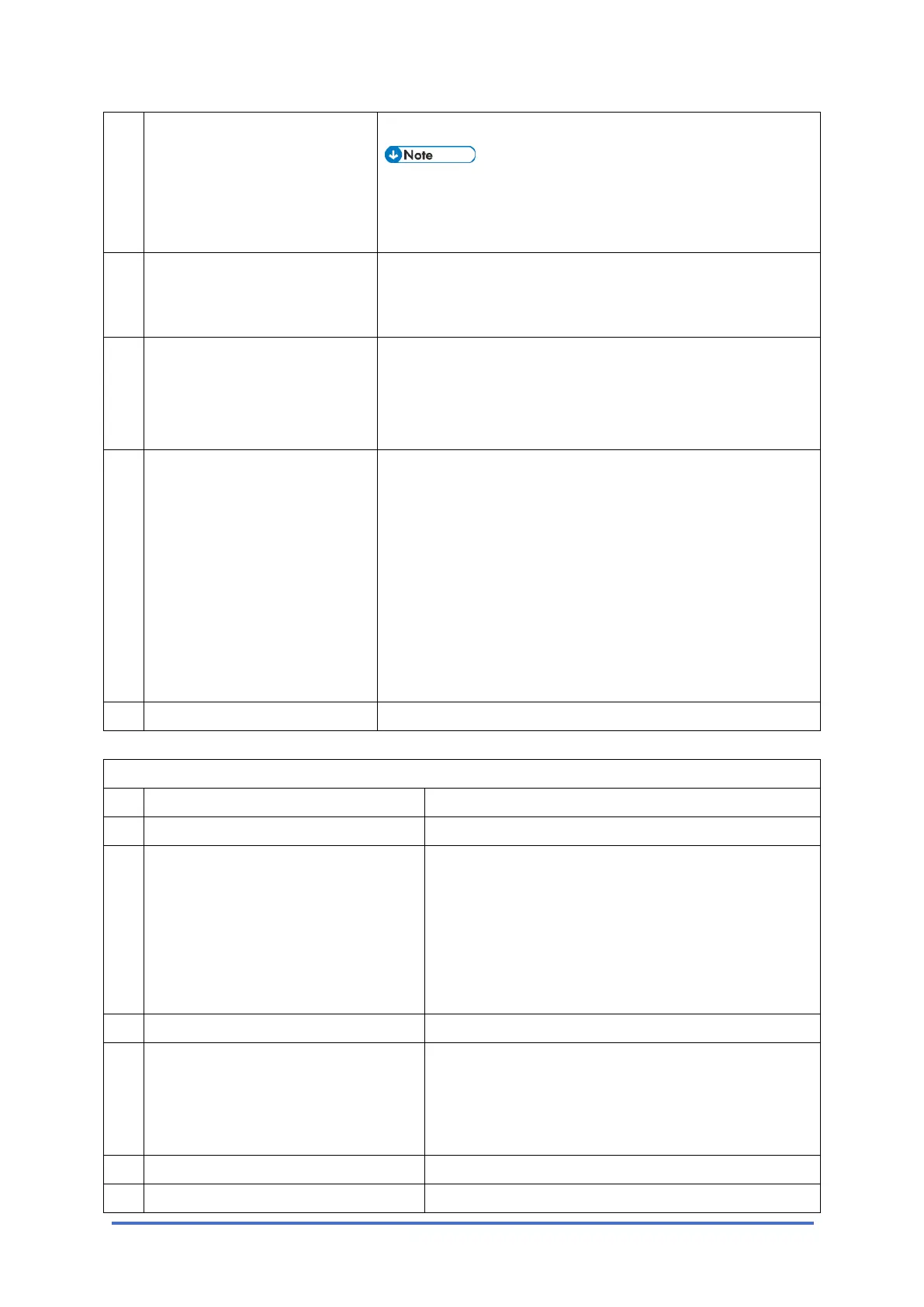
Bit Switches – 1
D0C5/D0C6/D0C4/D0AP FAX UNIT 60 SM
transmitted.
• This setting is effective only when Automatic
Journal printout is enabled but the machine
cannot print the report (e.g., no paper).
2 RTI/CSI display priority
0: RTI 1: CSI
This bit determines which identifier, RTI or CSI, is displayed
on the LCD while the machine is communicating in G3
non-standard mode.
3 File No. printing
0: Enabled
1: Disabled
1: File numbers are not printed on any reports.
NOTE: The file numbers may not be printed in the
sequential order. If a customer does not like this
numbering, select "0".
4 Action when authorized
reception is enabled but
authorized RTIs/CSIs are not
yet programmed
0: All fax reception is disabled
1: Faxes can be received if
the sender has an RTI or CSI
0: If the user has stored no acceptable sender RTIs or
CSIs, the user can select “ON” in the authorized reception
setting but the setting becomes invalid (“OFF”). The
machine will not be able to receive any fax messages.
If the customer wishes to receive messages from any
sender that includes an RTI or CSI and to block messages
from senders that do not include an RTI or CSI, change this
bit to "0", then enable Authorized Reception.
Otherwise, keep this bit at "1 (default setting)".
5-7 Not used Do not change the settings
* This setting can be used for the client machine which has no FCU.
System Switch 1F (SP No. 1-101-032)
No Function Comments
0 Not used Do not change the settings.
1 Report printout after an original jam
during SAF storage or if the SAF
memory fills up
0: Enabled
1: Disabled
0: When an original jams, or the SAF memory
overflows during scanning, a report will be printed.
Change this bit to "1" if the customer does not want
to have a report in these cases.
Memory tx – Memory storage report
Parallel memory tx – Transmission result report
2 Not used Do not change the settings.
3 Received fax print start timing
(G3 reception)
0: After receiving each page
1: After receiving all pages
0: The machine prints each page immediately after
the machine receives it.
1: The machine prints the complete message after
the machine receives all the pages in the memory.
4-6 Not used Do not change the factory settings.
7 Action when a fax SC has occurred 0: When the fax unit detects a fax SC code other



 To Next Page