Quilting
Various Stitches
117
3
Selecting the Stitch Pattern and
Stitch Regulator Mode
1
With the Utility Stitch screen displayed,
install the stitch regulator onto the
machine.
When the message appears, touch [OK]. The stitch
regulator sewing screen appears.
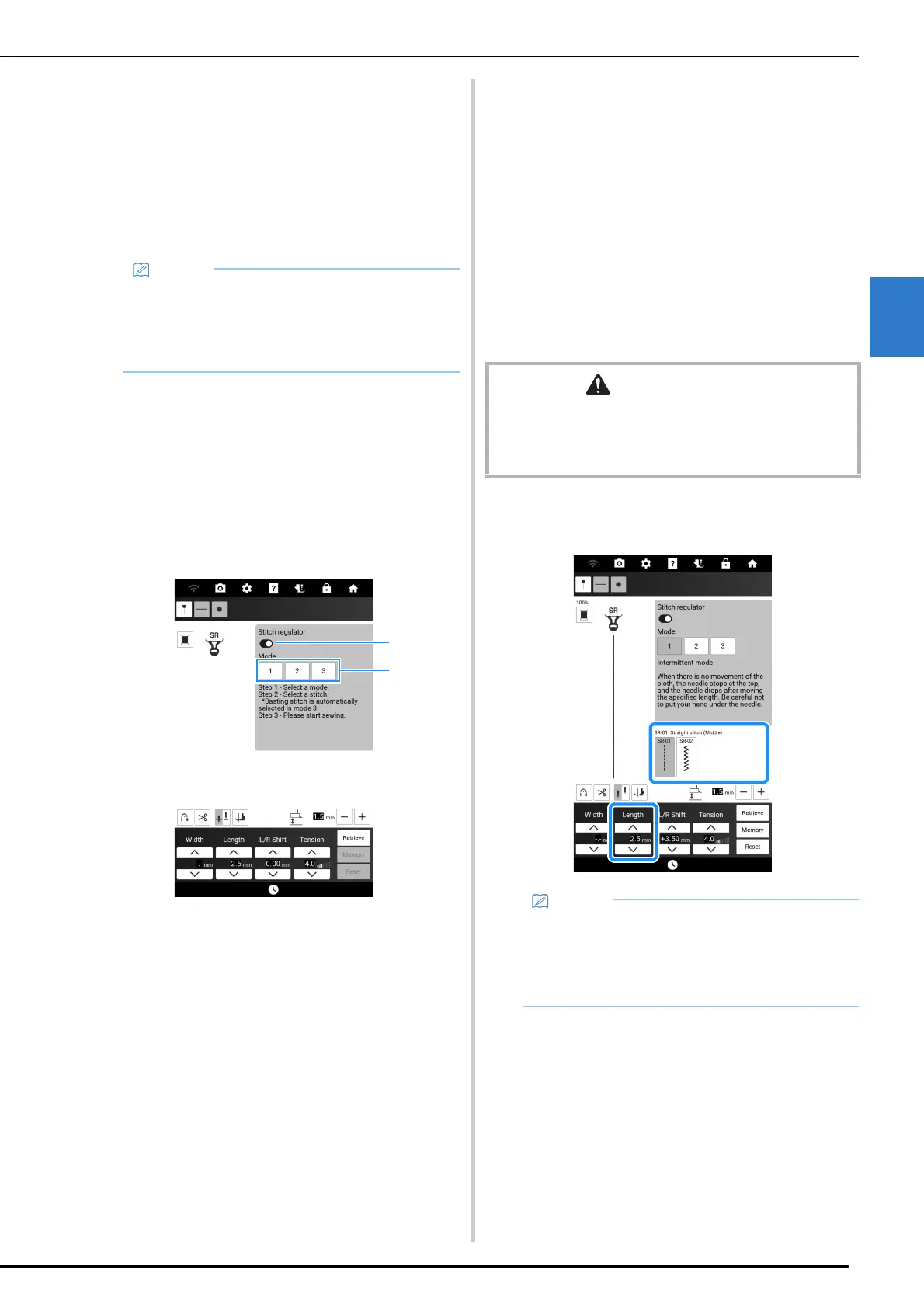
2 Touch a key to select the appropriate
mode.
* If using the foot controller with any mode, stepping
on the foot controller starts sewing when the stitch
regulator detects fabric movement. Release the
foot controller to stop sewing.
If using the “Start/Stop” button, pressing the button
starts sewing when the stitch regulator detects
fabric movement. Press the button again to stop
sewing.
a Intermittent mode:
Stitches are sewn when the fabric is moved the set
length. When the fabric is not being moved, the
needle is raised, the machine enters standby, and
the “Start/Stop” button flashes. Sewing starts when
the fabric is moved while the button is flashing.
A message appears and sewing ends when the
fabric has not been moved for a certain period of
time.
b Continuous mode:
Stitches are continuously sewn after sewing has
been started. This is suitable for sewing shapes
with corners such as rectangles.
If the fabric is not being moved, stitches are slowly
sewn at the same location. Since stitches continue
to be sewn at the same location, be careful that the
thread does not become tangled.
c Basting mode:
Stitches are sewn spaced far apart. Stitches are
sewn when the fabric is moved the set length.
When the fabric is not being moved, the needle is
raised, the machine enters standby, and the “Start/
Stop” button flashes. Sewing starts when the fabric
is moved while the button is flashing.
A message appears and sewing ends when the
fabric has not been moved for a certain period of
time.
Sew trial stitches, check the stitching and how
easily the thread can be removed, and then adjust
the thread tension if necessary.
d Turn on or off [Stitch regulator]. When switched off,
normal free-motion sewing is possible. Since the
machine does not detect fabric movement, feed
the fabric at a constant speed while you sew.
3 Select a stitch pattern, and then set the
stitch length.
• If the stitch regulator was installed with a
screen other than the utility stitch screen
displayed, touch [Sewing] in the home page
screen to display the stitch regulator sewing
screen.
CAUTION
• While using the stitch regulator open toe quilting foot
with [Stitch regulator] switched off, be careful not to pull
the fabric forcefully, which could cause the needle to
break.
• When using a straight stitch to sew small parts
or stippling, we recommend setting the stitch
length between 1 mm and 1.5 mm.
• Zigzag stitch patterns are suitable for thread
painting.



 To Next Page