Picture Play Embroidery Function
180
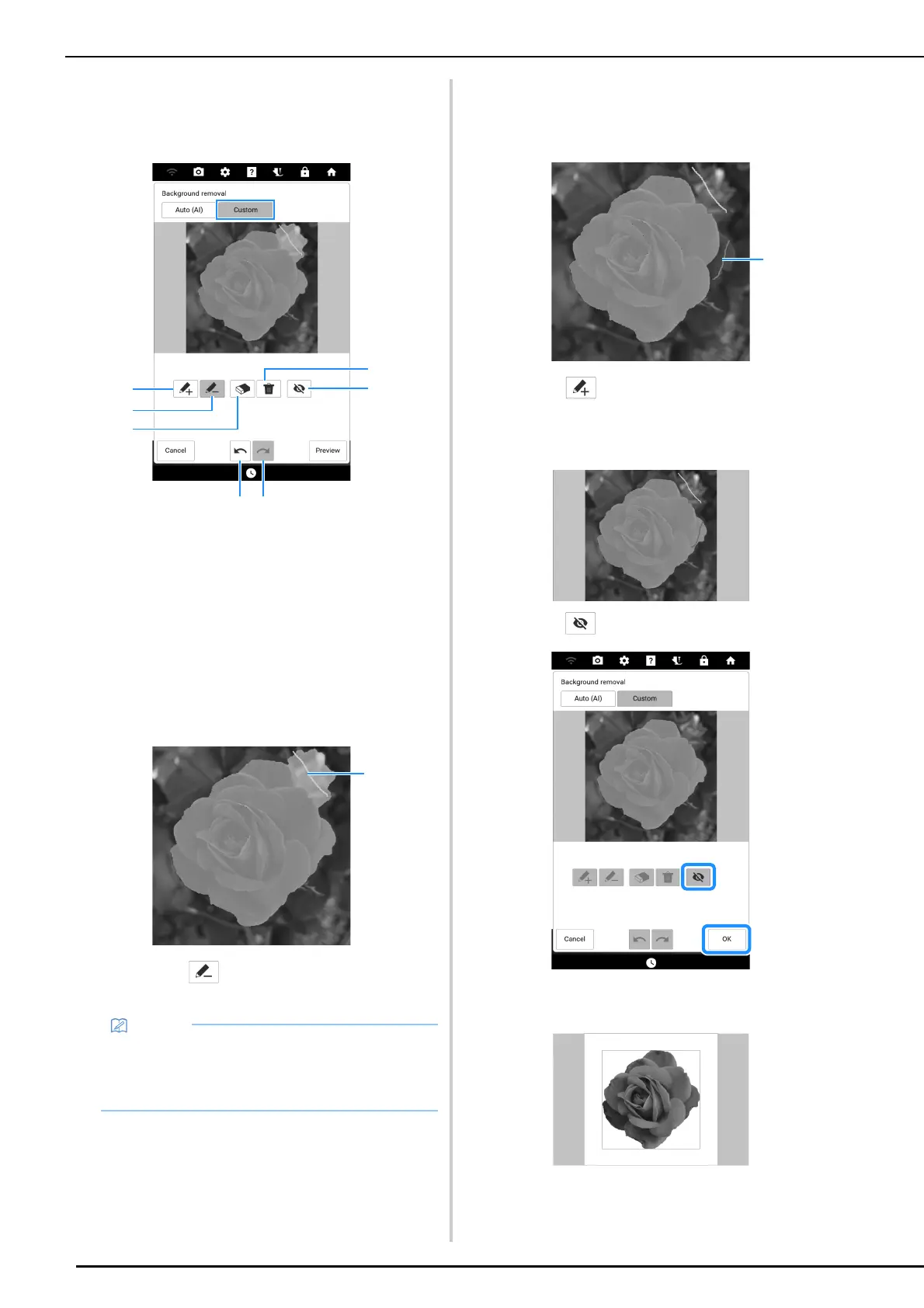
2 With the pens, mark the areas to be, and
not to be, extracted. And then touch
[Preview] to confirm the cropping area.
a With the pink pen, mark the areas to be extracted
(will be added to the cropping area).
b With the yellowish green pen, mark the areas not
to be extracted (will be removed from the cropping
area).
c Trace over lines drawn with 1 or 2 above in order
to erase the drawn line.
d Erases all drawn lines.
e Hide all lines drawn with pen 1 or 2.
f To undo the previous operation.
g To redo the last operation that was undone.
*1
Select , and then use the yellowish green
pen to mark areas not to be extracted.
3 Continue drawing lines and touching
[Preview] until the desired cropping area
is achieved.
a Select , and then use the pink pen to mark
areas to be extracted.
4 Touch [OK].
* Touch to hide all lines drawn with pens.
5 Touch [Next].
• When selecting areas to be added to or
removed from the cropping area, the entire
area does not need to be completely filled with
pen marks.



 To Next Page