LCD Screen
20
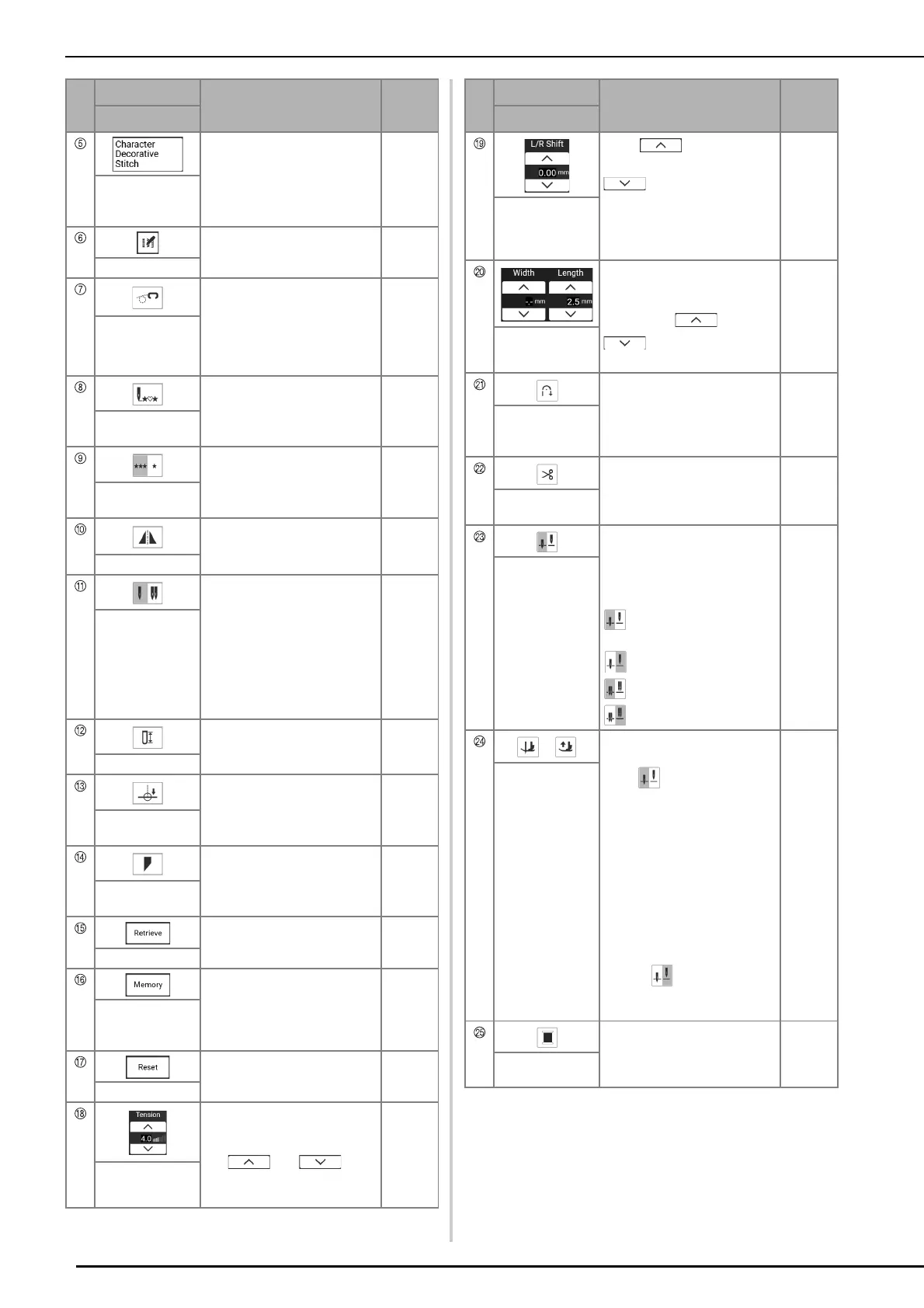
Touch this key to select
character or decorative stitch
patterns.
51
Character/
Decorative stitch
key
Touch this key to display editing
function keys on the screen.
—
Edit menu key
Touch this key to enter free
motion sewing mode.
The presser foot is raised to an
appropriate height and the feed
dogs are lowered for free
motion quilting.
111
Free motion
mode key
When sewing is stopped, touch
this key to return to the
beginning of the stitch.
59
Back to beginning
key
Touch this key to choose single
stitches or continuous stitches.
59
Single/Repeat
sewing key
Touch this key to create a
mirror image of the selected
stitch pattern.
—
Mirror image key
Touch this key to select twin
needle sewing mode. The
sewing mode changes between
single needle mode and twin
needle mode each time you
touch the key. If the key display
is light gray, the selected stitch
pattern cannot be sewn in the
twin needle mode.
106
Single needle/
twin needle key
Touch this key to manually set
the buttonhole length when a
buttonhole stitch is selected.
89
Slit length key
Touch this key to specify the
sewing end point.
75
End point setting
key
Touch this key to change the
start and end angles of the
stitch pattern.
98
Stitch tapering
key
Touch this key to retrieve a
saved stitch pattern.
63
Retrieve key
Change the stitch pattern
settings (stitch width and stitch
length, thread tension, etc.),
then save them by touching this
key.
63
Manual memory
key
Touch this key to return the
selected stitch pattern saved
settings to the default settings.
63
Reset key
Shows the automatic thread
tension setting of the currently
selected stitch pattern. You can
use and to
change the thread tension
settings.
62
Thread tension
key
No.
Display
Explanation
Reference
Name
Touch to shift the stitch
pattern to the right or touch
to shift the stitch
pattern to the left. This feature
is not available for all stitch
patterns. Only those applicable
will be shifted.
61
[L/R Shift] key
Shows the zigzag width and
stitch length settings of the
currently selected stitch pattern.
You can use and
to adjust the zigzag
width and stitch length settings.
61
Stitch width and
stitch length key
Touch this key to use the
automatic reinforcement
stitching (reverse stitching)
setting.
56
Automatic
reinforcement
stitch key
Touch this key to set the
automatic thread cutting
function.
58
Automatic thread
cutting key
Touch this key to select the
needle stop position to be up or
down. You can also check the
needle mode setting (single or
twin).
Single needle/down
position
Single needle/up position
Twin needle/down position
Twin needle/up position
72, 106
Needle stop
position setting
key
/
The pivot key appears when the
needle position setting key is
set to . Touch this key to
select the pivot function. When
the pivot function is selected,
stopping the machine lowers
the needle and slightly raises
the presser foot automatically.
In addition, when sewing is
restarted, the presser foot is
automatically lowered.
The auto up key appears when
the needle position setting key
is set to . Touch the auto
up key to raise the presser foot
when the machine is stopped.
59, 72
Pivot key / Auto
Up key
Touch this key to change the
thread color displayed on the
screen.
74
Thread color
change key
No.
Display
Explanation
Reference
Name



 To Next Page