EasyManua.ls Logo

Dynon Avionics SkyView Classic - Page 237

Default Icon
573 pages
Print Icon
To Next Page IconTo Next Page
To Previous Page IconTo Previous Page
Loading...
SV-GPS-250/2020 GPS Receiver Installation and Configuration
SkyView System Installation Guide - Revision AA 8-9
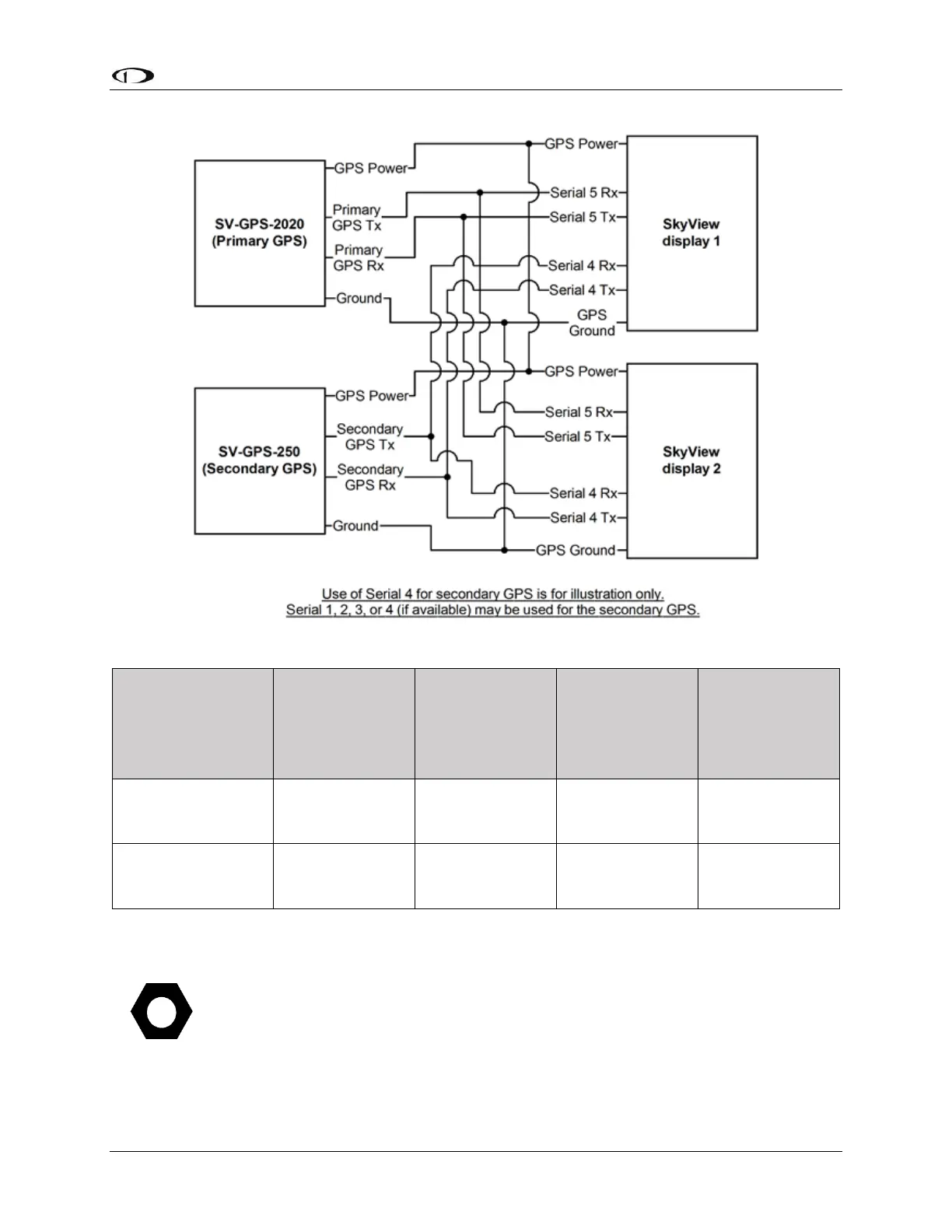
Figure 94 SV-GPS-2020 and SV-GPS-250 Connected to Multiple Displays (not applicable to SkyView SE)
Secondary
GPS Serial
Connection
Wire Color
Serial Port 1
Wire Color / Pin
Serial Port 2
Wire Color / Pin
Serial Port 3
Wire Color / Pin
Serial Port 4
Wire Color / Pin
Gray/Violet
Brown/Violet
(Pin 3 RX)
Yellow/Violet
(Pin 5 RX)
Green/Violet
(Pin 7 RX)
Blue/Violet
(Pin 9 RX)
Gray/Orange
Brown/Orange
(Pin 4 TX)
Yellow/Orange
(Pin 6 TX)
Green/Orange
(Pin 8 TX)
Blue/Orange
(Pin 10 TX)
Table 70 - Secondary GPS serial connection options
The SV-GPS-2020 is supported in SkyView Software v14.0 or later. Earlier versions
of SkyView Software do not support the SV-GPS-2020. To check your Software
version, go to SETUP MENU > LOCAL DISPLAY SETUP > DISPLAY HARDWARE
INFORMATION.

Table of Contents

Related product manuals