SV-AP-PANEL Installation
SkyView System Installation Guide - Revision AA 18-7
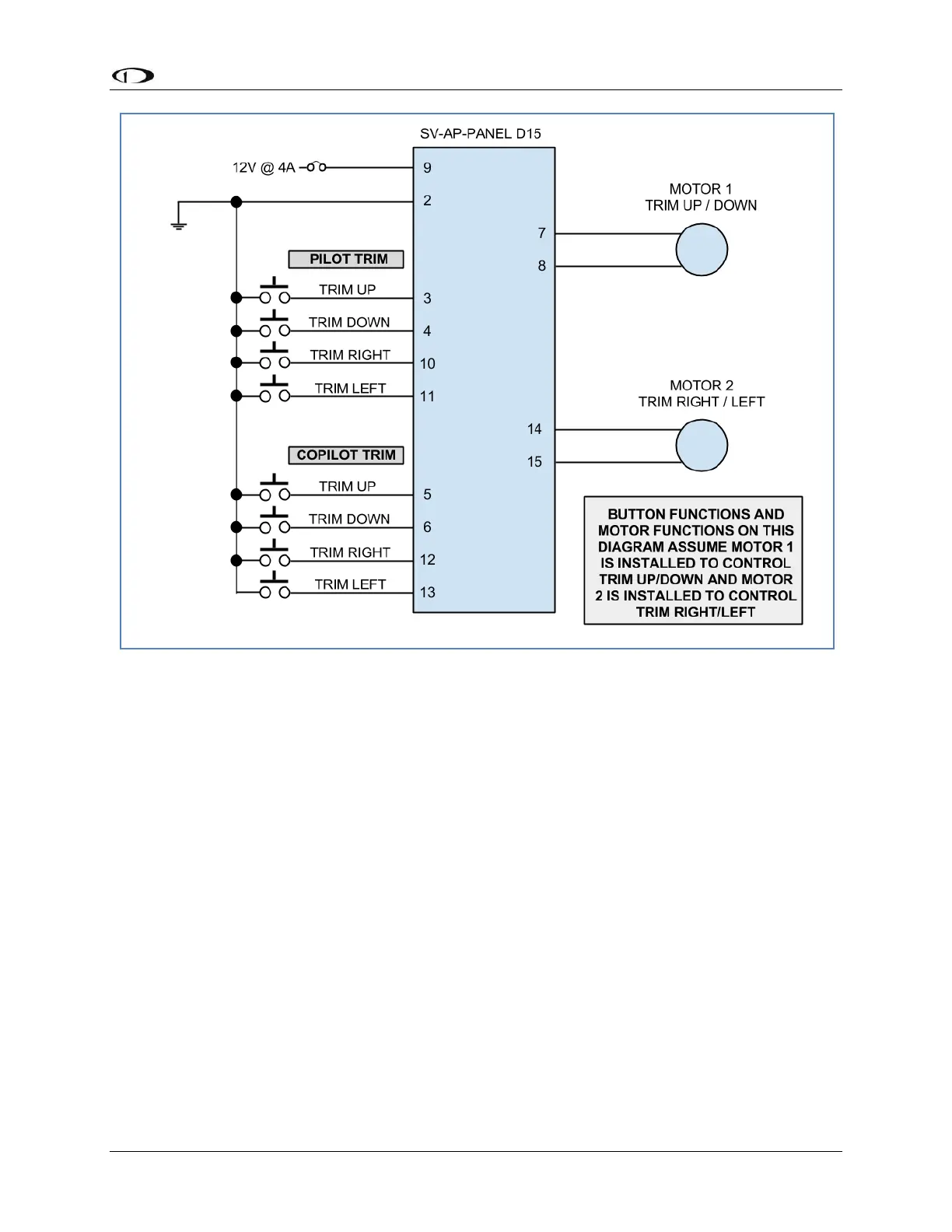
Figure 196 – SV-AP-PANEL Trim control wiring diagram
Network Setup
As with all other SkyView Network devices, the SV-AP-PANEL must be configured into the
SkyView Network:
Go to SETUP MENU > SYSTEM SETUP > SKYVIEW NETWORK SETUP > CONFIGURE > (right
click) > DETECT (button).
The SV-AP-PANEL(s) will be listed.
FINISH (button) > EXIT (button)
SkyView Configuration for SV-AP-PANEL (Trim Motor Control)
The SV-AP-PANEL’s trim controller can adjust the speed at which the trim motors run. In many
aircraft, this allows you have finer trim control for a given pushbutton press or hold by having the
trim motor movement slowed down at higher airspeeds.
SETUP MENU > HARDWARE CALIBRATION > TRIM CALIBRATION:
(If you connected trim control pushbuttons and the motors per Table 98 above, MOTOR 1 will
control PITCH trim.)










 To Next Page