210 Solution Ultima 844/862/880 Installation Manual
60 Area 1 Codepad Data Terminal
This output type is used to connect the data terminal of the Area 1 codepad when you are
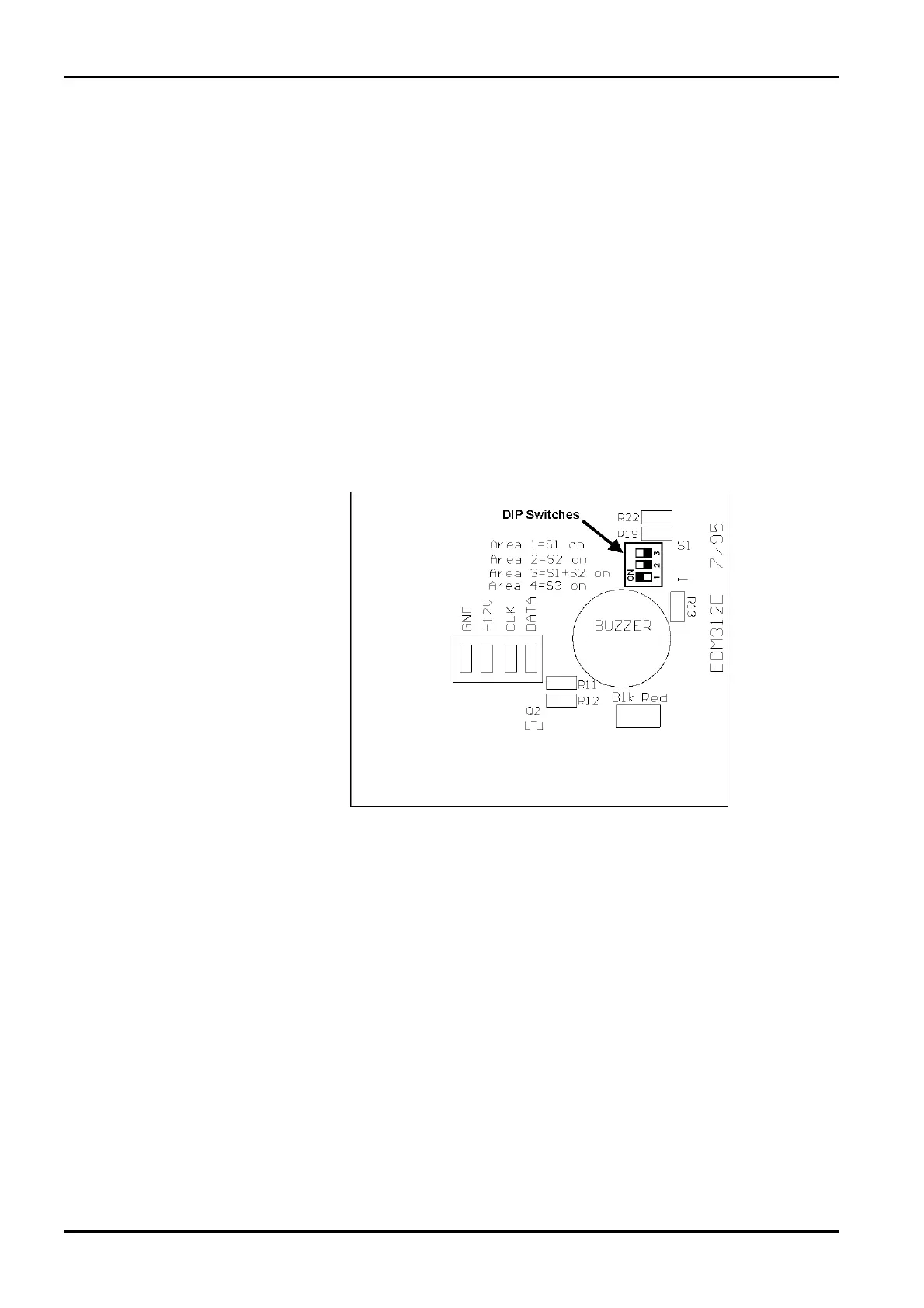
using the Master Partitioned codepad as the main codepad. Set DIP switch 1 in the ON
position for the Area 1 codepad to operate correctly. Refer to Figure 12: DIP Switch
Location On Back Of Codepad PCB below for the location of the DIP switches on the pack
of the codepad.
If you are not using a Master Partitioned as the main codepad, connect the data cable from
the Area 1 codepad to the DATA terminal on the control panel and enable Option 2 in
“LOCATION 444” on page 241.
Refer to Codepad Connections For Partitioning on page 247 for further information on
connecting codepads when the system has been partitioned.
61 Area 2 Codepad Data Terminal
This output type is used to connect the data terminal of the Area 2 codepad. Set DIP
Switch 2 to the ON position for the Area 2 codepad to operate correctly. Refer to Figure
12: DIP Switch Location On Back Of Codepad PCB below for the location of the DIP
switches on the back of the codepad.
Figure 12: DIP Switch Location On Back Of Codepad PCB
ISSUE162.DOC Electronics Design and Manufacturing Pty Limited



 To Next Page