4200-900-01 Rev. K / February 2017 Return to Section Topics 4-29
Model 4200-SCS User Manual Section 4: How to Control Other Instruments with the Model 4200-SCS
To set up KCON:
1. Start KCON. Double-click the KCON icon or use the Start menu, Start > Programs >
Keithley > KCON.
2. Add the Hewlett Packard Model 8110A/81110A Pulse Generator to the system configuration
using the KCON Tools menu as illustrated in Figure 4-39.
Figure 4-39
Adding a pulse generator
3. Set the GPIB Address for the pulse generator by selecting it in the configuration navigator
and entering the appropriate GPIB Address on the Properties & Connections tab. This is
illustrated in Figure 4-40.
Figure 4-40
Pulse generator configuration
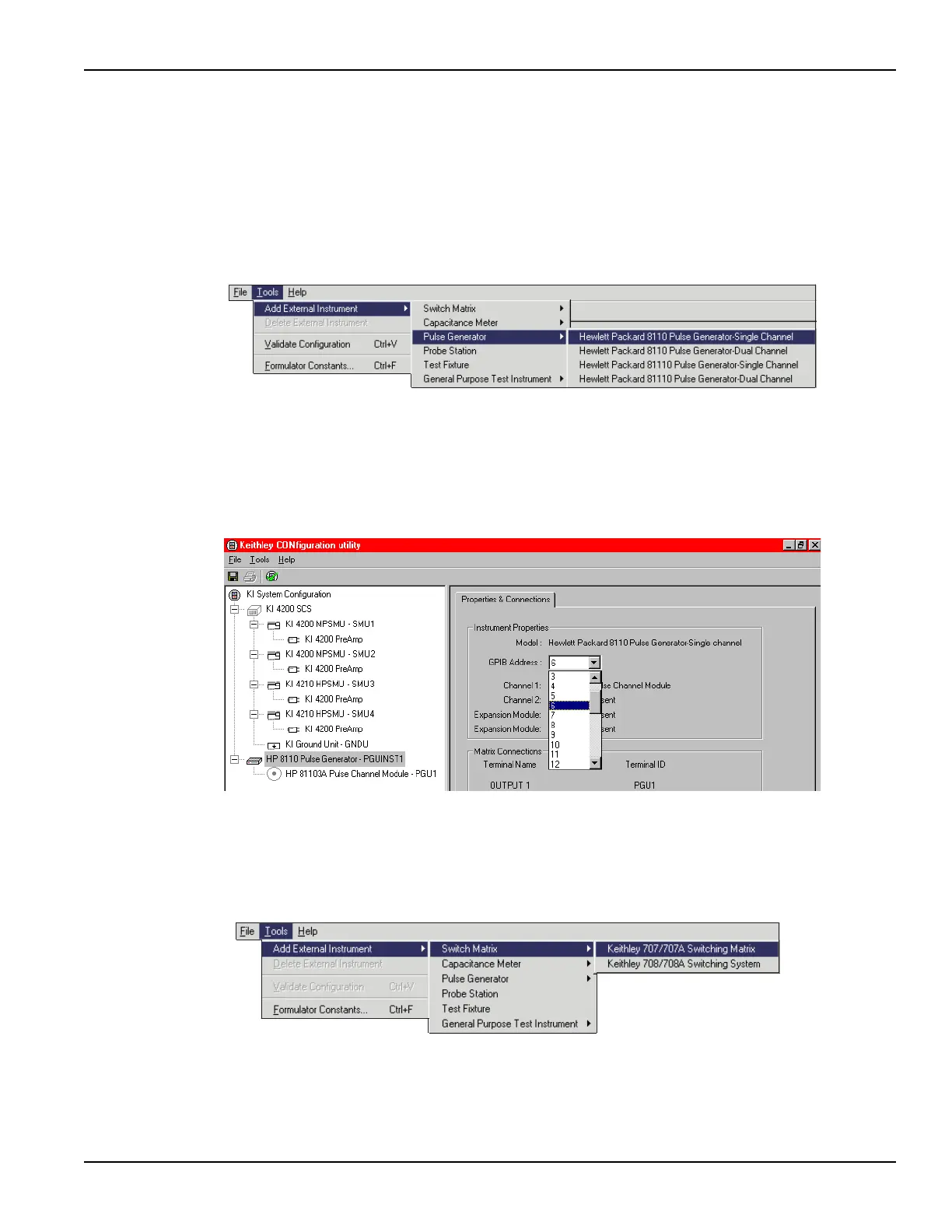
4. Add the Keithley Model 707/707A Switching Matrix to the system configuration using the
KCON Tools menu as illustrated in Figure 4-41.
Figure 4-41
Adding a switch matrix
5. Set the GPIB Address for the switch matrix and add the Model 7174A matrix card in Slot 1
as illustrated in Figure 4-42.


 To Next Page
 Loading...