4200-900-01 Rev. K / February 2017 Return to Section Topics 2-45
Model 4200-SCS User’s Manual Section 2: Model 4200-SCS Software Environment
KITE library management
Submitting devices, ITMs, and UTMs to libraries
If you create a customized device or test and wish to reuse it in more than one place in other
project plans, you must first submit it to a device or test library.
Submitting devices to a library
You may submit a project plan device (an empty device plan) to any Device Library, if you submit it
with a name that does not duplicate a device name that is already in the library.
To submit a device to a library:
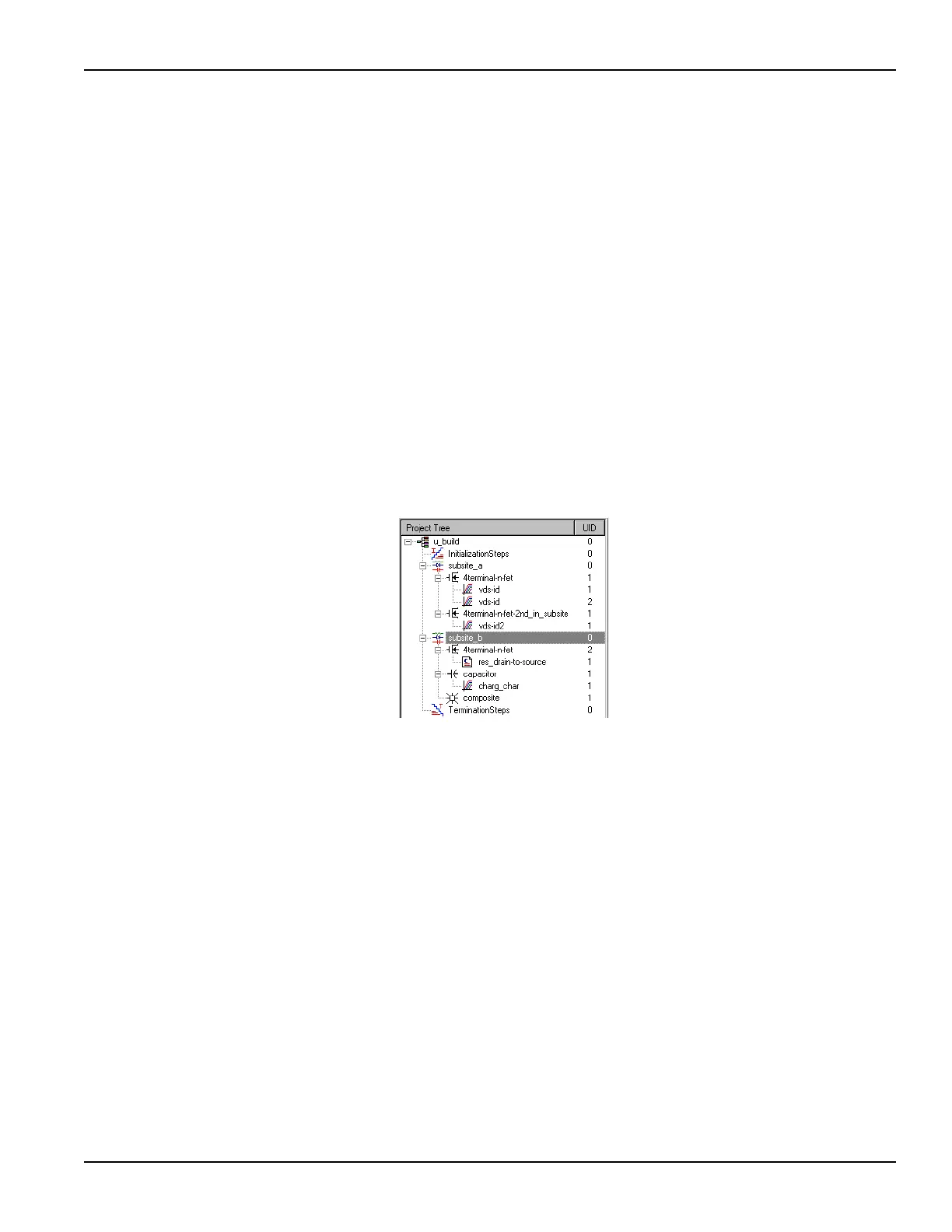
1. In the project navigator, locate the subsite plan that contains the device plan you wish to
submit. Figure 2-34 highlights subsite_b of the u_build project plan (developed for
illustration purposes during the example in the Reference Manual, Building a completely
new Project Plan, page 6-48. The subsite_b plan presently contains an added composite
device plan to be submitted.
Figure 2-34
Subsite plan containing the device plan to be submitted
2. Double-click the subsite plan that contains plans for the device that you wish to submit. The
subsite plan window opens. See Figure 2-35.


 To Next Page
 Loading...