Plockmatic BM3050 system 27 August 2019 3. Repairs and adjustments (REP and ADJ)
3-29
Parts List on PL 5.2
Removal
1. Remove the Back Jogger Assembly (3.7)
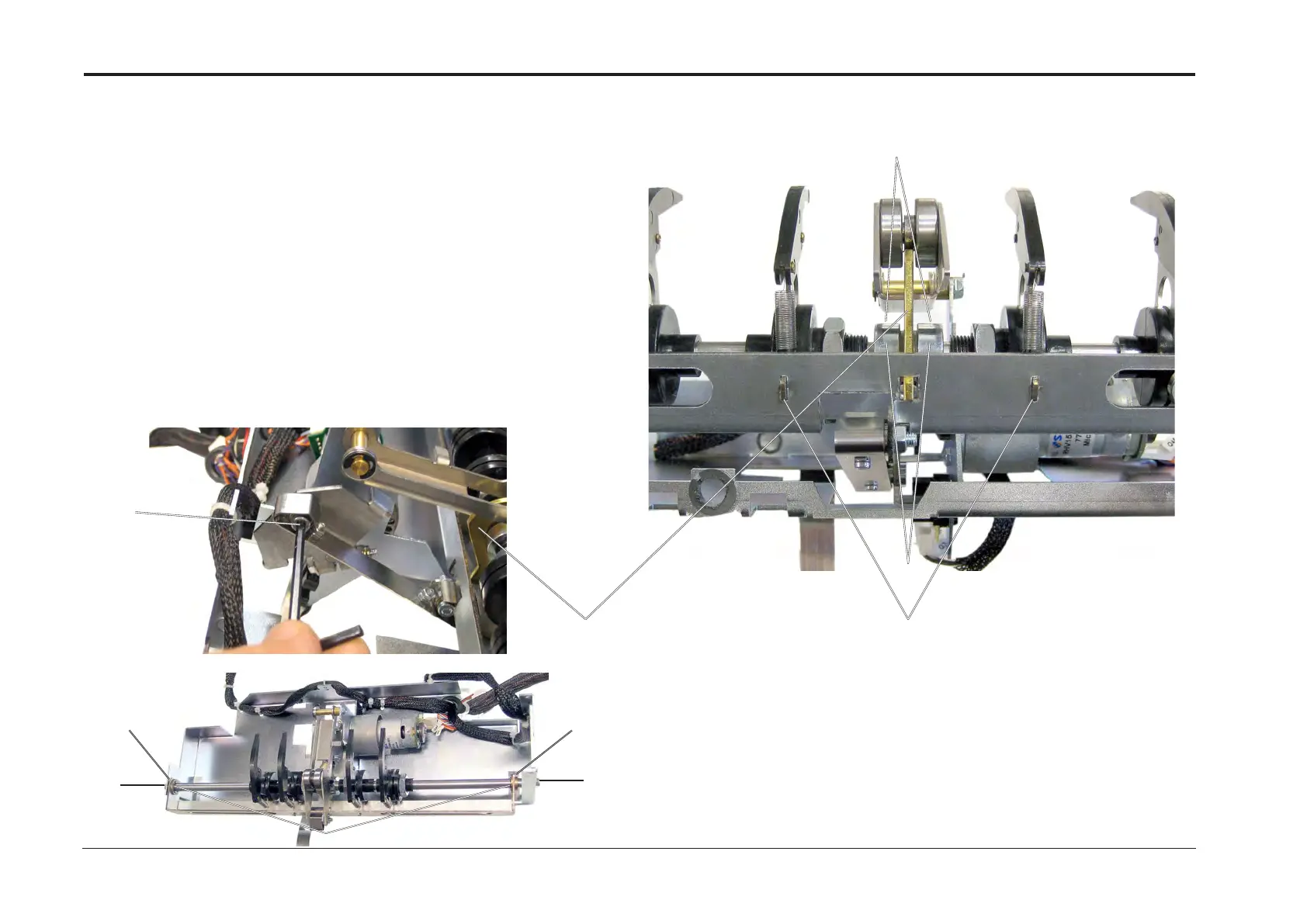
2. Loosen the spring linkage, by removing the screw and bushing [A].
3. Remove screws (x2) [B]
4. Remove E-clips (x2) [C]
5. Loosen set screws (x2) [D]
6. Push in the two sintered bearings [E], take out the shaft, and slide required parts off the Shaft.
NOTE: Make sure to notice the orientation of the Back jogger ngers,
the bushings and the orientation of the cam [F].
NOTE:There are four types of he Back jogger ngers assembly,
the two different left ngers are mirror images of the two right ngers.
REP 3.8 Back Jogger Fingers and cam
Replacement
1. When re-installing Fingers and the cam on Shaft ensure following: the left and right
ngers are placed in correct positions.
2. Adjust the two set collar [G] so they are as close against the cam as possible,
and tighten the set screws (x2) [D].
3. Reverse removal procedure.
NOTE: Make sure to position the middle nger tabs fully into the slots [H]
[B]
[B]
[E] [E]
[C]
[A]
[F]
[G]
[H]
[D]


 To Next Page