Plockmatic BM3050 system 27 August 2019 1. Installation Procedure
1-62
1.14.2 ADJUSTING/CHECKING THE CST BLEED TRIM
WARNING:
To avoid hazardous situations, please read and follow the safety informa-
tion in section 1.3 in this manual.
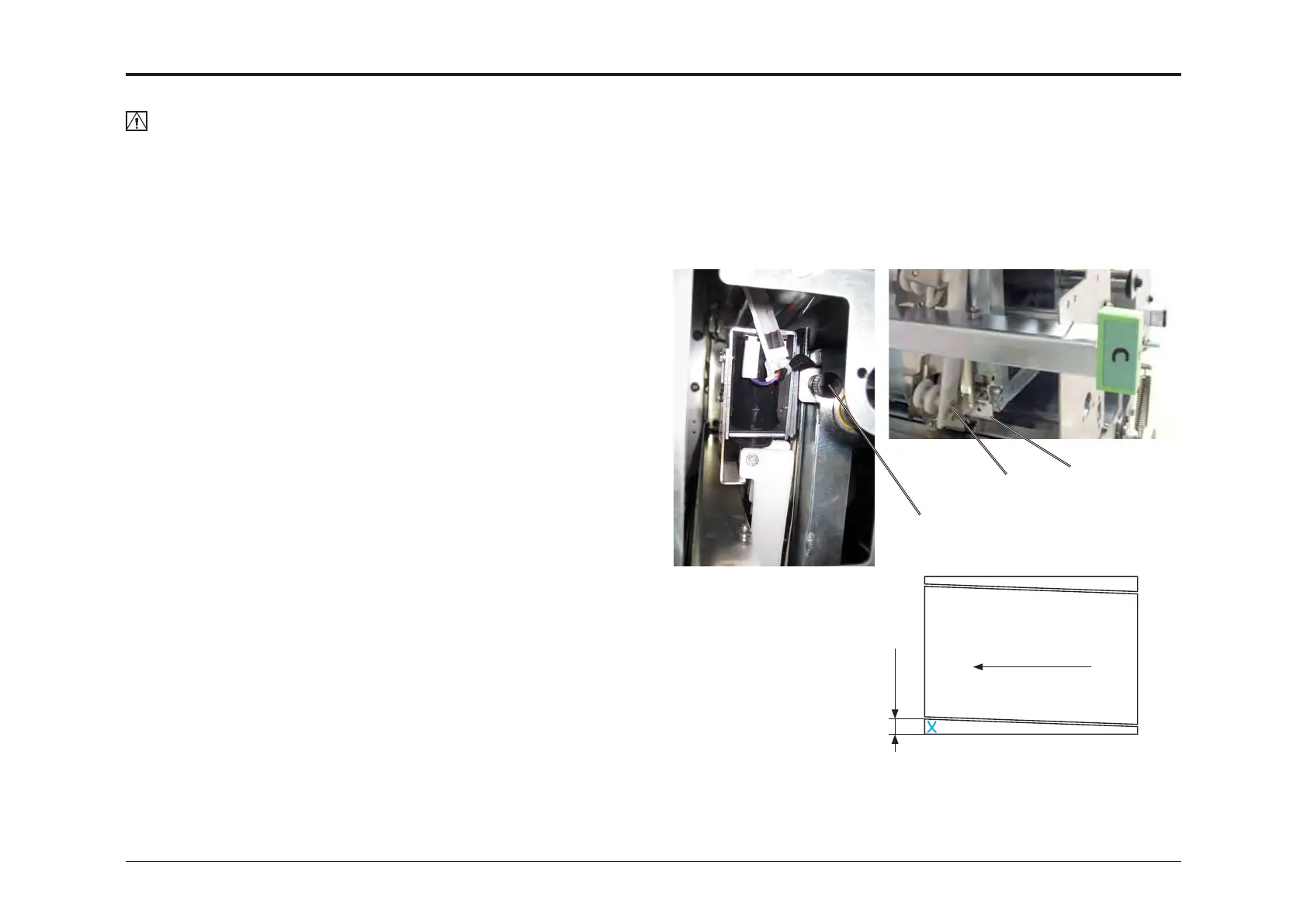
Purpose is to adjust CST bleed trimmer registration angle in order to en-
sure a parallell cut.
1. Note indication on reference scale [A]. Turn adjustment screw [B]
counter clockwise 1,5 - 2 turns. Make sure adjustment is reected on
reference scale [A]. If not, push at [C]. Purpose is to make operator
trim strip lead edge wider than trail edge and also take up any slack.
2. In the UI, press [Finished Booklet Size].
3. Press [Custom Booklet Size].
4. Press [Edit].
5. Press [Clear] to clear width setting.
6. Set width to 297,0mm/11.000” and press [OK]. You can see that you
will recieve booklets 297mm/11” tall.
7. Press [OK]. You can now see that the SRA3/12x11” sheets will have a
Bleed Trim of 11,5mm/0.500” on each side.
Booklet maker setup should read:
Input Sheet Size: SRA3 or 12x18”
Face Trim: 0,0mm or 0.000”
Bleed Trim: 11,5mm or 0.500”
Staple: ON
Cover: OFF
Book Fold: OFF
Fold position: AUTO
Crease: Status: OFF, Offset: -
8. Make sure that you after run can identify lead edge of operator trim
strip from CST. Marking sheets is one solution.
9. Using 80 gsm/20 lb Bond sheets, send ve sets of 2 sheet
SRA3/12x18” (2 sheets of SRA3/12x18” equals a booklet containing 8
pages) to the Booklet Maker system.
10. Compare Operator trim strip lead edge and trail edge. Operator trim
strip lead edge should now be wider than trail edge.
If not, repeat step 1, 8 - 10.
11. Turn adjustment screw [B] clockwise and send ve more sets of 2
sheet SRA3/12x18”.
[B]
[A]
[C]
NOTE:
Sheets may show wrinkles in the process direction if adjustment is set too
tight.
Turn adjustment screw counter clockwise until wrinkles disappear.
Turn adjustment screw
clockwise to remedy
this misalignment
Process direction
Lead
edge
Trail
edge
Operator side trim strip
non-operator trim strip
12. Compare operator trim strip lead edge and trail edge. Repeat step 11
- 12 until OB trim strip have the same width in both lead and trail edge.
Trimmer cut is now parallell to registration edge (on operator side).
13. Check that the actual sheet width corresponds to sheet width set in
[Custom booklet size] ±0.5mm/0.02”.
If not, this is a Booklet Quality issue. Not an Installation issue.
To correct this, a trained service technician and a service manual is
needed. Make a note of this issue and pass it on to a trained service
technician.



 To Next Page