Plockmatic BM3050 system 27 August 2019 3. Repairs and adjustments (REP and ADJ)
3-16
REP 1.3 Upper and Lower Exit Cover
Parts List on PL 2.1
Removal
Upper Exit Cover
1. Set the machine to paper size 12x18”.
2. Turn off the main power and disconnect the power cord.
3. Undock the BM, TR and SQF (REP 1.0 Undocking BM / TR / SQF).
4. Remove Front and Rear Cover (REP 1.1 Front and Rear Cove).
5. Remove User Interface (REP 7.6 User Interface assembly).
6. If present, remove stacker module (REP 8.0 Stacker Module).
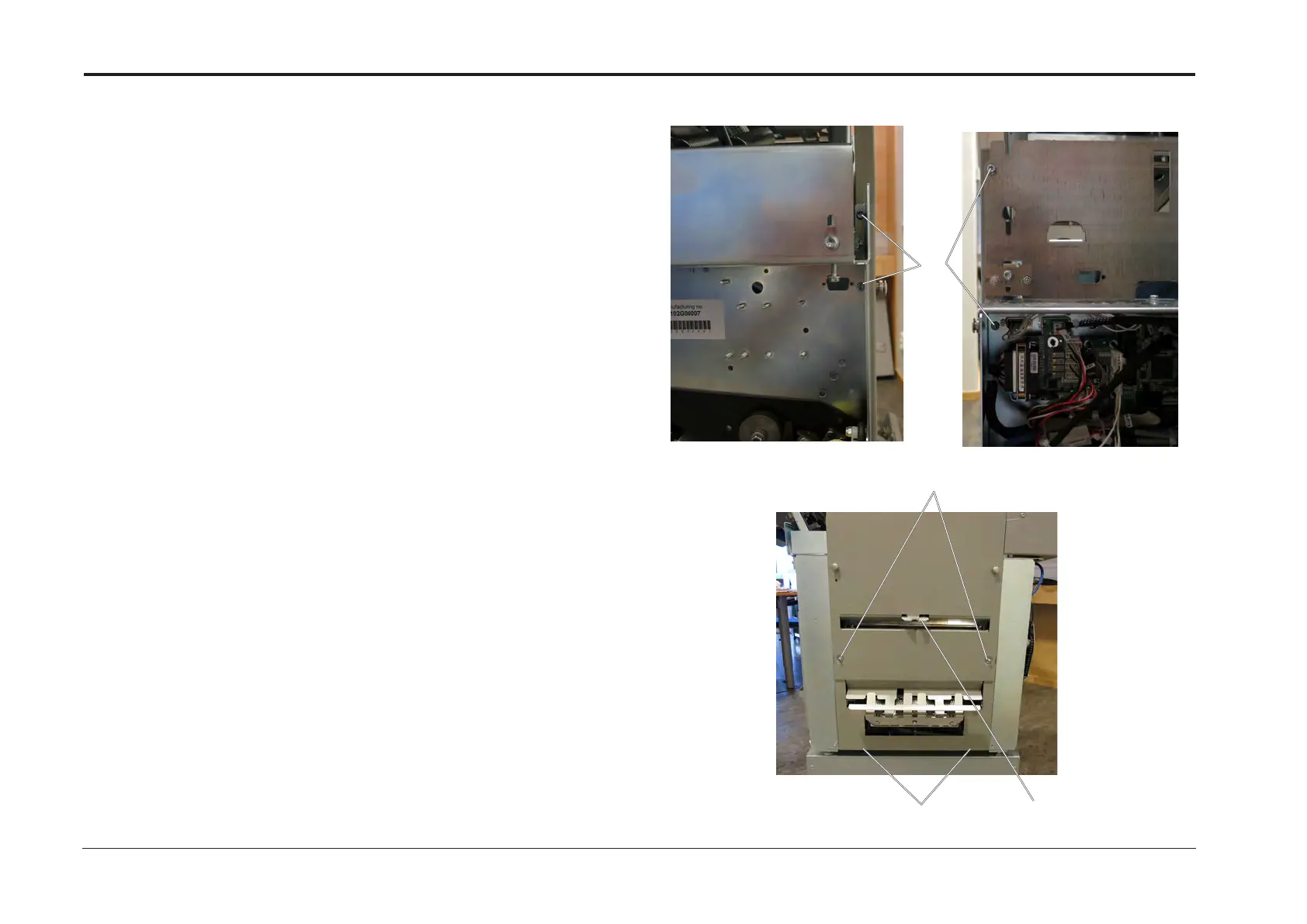
7. Remove screws (x5) [A] (two screws in the rear frame and two screws in the rear frame).
8. Remove screws (x2) [B] .
9. Loosen screws (x2) [C] .
10. Pull out lower end of the Exit Cover, lift it up enough to clear the Exit Sensor [D].
11. Pull out upper end of the Exit Cover and lower it until it touches the Fold Gate.
[B]
[D]
[C]
[A]
Replacement
1. Reverse removal procedure.



 To Next Page