Plockmatic BM3050 system 27 August 2019 4. Troubleshooting (RAP)
4-89
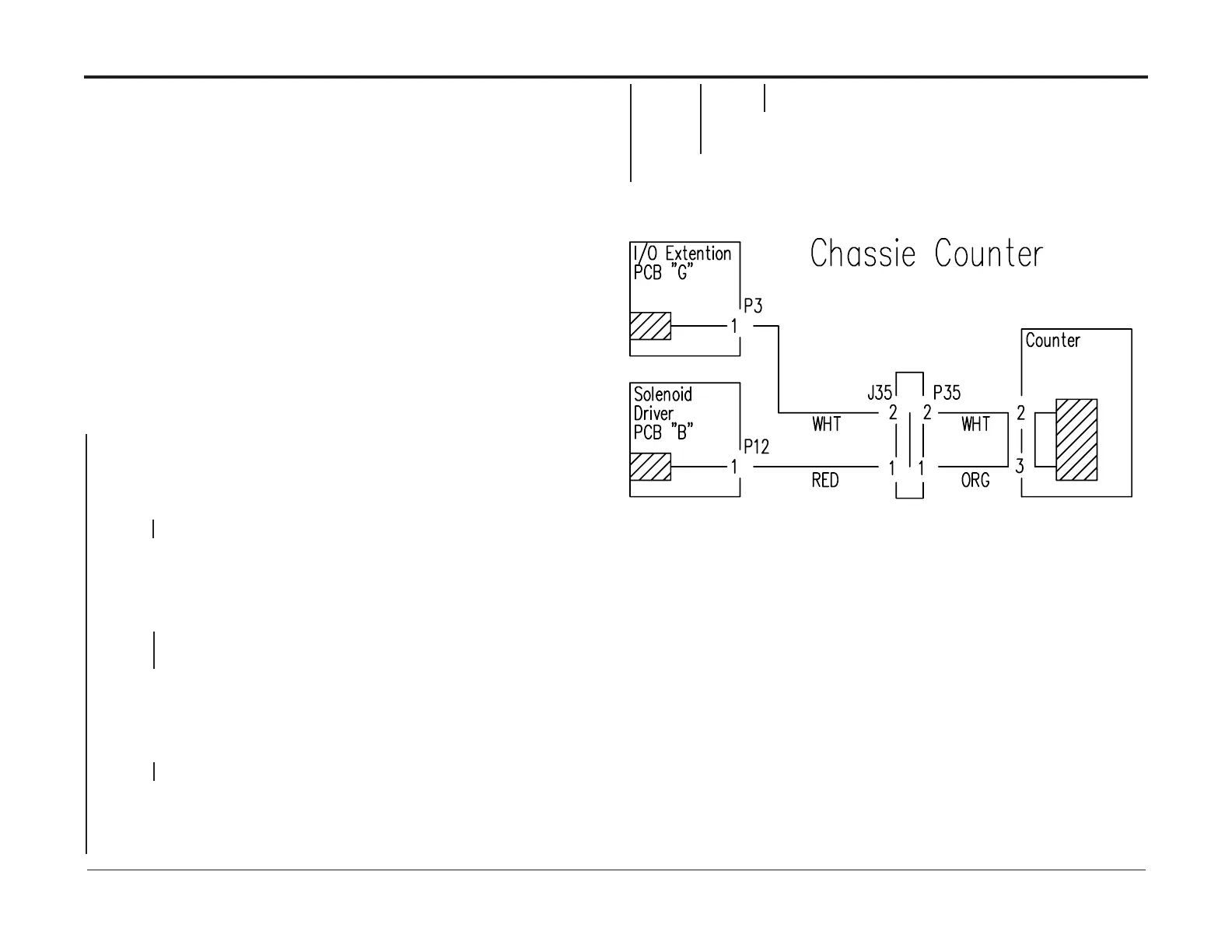
Counter RAP, CT
This RAP is for troubleshooting the Chassis Counter .
Initial Actions
• Enter Service (GP 1)
• Check solenoid CT-COUNTER (PL 12.11) according to GP4
• Ensure that the connectors are properly connected to the Counter.
• Ensure that Plug / Jack 35 is correctly connected
• Ensure that plug B.P2 is correctly connected to Solenoid driver PCB “B”
• Ensure that plug G.P3 is correctly connected to I/O Extension PCB “G”
Procedure
Power off the machine. Remove connectors from Chassis Counter.
Measure on the contacts of the Solenoid.
There is an open circuit.
Y N
Disconnect plug G, P3 from I/O Extension PCB “G”.
Measure between the white connector on the Chassis Counter and G.P3-1.
There is continuity.
Y N
Repair Wire Harness.
Disconnect plug B.P12 From solenoid driver PCB “B”.
Measure between the orange connector on the Chassis Counter and B.P12-1.
There is continuity.
Y N
Repair Wire Harness.
Connect plug B.P12 to Solenoid Driver PCB “B” and connect the plug to the Chassis Counter.
Measure between G.P3-1 and Ground.
The voltage is 24VDC±10%.
Y N
Replace the Solenoid Driver PCB “B” (REP 13.24 Solenoid Driver PCB “B”)
Replace the Chassis Counter.
The Counter functions OK.
Y N
Replace the Extension PCB “G” I/O (REP 13.29) according to
“G” I/O Extension PCB RAP.
Exit
Replace the Chassis Counter (REP 12.25).



 To Next Page