Plockmatic BM3050 system 27 August 2019 3. Repairs and adjustments (REP and ADJ)
3-180
REP 13.11 Transportation Disengage Solenoid (CT-SOL4)
Parts List on PL 12.27
Removal
1. Turn off the main power and disconnect the power cord.
2. Unlatch and pull out the Slide.
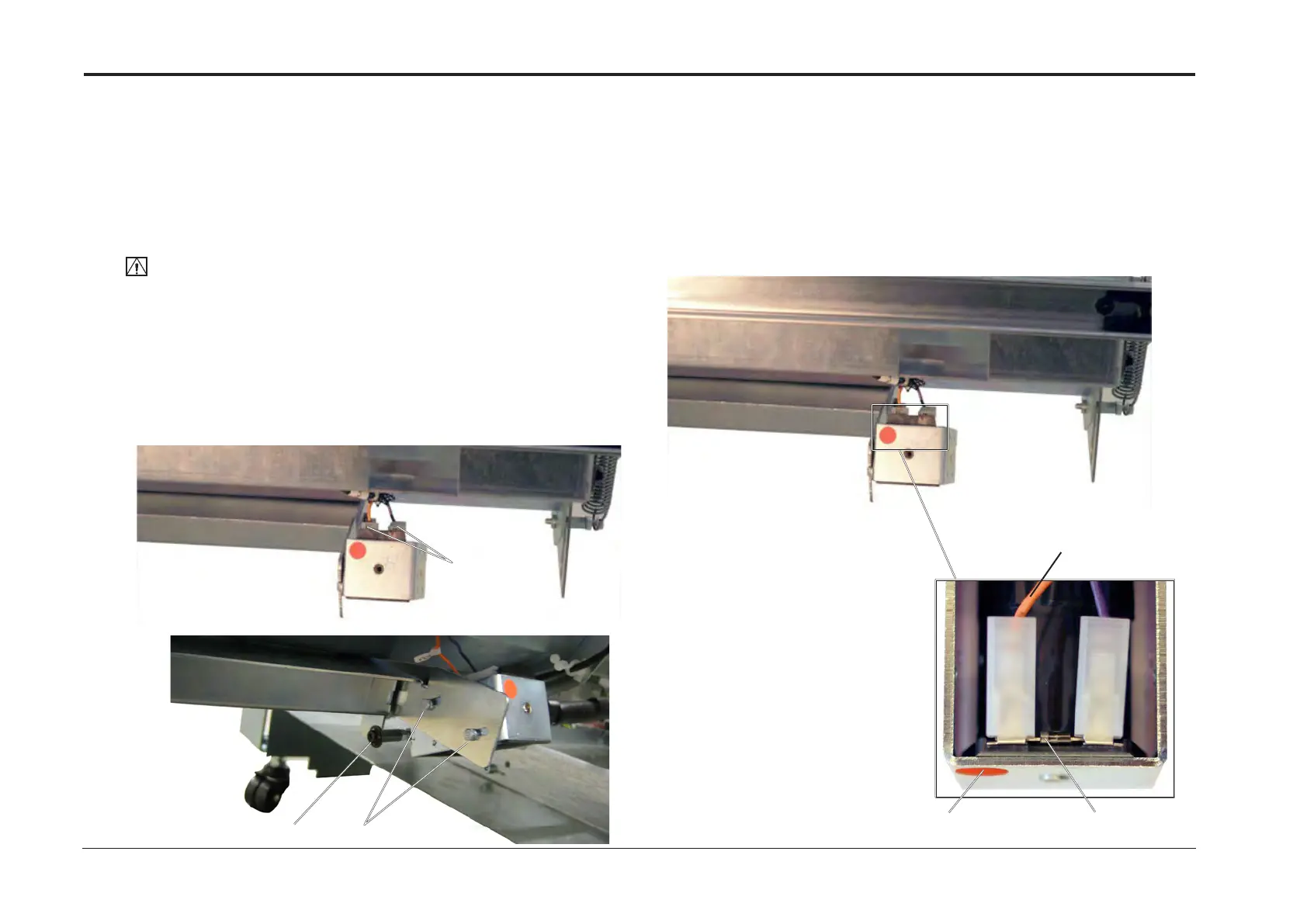
3. Note wiring position and disconnect Transportation Disengage Solenoid (CT-SOL4)
connectors (x2) [A].
CAUTION:
The Solenoid connectors must be correctly connected during the replacement procedure.
Refer to Step 1 in the Replacement process. Failure to re-connect properly might cause
Solenoid and PCB to fail.
4. Remove screw (linkage from lever) [B].
5. Disconnect Transportation Disengage Solenoid (CT-SOL4).
6. Remove screws (x2) [C].
7. Remove Transportation Disengage Solenoid (CT-SOL4).
[A]
[B]
[C]
Ensure the ORN connector is
mounted on the indicated side.
Same side as line on the Diode.
Replacement
1. Ensure the solenoid is correctly connected according to below gure.
Reverse removal procedure (ADJ 13.12).
Indicated side
orange connector
Line on Diode



 To Next Page