Plockmatic BM3050 system 27 August 2019 3. Repairs and adjustments (REP and ADJ)
3-272
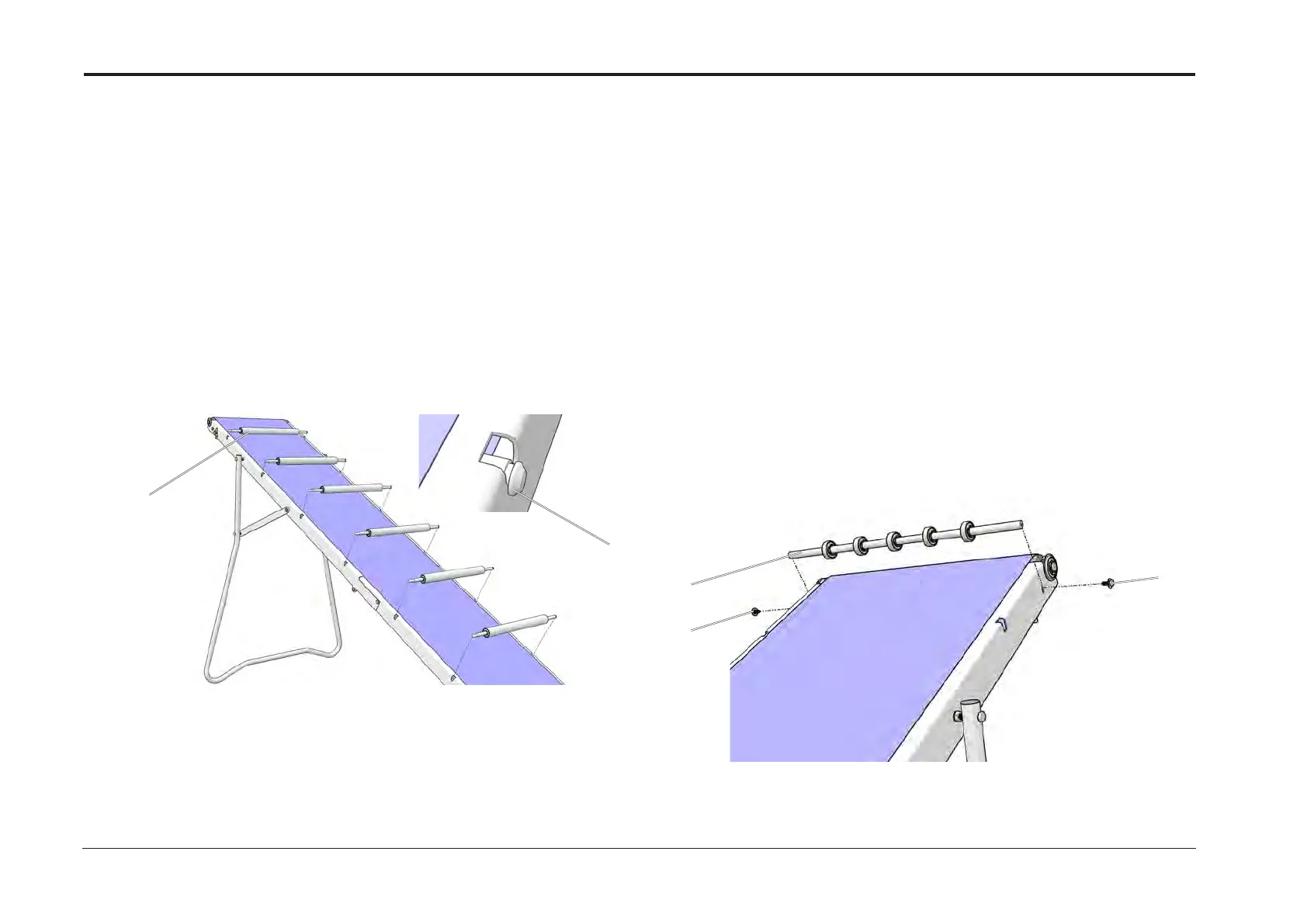
REP 16.7 Support Rollers
Parts List on PL 15.2
Removal
1. Turn off the main power and disconnect the Power Cord.
2. Lift the Belt.
3. Lift the Rollers [A] at the side with the groove [B].
4. Remove the Rollers (x6).
Replacement
1 Reverse the removal procedure. Start from the Idler Roller end (upper end).
2 Orientation of the rollers is not critical as long as they are properly seated in the grooves
[B].
REP 16.8 Corrugator Roller
Parts List on PL 15.2
Removal
1. Turn off the main power and disconnect the Power Cord.
2. Loosen the screws (x2) [A]
3. Lift the Belt and hold the Corrugator Roller [B].
4. Remove the screws (x2) [A] and remove the Corrugator Roller [B].
Replacement
1 Reverse the removal procedure.
Adjustment
1 With the Idler Roller, Drive Shaft and Conveyor Belt in place, adjust the Corrugator
Roller so that the Belt is as close to the Plastic Waste Guides (see REP 15.7) as
possible without touching them.
[A]
[B]
[A]
[B]
[A]



 To Next Page