Plockmatic BM3050 system 27 August 2019 3. Repairs and adjustments (REP and ADJ)
3-62
REP 7.8 Removing Power Supply unit
Parts List on PL 3.0
Removal
CAUTION:
ESD Hazard! ESD (Electrostatic Discharge) can cause hardware crashes, data and/or com-
munications problems. Failure to use proper ESD procedures will cause damage to electronic
components (example: PCBs). ESD problems can be minimized by maintaining all machine
ground connections, ensuring the proper handling of circuit boards/ sensors. Use ESD
protection when working near PCBs. Failure to use ESD protection is likely to result in a PCB
failure.
1. Turn off the main power and disconnect the power cord.
2. Undock the Booklet Maker and Trimmer (REP 1.0 Undocking BM / TR / SQF).
3. Remove the Front Cover (REP 1.1 Front and Rear Cover).
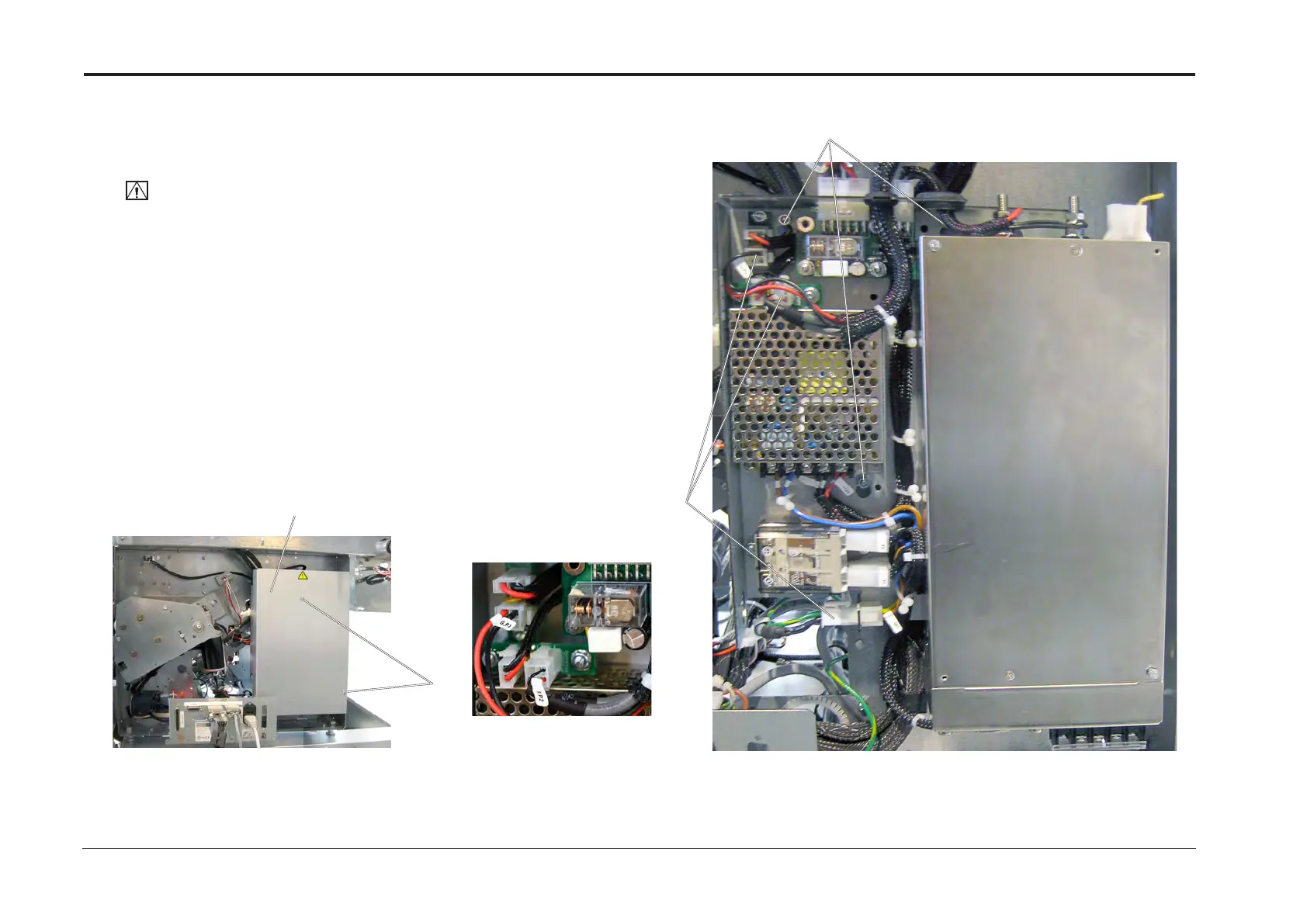
4. Loosen screws [A] and remove cover [B] (x2).
5. Disconnect connectors P45, G.P2, F.P2 [C] (x3).
6. Loosen nuts [D] and remove PSU (x3).
Replacement
1. Reverse the removal procedure.
[D]
[C]
[A]
[B]
Positions of G.P2 and F.P2


 To Next Page