Plockmatic BM3050 system 27 August 2019 4. Troubleshooting (RAP)
4-159
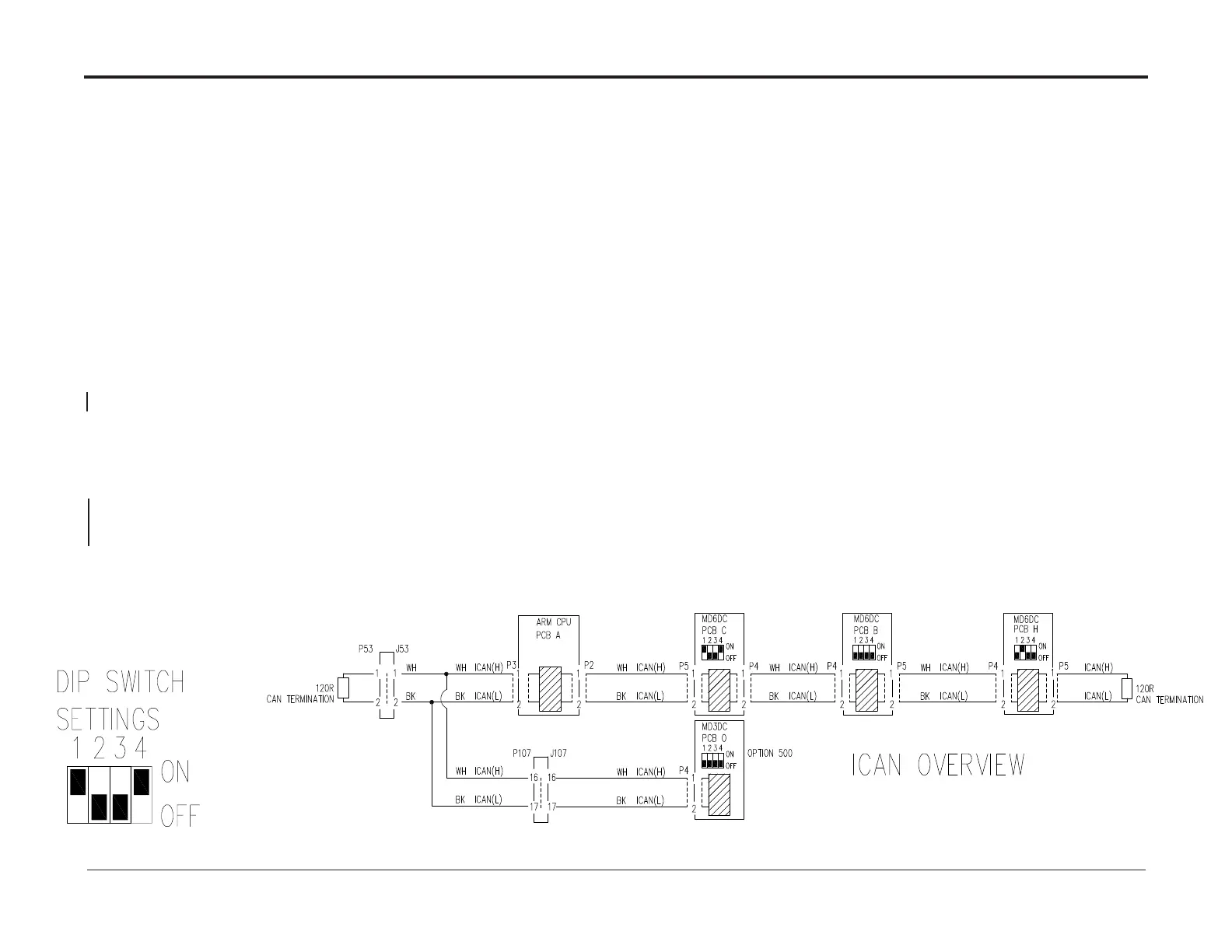
BM-160 PCB MD6DC “C” Not Connected
Fault code indicates that the PCB MD6DC C is not connected.
Initial Actions
• Ensure that all connectors are properly connected to MD6DC C (REP 7.2 MD6DC PCB ”C” (lower)).
• Ensure that the dipswitches on the PCB are set correctly (REP 7.2 MD6DC PCB ”C” (lower)).
Procedure
• Power off the machine.
• Measure for continuity between P4-1 on MD6DC PCB “C” (PL 4.0)
• Measure for continuity between P2-1 on CPU/Controller PCB “A” (PL 3.0).
There is continuity.
Y N
Replace/Repair Wire Harness.
Measure for continuity between
P4-2 on MD6DC C and P2-2 on CPU/Controller PCB “A” (PL 3.0).
There is continuity.
Y N
Replace/Repair Wire Harness.
Replace MD6DC PCB “C(PL 4.0).


 To Next Page