Plockmatic BM3050 system 27 August 2019 4. Troubleshooting (RAP)
4-46
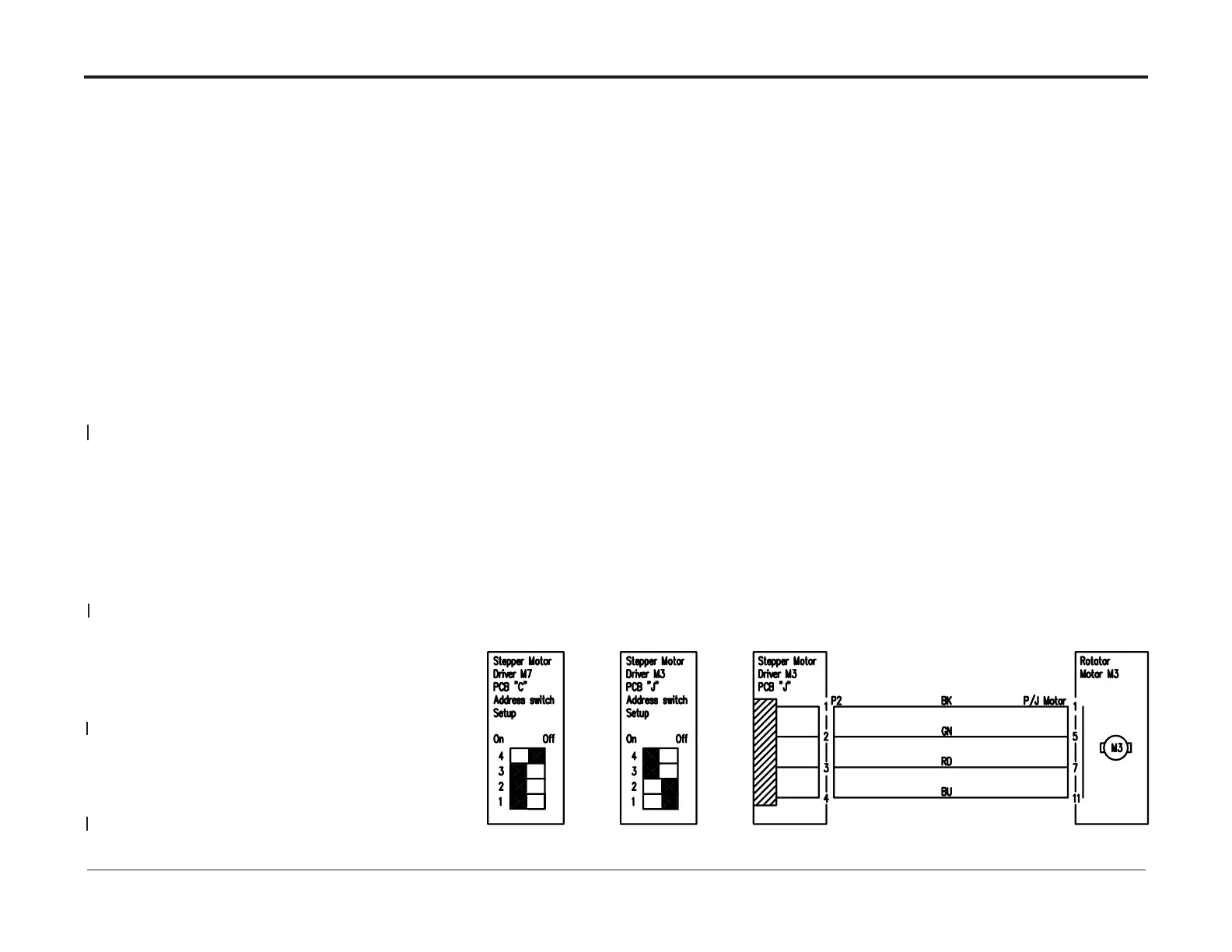
This RAP is for troubleshooting the Rotator Motor CT-M3.
Initial Actions
• Enter Service (GP 1)
• Check motor CT-M3 (PL 12.29) and M7 (PL 12.39) according to GP4
• Ensure that plugs J.P2, J.P3, J.P5, J.P6 are properly connected to
Stepper motor driver PCB “J” (PL 12.29)
• Ensure that P/J Motor situated directly on the motor chassie is properly connected.
Procedure
• Turn off the main switch while turning M3 transmission by hand to
rule out mechanical binding and/or other mechanical problems in the transmission.
• Go to Rotator Motor (M3) Transmission RAP and
verify that all transmission components move as indicated.
The M3 transmission works OK?
Y N
Fix problem.
• Swap M7 Stepper Motor Driver PCB “C” (PL 12.12) with
the Stepper Motor Driver (M3) PCB ”J” (PL 12.29).
After swapping the Stepper motor PCBs,
set the address dip switches to the settings in the Circuit Diagram.
• Check motor M7 functionality.
The M7 system works OK?
Y N
Replace the Stepper Motor Driver (M7) PCB “C” (PL 12.12)
Check for continuity between pins J.P2-1 and J.P2-2.
Check for continuity between pins J.P2-3 and J.P2-4.
There is continuity and no short circuit.
Y N
Repair harness.
Check for voltage at J.P3 between pins J.P3-1 and J.P3-2.
The Voltage is 48VDC±10%
Y N
Go to Stepper Motor Driver (M3) PCB “J” RAP.
Replace Rotator Motor (M3) REP 12.36).
Rotator Motor CT-M3 RAP



 To Next Page