Plockmatic BM3050 system 27 August 2019 3. Repairs and adjustments (REP and ADJ)
3-139
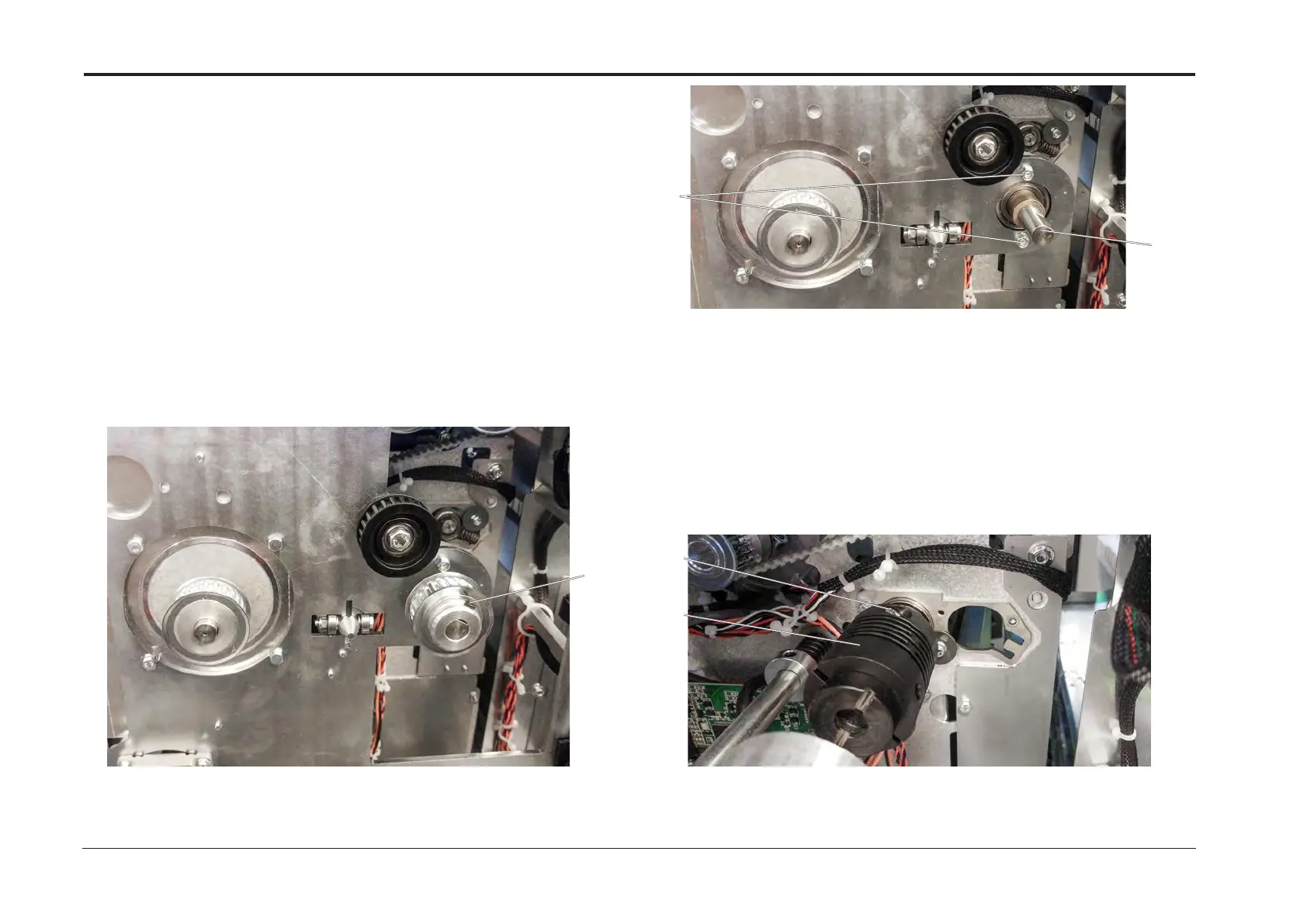
REP 12.20 Lower Drive Shaft
Parts List on PL 12.8
Removal
1. Turn off the main power and disconnect the power cord.
2. Remove the Rear Cover (REP 12.0 Front and rear cover).
3. Remove Drive Motor (M1) Primary Timing Belt
(REP 12.9 Drive Motor (CT-M1) Primary Timing Belt).
4. Unlatch and pull out the Slide to disengage the Drive Dog.
5. Loosen set screw, remove pulley and spacer [A].
6. Remove screws (x2) [B].
7. Remove Lower Drive Shaft [C].
Replacement
1. Reverse removal procedure (ADJ 12.23 Lower Drive Shaft).
Replacement, Drive Shaft
1. Reverse removal procedure.
[D]
[E]
[B]
[C]
Removal of Drive Dog
1. Turn off the main power and disconnect the power cord.
2. Remove the Rear Cover (REP 12.0 Front and rear cover).
3. Unlatch and pull out the Slide to disengage the Drive Dog.
4. Loosen allen screw [D].
5. Remove Drive Dog [E]
[A]



 To Next Page